Apple Lightning to USB3 Camera Adapter – Features & Prices in Saudi Arabia :
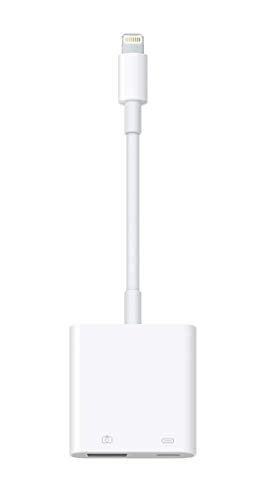
Apple Lightning to USB3 Camera Adapter
Test video – Apple Lightning to USB3 Camera Adapter :
https://www.youtube.com/www.youtube.com/wat
Product highlights :
With the Lightning to USB 3 Camera Adapter, it’s easy to transfer photos and videos from your high-resolution digital camera to your iPad Pro.
After you connect the Lightning to USB 3 Camera Adapter, your iPad Pro automatically opens the Photos app, which lets you choose photos and videos to import, then organizes them into albums.
Add even greater capability and versatility to your iPad Pro by powering the Lightning to USB 3 Camera Adapter with a USB Power Adapter. Then you can connect USB peripherals like hubs, Ethernet adapters, audio/MIDI interfaces, and card readers for CompactFlash, SD, microSD, and more.
The Lightning to USB 3 Camera Adapter supports standard photo formats, including JPEG and RAW, along with SD and HD video formats, including H.264 and MPEG-4.
The 12.9-inch iPad Pro (1st and 2nd generation) and 10.5-inch iPad Pro transfers data at USB 3 speeds, while the 9.7-inch iPad Pro uses USB 2.
Questions & Answers – Apple Lightning to USB3 Camera Adapter :
➕ What is the price of Apple Lightning to USB3 Camera Adapter in Saudi Arabia ?
The price of Apple Lightning to USB3 Camera Adapter in-store is 150 SAR VAT.
➕ When Apple Lightning to USB3 Camera Adapter was released ?
The release date was .
➕ What is the price of Apple Lightning to USB3 Camera Adapter cheap used ?
The price of Apple Lightning to USB3 Camera Adapter used is 100 SAR VAT.
➕ What are the main characteristics of Apple Lightning to USB3 Camera Adapter ?
Special specifications :
With the Lightning to USB 3 Camera Adapter, it’s easy to transfer photos and videos from your high-resolution digital camera to your iPad Pro.
After you connect the Lightning to USB 3 Camera Adapter, your iPad Pro automatically opens the Photos app, which lets you choose photos and videos to import, then organizes them into albums.
➕ Is it interesting to buy this product ?
The best people who can answer you are customers who have already bought and tested this product (See Customer Reviews). This product is rated 4.6 / 5 on Amazon.
➕ Where to buy Apple Lightning to USB3 Camera Adapter in Saudi Arabia ?
Technical specifications – Apple Lightning to USB3 Camera Adapter :
Compatible Devices
,
Specific Uses For Product
Business, personal
Connector Type
Other
Connector Gender
Male
Color
White
Purchase advice :
Warranty :
Check the duration of the warranty and also the faults and defects it covers. Is it complete or limited? and What is included in the warranty (parts, repairs or both)?
Shipping :
Is delivery offered? And how long does it take to get delivered (Delivery time)
Proof of purchase :
Does the shop give you an invoice ?
After-sales service :
Do they have an after-sales service to have information about the installation or operation (instructions for use). Also in case of problem, it is the seller who takes charge or you must contact the manufacturer or supplier yourself.
_____________________________
16 reviews for Apple Lightning to USB3 Camera Adapter
Rated 4 out of 5
E. L (verified owner)–
Pricey, but works better than the rest – I have tried about 4 of these iPhone dongles from various sellers. I think most of them are probably made from the same manufacturer in China. They are inexpensive when compared to this Apple-branded dongle, but they don’t work well. Every single one of them I tried would cut in and out or stop working and then I would need to unplug it from the phone and plug it back in. None of them worked consistently. The Apple camera adapter seems to be consistent and doesn’t cut out when using it. One difference is the Apple device can update itself with new firmware, which is a good thing. Another thing is the Apple dongle will complain about the device plugged into it taking too much power before one of the cheap ones would.
Rated 5 out of 5
N. J (verified owner)–
Works with ethernet and charges – I use this adapter to hardwire my ipads with ethernet that I use for a POS system. The other ethernet adapters that have a charging port would lose power while plugged in, making it impossible to use the ipads all day. This one charges, and you can plug in a USB ethernet adapter. Some ethernet adapters use too much power and make you plug in the power on the camera adapter.
Rated 5 out of 5
N. O (verified owner)–
MIDI to iPad is a yes – Like so many people here I bought this to use with my 88 key full size midi keyboard. If it works for that I’m happy, although I know and can appreciate that other people may have all kind of other expectations and may say they love or despise this adapter based on how well it works for them. The only thing I can definitely state as a negative is I know this thing must cost about ten cents to manufacturer – it is grossly overpriced at almost forty bucks.
Rated 5 out of 5
I. I (verified owner)–
What An Expensive Crock – Never worked at all with my iPhone and a 1TB G-Drive SSD. As proof that I wan’t using it wrong, I bought a $13 knock-off version and it’s working just fine.
Rated 5 out of 5
I. I (verified owner)–
What An Expensive Crock – Never worked at all with my iPhone and a 1TB G-Drive SSD. As proof that I wan’t using it wrong, I bought a $13 knock-off version and it’s working just fine.
Rated 5 out of 5
I. Z (verified owner)–
Studio time – With this simple pieces of Equipment u can have Free Studio Time, Yes Free Studio Time
Rated 5 out of 5
C. P (verified owner)–
Fast and easy – This adapter was exactly what I was looking for to transfer photos to/from a PC to iOS and iPadOS devices. Initially the not enough power notification came through as noted by others until I realized it needed to be plugged into the wall, or a power bank. Once the lightning port was plugged into the adapter and connected to a power source with my Apple cable and wall plug (or power bank), I then connected the usb with my photos copied from the PC to the USB port on the adapter. Final step was connecting the whole unit to the iPhone with the adapter’s lightning cable. My iPhone Files app read the drive and the usb with jpg files was recognized and placed onto the list of Locations for the iPhone Files app. Simply tapped the files I wanted to download into my photos app and they were there in just a very short time. It also works with a power bank while mobile. This procedure also worked flawlessly with my iPad running on iPadOS 14.8. But take note, the power supply for the iPadOS must be its original charging plug for the files to transfer. It’s a higher power source to adequately accommodate the function of the adapter itself. I can also transfer jpg files to the usb from my IPhone and iPad to the PC. I noticed when uploading these files to the usb from my iOS device there are duplicate file types. One is recognizable as a standard jpg file and the other is a type of file not recognized by my PC. Not sure about the whys and the wherefores specific to this transfer, but the file that is compatible with the computer is standard identity where jpg files are concerned. The odd name has a couple of characters in it before the common file name. I downloaded both to the desktop and put the common file name into a file I created on the PC and deleted the other. Hope this helps and makes sense. I’m not a tech guru but I do enough trial and error based on common logic to get results. There is also a YouTube video that shows steps for working with file transfers on iOS devices from a PC.
Rated 5 out of 5
I. Z (verified owner)–
Studio time – With this simple pieces of Equipment u can have Free Studio Time, Yes Free Studio Time
Rated 5 out of 5
N. J (verified owner)–
Works with ethernet and charges – I use this adapter to hardwire my ipads with ethernet that I use for a POS system. The other ethernet adapters that have a charging port would lose power while plugged in, making it impossible to use the ipads all day. This one charges, and you can plug in a USB ethernet adapter. Some ethernet adapters use too much power and make you plug in the power on the camera adapter.
Rated 5 out of 5
N. T (verified owner)–
Expensive BUT it works! – Wasn’t keen on the price for this item given how cheap the competitors are, but I tried that route and it failed. This adapter does the trick and simply Works! So not a fan of high price, but I am a fan of its quality! When you’re in a jam and such has to work, this was the way I had to go!
Rated 5 out of 5
R. J (verified owner)–
Gets the job done – Simple to setup
Rated 5 out of 5
N. T (verified owner)–
Expensive BUT it works! – Wasn’t keen on the price for this item given how cheap the competitors are, but I tried that route and it failed. This adapter does the trick and simply Works! So not a fan of high price, but I am a fan of its quality! When you’re in a jam and such has to work, this was the way I had to go!
Rated 5 out of 5
C. P (verified owner)–
Fast and easy – This adapter was exactly what I was looking for to transfer photos to/from a PC to iOS and iPadOS devices. Initially the not enough power notification came through as noted by others until I realized it needed to be plugged into the wall, or a power bank. Once the lightning port was plugged into the adapter and connected to a power source with my Apple cable and wall plug (or power bank), I then connected the usb with my photos copied from the PC to the USB port on the adapter. Final step was connecting the whole unit to the iPhone with the adapter’s lightning cable. My iPhone Files app read the drive and the usb with jpg files was recognized and placed onto the list of Locations for the iPhone Files app. Simply tapped the files I wanted to download into my photos app and they were there in just a very short time. It also works with a power bank while mobile. This procedure also worked flawlessly with my iPad running on iPadOS 14.8. But take note, the power supply for the iPadOS must be its original charging plug for the files to transfer. It’s a higher power source to adequately accommodate the function of the adapter itself. I can also transfer jpg files to the usb from my IPhone and iPad to the PC. I noticed when uploading these files to the usb from my iOS device there are duplicate file types. One is recognizable as a standard jpg file and the other is a type of file not recognized by my PC. Not sure about the whys and the wherefores specific to this transfer, but the file that is compatible with the computer is standard identity where jpg files are concerned. The odd name has a couple of characters in it before the common file name. I downloaded both to the desktop and put the common file name into a file I created on the PC and deleted the other. Hope this helps and makes sense. I’m not a tech guru but I do enough trial and error based on common logic to get results. There is also a YouTube video that shows steps for working with file transfers on iOS devices from a PC.
Rated 5 out of 5
N. O (verified owner)–
MIDI to iPad is a yes – Like so many people here I bought this to use with my 88 key full size midi keyboard. If it works for that I’m happy, although I know and can appreciate that other people may have all kind of other expectations and may say they love or despise this adapter based on how well it works for them. The only thing I can definitely state as a negative is I know this thing must cost about ten cents to manufacturer – it is grossly overpriced at almost forty bucks.
Rated 4 out of 5
E. L (verified owner)–
Pricey, but works better than the rest – I have tried about 4 of these iPhone dongles from various sellers. I think most of them are probably made from the same manufacturer in China. They are inexpensive when compared to this Apple-branded dongle, but they don’t work well. Every single one of them I tried would cut in and out or stop working and then I would need to unplug it from the phone and plug it back in. None of them worked consistently. The Apple camera adapter seems to be consistent and doesn’t cut out when using it. One difference is the Apple device can update itself with new firmware, which is a good thing. Another thing is the Apple dongle will complain about the device plugged into it taking too much power before one of the cheap ones would.

![[Apple MFi Certified] Lightning to HDMI Adapter for Phone to TV](/wp-content/uploads/2023/05/31vRYbWUNSL-300x225.jpg)
E. L (verified owner) –
Pricey, but works better than the rest – I have tried about 4 of these iPhone dongles from various sellers. I think most of them are probably made from the same manufacturer in China. They are inexpensive when compared to this Apple-branded dongle, but they don’t work well. Every single one of them I tried would cut in and out or stop working and then I would need to unplug it from the phone and plug it back in. None of them worked consistently. The Apple camera adapter seems to be consistent and doesn’t cut out when using it. One difference is the Apple device can update itself with new firmware, which is a good thing. Another thing is the Apple dongle will complain about the device plugged into it taking too much power before one of the cheap ones would.
N. J (verified owner) –
Works with ethernet and charges – I use this adapter to hardwire my ipads with ethernet that I use for a POS system. The other ethernet adapters that have a charging port would lose power while plugged in, making it impossible to use the ipads all day. This one charges, and you can plug in a USB ethernet adapter. Some ethernet adapters use too much power and make you plug in the power on the camera adapter.
N. O (verified owner) –
MIDI to iPad is a yes – Like so many people here I bought this to use with my 88 key full size midi keyboard. If it works for that I’m happy, although I know and can appreciate that other people may have all kind of other expectations and may say they love or despise this adapter based on how well it works for them. The only thing I can definitely state as a negative is I know this thing must cost about ten cents to manufacturer – it is grossly overpriced at almost forty bucks.
I. I (verified owner) –
What An Expensive Crock – Never worked at all with my iPhone and a 1TB G-Drive SSD. As proof that I wan’t using it wrong, I bought a $13 knock-off version and it’s working just fine.
I. I (verified owner) –
What An Expensive Crock – Never worked at all with my iPhone and a 1TB G-Drive SSD. As proof that I wan’t using it wrong, I bought a $13 knock-off version and it’s working just fine.
I. Z (verified owner) –
Studio time – With this simple pieces of Equipment u can have Free Studio Time, Yes Free Studio Time
C. P (verified owner) –
Fast and easy – This adapter was exactly what I was looking for to transfer photos to/from a PC to iOS and iPadOS devices. Initially the not enough power notification came through as noted by others until I realized it needed to be plugged into the wall, or a power bank. Once the lightning port was plugged into the adapter and connected to a power source with my Apple cable and wall plug (or power bank), I then connected the usb with my photos copied from the PC to the USB port on the adapter. Final step was connecting the whole unit to the iPhone with the adapter’s lightning cable. My iPhone Files app read the drive and the usb with jpg files was recognized and placed onto the list of Locations for the iPhone Files app. Simply tapped the files I wanted to download into my photos app and they were there in just a very short time. It also works with a power bank while mobile. This procedure also worked flawlessly with my iPad running on iPadOS 14.8. But take note, the power supply for the iPadOS must be its original charging plug for the files to transfer. It’s a higher power source to adequately accommodate the function of the adapter itself. I can also transfer jpg files to the usb from my IPhone and iPad to the PC. I noticed when uploading these files to the usb from my iOS device there are duplicate file types. One is recognizable as a standard jpg file and the other is a type of file not recognized by my PC. Not sure about the whys and the wherefores specific to this transfer, but the file that is compatible with the computer is standard identity where jpg files are concerned. The odd name has a couple of characters in it before the common file name. I downloaded both to the desktop and put the common file name into a file I created on the PC and deleted the other. Hope this helps and makes sense. I’m not a tech guru but I do enough trial and error based on common logic to get results. There is also a YouTube video that shows steps for working with file transfers on iOS devices from a PC.
I. Z (verified owner) –
Studio time – With this simple pieces of Equipment u can have Free Studio Time, Yes Free Studio Time
N. J (verified owner) –
Works with ethernet and charges – I use this adapter to hardwire my ipads with ethernet that I use for a POS system. The other ethernet adapters that have a charging port would lose power while plugged in, making it impossible to use the ipads all day. This one charges, and you can plug in a USB ethernet adapter. Some ethernet adapters use too much power and make you plug in the power on the camera adapter.
N. T (verified owner) –
Expensive BUT it works! – Wasn’t keen on the price for this item given how cheap the competitors are, but I tried that route and it failed. This adapter does the trick and simply Works! So not a fan of high price, but I am a fan of its quality! When you’re in a jam and such has to work, this was the way I had to go!
R. J (verified owner) –
Gets the job done – Simple to setup
N. T (verified owner) –
Expensive BUT it works! – Wasn’t keen on the price for this item given how cheap the competitors are, but I tried that route and it failed. This adapter does the trick and simply Works! So not a fan of high price, but I am a fan of its quality! When you’re in a jam and such has to work, this was the way I had to go!
C. P (verified owner) –
Fast and easy – This adapter was exactly what I was looking for to transfer photos to/from a PC to iOS and iPadOS devices. Initially the not enough power notification came through as noted by others until I realized it needed to be plugged into the wall, or a power bank. Once the lightning port was plugged into the adapter and connected to a power source with my Apple cable and wall plug (or power bank), I then connected the usb with my photos copied from the PC to the USB port on the adapter. Final step was connecting the whole unit to the iPhone with the adapter’s lightning cable. My iPhone Files app read the drive and the usb with jpg files was recognized and placed onto the list of Locations for the iPhone Files app. Simply tapped the files I wanted to download into my photos app and they were there in just a very short time. It also works with a power bank while mobile. This procedure also worked flawlessly with my iPad running on iPadOS 14.8. But take note, the power supply for the iPadOS must be its original charging plug for the files to transfer. It’s a higher power source to adequately accommodate the function of the adapter itself. I can also transfer jpg files to the usb from my IPhone and iPad to the PC. I noticed when uploading these files to the usb from my iOS device there are duplicate file types. One is recognizable as a standard jpg file and the other is a type of file not recognized by my PC. Not sure about the whys and the wherefores specific to this transfer, but the file that is compatible with the computer is standard identity where jpg files are concerned. The odd name has a couple of characters in it before the common file name. I downloaded both to the desktop and put the common file name into a file I created on the PC and deleted the other. Hope this helps and makes sense. I’m not a tech guru but I do enough trial and error based on common logic to get results. There is also a YouTube video that shows steps for working with file transfers on iOS devices from a PC.
N. O (verified owner) –
MIDI to iPad is a yes – Like so many people here I bought this to use with my 88 key full size midi keyboard. If it works for that I’m happy, although I know and can appreciate that other people may have all kind of other expectations and may say they love or despise this adapter based on how well it works for them. The only thing I can definitely state as a negative is I know this thing must cost about ten cents to manufacturer – it is grossly overpriced at almost forty bucks.
E. L (verified owner) –
Pricey, but works better than the rest – I have tried about 4 of these iPhone dongles from various sellers. I think most of them are probably made from the same manufacturer in China. They are inexpensive when compared to this Apple-branded dongle, but they don’t work well. Every single one of them I tried would cut in and out or stop working and then I would need to unplug it from the phone and plug it back in. None of them worked consistently. The Apple camera adapter seems to be consistent and doesn’t cut out when using it. One difference is the Apple device can update itself with new firmware, which is a good thing. Another thing is the Apple dongle will complain about the device plugged into it taking too much power before one of the cheap ones would.
R. J (verified owner) –
Gets the job done – Simple to setup