Description
Wireless Trackball Mouse, Rechargeable Ergonomic Mouse, Easy – Features & Prices in Saudi Arabia :
Wireless Trackball Mouse, Rechargeable Ergonomic Mouse, Easy Thumb Control, Precise & Smooth Tracking, 3 Device Connection (Bluetooth or USB), Compatible for PC, Laptop, iPad, Mac, Windows, Android
5.55 x 4.37 x 2.44 inches
1 Lithium Ion batteries required. (included)
Test video – Wireless Trackball Mouse, Rechargeable Ergonomic Mouse, Easy :
Product highlights :
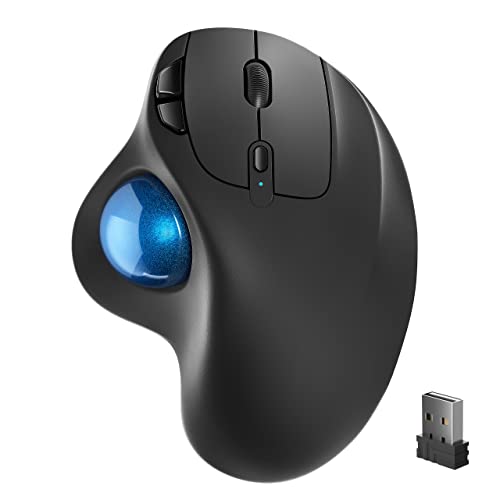
Ergonomic Design with Smooth Thumb Control: Move your cursor by the smooth trackball instead of moving your wrist and arm. Let the easy and smooth thumb control help you reduce your muscle stress. The optimal angle of the trackball mouse allows you to keep your palm in a natural position for all-day comfort.
Precise Tracking with Adjustable DPI: Nulea trackball mouse provides precise cursor movement for exceptional accuracy and control. With the smooth trackball, you can be more productive on the move on almost any surface, any workplace. Especially on the narrow space, such as the messy desktop, couch, bed, small writing board on a chair, etc.
True Wireless Freedom: Connect up to 3 devices by either bluetooth or USB dongle. Switch easily between them by the button on the bottom to improve your efficiency.
Rechargeable Battery: (For your best experience, please fully charge the mouse before your first use) The built-in rechargeable battery has a long battery life enables you to say goodbye to dry cell batteries. Please Note: 1. Please use our included charging cable to charge the mouse 2. Do not use a fast charger to charge the mouse. (Directly use the computer USB port or a 5V charger to charge the mouse).
6 Button High Performance: Nulea trackball mouse bluetooth is designed with thoughtful ergonomic details and an elegant curved shape. Plus the back and forward button, you can operate easily with higher productivity as well as added comfort. Note: all the buttons are non-programmable.
Questions & Answers – Wireless Trackball Mouse, Rechargeable Ergonomic Mouse, Easy :
➕ What is the price of Wireless Trackball Mouse, Rechargeable Ergonomic Mouse, Easy in Saudi Arabia ?
The price of Wireless Trackball Mouse, Rechargeable Ergonomic Mouse, Easy in-store is 120 SAR VAT.
➕ When Wireless Trackball Mouse, Rechargeable Ergonomic Mouse, Easy was released ?
The release date was March 30, 2022.
➕ What is the price of Wireless Trackball Mouse, Rechargeable Ergonomic Mouse, Easy cheap used ?
The price of Wireless Trackball Mouse, Rechargeable Ergonomic Mouse, Easy used is 80 SAR VAT.
➕ What are the main characteristics of Wireless Trackball Mouse, Rechargeable Ergonomic Mouse, Easy ?
Special specifications :
Ergonomic Design with Smooth Thumb Control: Move your cursor by the smooth trackball instead of moving your wrist and arm. Let the easy and smooth thumb control help you reduce your muscle stress. The optimal angle of the trackball mouse allows you to keep your palm in a natural position for all-day comfort.
➕ Is it interesting to buy this product ?
The best people who can answer you are customers who have already bought and tested
this product (
See Customer Reviews). This product is rated 4.3 / 5
on Amazon.
➕ Where to buy Wireless Trackball Mouse, Rechargeable Ergonomic Mouse, Easy in Saudi Arabia ?
Mall, Supermarkets, Amazon, Specialized stores, ….
Technical specifications – Wireless Trackball Mouse, Rechargeable Ergonomic Mouse, Easy :
Wireless, Bluetooth, Ergonomic Design, Rechargeable
Movement Detection Technology
Purchase advice :
-
Warranty :
Check the duration of the warranty and also the faults and defects it covers. Is it complete or limited? and What is included in the warranty (parts, repairs or both)?
-
Shipping :
Is delivery offered? And how long does it take to get delivered (Delivery time)
-
Proof of purchase :
Does the shop give you an invoice ?
-
After-sales service :
Do they have an after-sales service to have information about the installation or operation (instructions for use). Also in case of problem, it is the seller who takes charge or you must contact the manufacturer or supplier yourself.
_____________________________

![Syntech USB C to USB Adapter [2 Pack] USB C Male to USB3 Female Adapter Compatible with iMac 2021 iPad Mini/Pro 2021 MacBook Pro 2020 MacBook Air 2020 and Other Type C Devices](/wp-content/uploads/2023/05/41nSZMNmLGL-300x225.jpg)
B. I (verified owner) –
It’s a great forray into the trackball mouse world! – While not personally my favorite type of mouse, this is definitely a great affordable way to get a feel of how these trackball mice operate. I was always curious, and not paying $100-200 to try it out is a great point of entry. It allows you to do a lot of desktop tasks without needing to flick your wrist all over the desk, it’s all done by your thumb.
P. T (verified owner) –
Almost perfect – Works just like my old trackball with two exceptions. It must be charged periodically as it has an internal battery and not one you can change. The other difference is, after hours of idle time, you have to cycle the on and off switch to get it to work. It does not automatically become active when you wake the computer up. Other than that, it’s a great trackball for a great price.
F. B (verified owner) –
A reasonably close Logitech clone – When I first saw this, I immediately thought it was a clone of the Logitech Mx Ergo. It has a very similar shape and button placement. I use the Logitech daily at work, so I was able to make a solid comparison. The build quality of this trackball seems ok but not great. It’s rather light and seems a little more potentially breakable than the Logitech. The Logitech has quite a weighty base where this trackball is rather light. On the positive side, the ball is easy to remove for cleaning. The hole beneath is finger sized, which makes complete sense. With the Logitech, you have to use something smaller, such as a pencil or pen. The button function is a bit different. The top center button behind the scroll wheel functions as a resolution control. It has 4 resolutions where the Logitech has 2. The Logitech has two buttons dedicated to resolution where this button on the Ergo functions as a switch to go between two paired devices. This button on the underside of this trackball changes the paired device. The two buttons on the upper left of the Logitech function as a multi-function programmable triggers depending upon what software you’re using. I find that incredibly useful at work. On this trackball, they appear just to have a “forward” and “back” function and are not programmable, from what the instruction book shows. In the end, there’s give and take with this product. You’re getting similar function at a much lower cost. I’ll be interested to see what the durability is over the lift of the product.
R. N (verified owner) –
Didn’t work for my setup. – I bought this trackball mouse to use on my two computer KVM setup. I was having random disconnects with my Logitech M570 usb trackball mouse when playing Bethesda games. I didn’t want to keep switching the dongle from one computer to the other when switching from one computer to the other. I figure I could use USB on the computer without Bluetooth and use Bluetooth on the other computer. Unfortunately the bluetooth on the Mobo is weak and loses connection. The mouse itself feels good and solid, hooked up and worked fine on my laptop. Not as good as cursor motion as the M570 but something you could get use to quickly. I would recommend this trackball as a cheaper option than the M570.
G. I (verified owner) –
I Love This Mouse – This is the 3rd one I’ve purchased and not because it broke but because I needed one for work. I love the ease of use and like using my thumb instead of having to move my hand around my desk. I don’t have any room for that anyway. The center wheel for scrolling is great as well. The other people at my work can’t figure out how to use it though and I think that’s hysterical. Connects easily and every time using the USB. I haven’t tried using the Bluetooth.
F. B (verified owner) –
A reasonably close Logitech clone – When I first saw this, I immediately thought it was a clone of the Logitech Mx Ergo. It has a very similar shape and button placement. I use the Logitech daily at work, so I was able to make a solid comparison. The build quality of this trackball seems ok but not great. It’s rather light and seems a little more potentially breakable than the Logitech. The Logitech has quite a weighty base where this trackball is rather light. On the positive side, the ball is easy to remove for cleaning. The hole beneath is finger sized, which makes complete sense. With the Logitech, you have to use something smaller, such as a pencil or pen. The button function is a bit different. The top center button behind the scroll wheel functions as a resolution control. It has 4 resolutions where the Logitech has 2. The Logitech has two buttons dedicated to resolution where this button on the Ergo functions as a switch to go between two paired devices. This button on the underside of this trackball changes the paired device. The two buttons on the upper left of the Logitech function as a multi-function programmable triggers depending upon what software you’re using. I find that incredibly useful at work. On this trackball, they appear just to have a “forward” and “back” function and are not programmable, from what the instruction book shows. In the end, there’s give and take with this product. You’re getting similar function at a much lower cost. I’ll be interested to see what the durability is over the lift of the product.
P. T (verified owner) –
Almost perfect – Works just like my old trackball with two exceptions. It must be charged periodically as it has an internal battery and not one you can change. The other difference is, after hours of idle time, you have to cycle the on and off switch to get it to work. It does not automatically become active when you wake the computer up. Other than that, it’s a great trackball for a great price.
B. K (verified owner) –
Nice hardware, GREAT customer support – Box arrived quickly, with minimal packaging.
B. K (verified owner) –
Nice hardware, GREAT customer support – Box arrived quickly, with minimal packaging.
G. I (verified owner) –
I Love This Mouse – This is the 3rd one I’ve purchased and not because it broke but because I needed one for work. I love the ease of use and like using my thumb instead of having to move my hand around my desk. I don’t have any room for that anyway. The center wheel for scrolling is great as well. The other people at my work can’t figure out how to use it though and I think that’s hysterical. Connects easily and every time using the USB. I haven’t tried using the Bluetooth.
B. I (verified owner) –
It’s a great forray into the trackball mouse world! – While not personally my favorite type of mouse, this is definitely a great affordable way to get a feel of how these trackball mice operate. I was always curious, and not paying $100-200 to try it out is a great point of entry. It allows you to do a lot of desktop tasks without needing to flick your wrist all over the desk, it’s all done by your thumb.
R. N (verified owner) –
Didn’t work for my setup. – I bought this trackball mouse to use on my two computer KVM setup. I was having random disconnects with my Logitech M570 usb trackball mouse when playing Bethesda games. I didn’t want to keep switching the dongle from one computer to the other when switching from one computer to the other. I figure I could use USB on the computer without Bluetooth and use Bluetooth on the other computer. Unfortunately the bluetooth on the Mobo is weak and loses connection. The mouse itself feels good and solid, hooked up and worked fine on my laptop. Not as good as cursor motion as the M570 but something you could get use to quickly. I would recommend this trackball as a cheaper option than the M570.