Wacom One HD Creative Pen Display, Drawing – Features & Prices in Saudi Arabia :
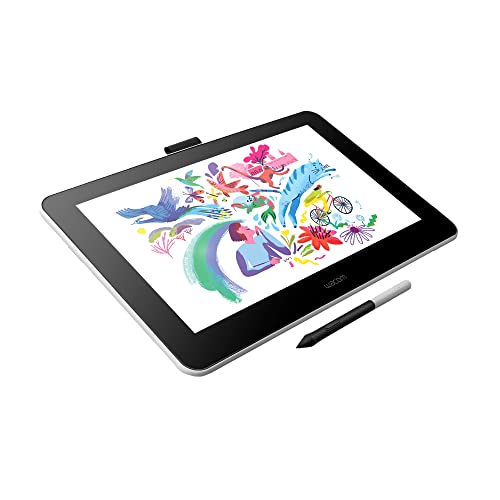
Wacom One HD Creative Pen Display, Drawing Tablet With Screen, 13.3″ Graphics Monitor; includes Training & Software, works with Mac, PC & Chromebook, photo/video editing, drawing, design, & education
Standing screen display size
13.3 Inches
Series
WCMONETAB13OB
Item model number
DTC133W0A
Operating System
Windows, Mac OS, Android OS
Item Weight
4.2 ounces
Product Dimensions
8.86 x 14.05 x 0.57 inches
Item Dimensions LxWxH
8.86 x 14.05 x 0.57 inches
Color
Black and white
Batteries
1 Lithium Polymer batteries required.
Manufacturer
WACOM
ASIN
B082LZXQ6B
Date First Available
January 7, 2020
Test video – Wacom One HD Creative Pen Display, Drawing :
Product highlights :
Wacom One Creative Pen Display: High definition creative pen display designed for creative hobbyists, visual thinkers, and anyone needing a second screen or bigger digital canvas for work or play
Natural Pen Experience: The included ergonomic 4096 pressure sensitive battery-free pen is responsive and easy to control, giving you the familiar pen-on-paper feel that you are used to with precision
Digital Freedom: See your imagination come to life in full color on a 13.3″ HD screen. You can draw, edit photos and videos, or take notes just like you would with a pen and paper
Includes Creative Software: Register your device to get Bamboo Paper Pro, Magma Studio, Bluescape, Affinity Photo, Affinity Publisher, Affinity Designer, & Skillshare for 3 months. Get Clip Studio Paint Pro (6-mos license Mac/PC, 3-mos license for Chromebook)
Register your device to get education software: Kami App (12-Mos), Foxit PDF Editor for Education (12-Mos), and 3-mos of Explain Everything, Pear Deck, & Limnu.
Questions & Answers – Wacom One HD Creative Pen Display, Drawing :
➕ What is the price of Wacom One HD Creative Pen Display, Drawing in Saudi Arabia ?
The price of Wacom One HD Creative Pen Display, Drawing in-store is 1210 SAR VAT.
➕ When Wacom One HD Creative Pen Display, Drawing was released ?
The release date was January 7, 2020.
➕ What is the price of Wacom One HD Creative Pen Display, Drawing cheap used ?
The price of Wacom One HD Creative Pen Display, Drawing used is 840 SAR VAT.
➕ What are the main characteristics of Wacom One HD Creative Pen Display, Drawing ?
Special specifications :
Wacom One Creative Pen Display: High definition creative pen display designed for creative hobbyists, visual thinkers, and anyone needing a second screen or bigger digital canvas for work or play
➕ Is it interesting to buy this product ?
The best people who can answer you are customers who have already bought and tested this product (See Customer Reviews). This product is rated 4.5 / 5 on Amazon.
➕ Where to buy Wacom One HD Creative Pen Display, Drawing in Saudi Arabia ?
Technical specifications – Wacom One HD Creative Pen Display, Drawing :
Brand
Wacom
Connectivity Technology
Chrome, Windows, Mac, Android
Operating System
Windows, Mac OS, Android OS
Series
WCMONETAB13OB
Screen Size
13.3 Inches
Purchase advice :
Warranty :
Check the duration of the warranty and also the faults and defects it covers. Is it complete or limited? and What is included in the warranty (parts, repairs or both)?
Shipping :
Is delivery offered? And how long does it take to get delivered (Delivery time)
Proof of purchase :
Does the shop give you an invoice ?
After-sales service :
Do they have an after-sales service to have information about the installation or operation (instructions for use). Also in case of problem, it is the seller who takes charge or you must contact the manufacturer or supplier yourself.
_____________________________
16 reviews for Wacom One HD Creative Pen Display, Drawing
Rated 5 out of 5
I. L (verified owner)–
A budget drawing tablet that doesn’t feel like it’s missing anything – I LOVE this! It fits on my lap and I’m able to draw with my right hand while keeping the left on my keyboard, which eliminates the need for extra buttons on the tablet itself. I’ve had much bigger drawing monitors with fancy controls, but this is more comfortable and natural to draw with, and I find myself reaching for it while editing far more often than I ever did with the big monitors. The drawing surface feels great. No lag, no distance between the pen and the surface.
Rated 4 out of 5
F. D (verified owner)–
Great screen and responsiveness, but… – The screen is responsive. The pen is accurate. The color is good. I don’t use this for note taking or anything but image editing and retouching, so I am basing everything on that.
Rated 5 out of 5
Z. P (verified owner)–
Great drawing screen for beginners and pros who want a portable drawing screen – Love the size and form factor. Love that I can take it with me in my laptop bag. Wish it was usb-c but I imagine that will be an option in the future as the technology improves.
Rated 4 out of 5
F. D (verified owner)–
Great screen and responsiveness, but… – The screen is responsive. The pen is accurate. The color is good. I don’t use this for note taking or anything but image editing and retouching, so I am basing everything on that.
Rated 5 out of 5
I. L (verified owner)–
A budget drawing tablet that doesn’t feel like it’s missing anything – I LOVE this! It fits on my lap and I’m able to draw with my right hand while keeping the left on my keyboard, which eliminates the need for extra buttons on the tablet itself. I’ve had much bigger drawing monitors with fancy controls, but this is more comfortable and natural to draw with, and I find myself reaching for it while editing far more often than I ever did with the big monitors. The drawing surface feels great. No lag, no distance between the pen and the surface.
Rated 4 out of 5
G. H (verified owner)–
Really good especially for beginning – This pen display is really good for its price, the main features are there and you can’t deny that they work perfectly well. Here are the things that are kind of missing or that I would want: touch screen for zooming etc, wireless capabilities, maybe an extra button or two, and the adjustment of the height level is super basic so be prepared to use random books if your desk isnt the right height or angle. Really solid tablet, simple to use and connect.
Rated 4 out of 5
T. O (verified owner)–
For $250 Wacom One is an ideal gift for digital illustrators on a budget. – I’ve been a freelance illustrator/graphic artist part-time for a little over a decade. I got my first Wacom Intuos in 2011 (no screen), a Wacom Cintiq in 2016 (with screen), played around with a Bamboo a couple of times (no screen), and for comparison bought a used 3rd gen Microsoft Surface in 2019.
Rated 5 out of 5
D. O (verified owner)–
One of my most prized possessions – I love my Wacom! I bought it refurbished but it works like new
Rated 4 out of 5
T. O (verified owner)–
For $250 Wacom One is an ideal gift for digital illustrators on a budget. – I’ve been a freelance illustrator/graphic artist part-time for a little over a decade. I got my first Wacom Intuos in 2011 (no screen), a Wacom Cintiq in 2016 (with screen), played around with a Bamboo a couple of times (no screen), and for comparison bought a used 3rd gen Microsoft Surface in 2019.
Rated 4 out of 5
M. B (verified owner)–
This doesn’t seem to work on Windows 7, atleast not on older computers like mine. – I had gotten this tablet to draw digital art commissions with as it was recommended to me by a few close friends who also use it, however despite the fact my computer has all of the proper ports to support this tablet, it refuses to work with it as well as the tablet’s drivers also refuse to install onto my computer as the “Platform is not supported” in addition to my version of Windows is also actively blocking the pen input and has no way of unblocking it, which means I need to get a new computer in order to use this tablet. I do like this tablet, and I was so excited to get started using it, but given how much this tablet costs, I was pretty upset that it didn’t work with my current system, which was given to me by my father’s company since I couldn’t afford to get one on my own at the time my last one croaked.
Rated 5 out of 5
D. O (verified owner)–
One of my most prized possessions – I love my Wacom! I bought it refurbished but it works like new
Rated 5 out of 5
P. N (verified owner)–
One of the best investments in my art career that I’ve ever made. – Installed and loaded quickly. The screen resolution is good. Not quite what the higher-end Wacom tablets are, but good enough for me to be successful with fine detail and shading of some pretty involved images. I’m more than pleased!
Rated 4 out of 5
M. B (verified owner)–
This doesn’t seem to work on Windows 7, atleast not on older computers like mine. – I had gotten this tablet to draw digital art commissions with as it was recommended to me by a few close friends who also use it, however despite the fact my computer has all of the proper ports to support this tablet, it refuses to work with it as well as the tablet’s drivers also refuse to install onto my computer as the “Platform is not supported” in addition to my version of Windows is also actively blocking the pen input and has no way of unblocking it, which means I need to get a new computer in order to use this tablet. I do like this tablet, and I was so excited to get started using it, but given how much this tablet costs, I was pretty upset that it didn’t work with my current system, which was given to me by my father’s company since I couldn’t afford to get one on my own at the time my last one croaked.
Rated 4 out of 5
G. H (verified owner)–
Really good especially for beginning – This pen display is really good for its price, the main features are there and you can’t deny that they work perfectly well. Here are the things that are kind of missing or that I would want: touch screen for zooming etc, wireless capabilities, maybe an extra button or two, and the adjustment of the height level is super basic so be prepared to use random books if your desk isnt the right height or angle. Really solid tablet, simple to use and connect.
Rated 5 out of 5
Z. P (verified owner)–
Great drawing screen for beginners and pros who want a portable drawing screen – Love the size and form factor. Love that I can take it with me in my laptop bag. Wish it was usb-c but I imagine that will be an option in the future as the technology improves.
Rated 5 out of 5
P. N (verified owner)–
One of the best investments in my art career that I’ve ever made. – Installed and loaded quickly. The screen resolution is good. Not quite what the higher-end Wacom tablets are, but good enough for me to be successful with fine detail and shading of some pretty involved images. I’m more than pleased!

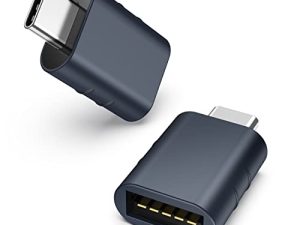
![Syntech USB C to USB Adapter [2 Pack] USB C Male to USB3 Female Adapter Compatible with iMac 2021 iPad Mini/Pro 2021 MacBook Pro 2020 MacBook Air 2020 and Other Type C Devices](/wp-content/uploads/2023/05/41nSZMNmLGL-300x225.jpg)
I. L (verified owner) –
A budget drawing tablet that doesn’t feel like it’s missing anything – I LOVE this! It fits on my lap and I’m able to draw with my right hand while keeping the left on my keyboard, which eliminates the need for extra buttons on the tablet itself. I’ve had much bigger drawing monitors with fancy controls, but this is more comfortable and natural to draw with, and I find myself reaching for it while editing far more often than I ever did with the big monitors. The drawing surface feels great. No lag, no distance between the pen and the surface.
F. D (verified owner) –
Great screen and responsiveness, but… – The screen is responsive. The pen is accurate. The color is good. I don’t use this for note taking or anything but image editing and retouching, so I am basing everything on that.
Z. P (verified owner) –
Great drawing screen for beginners and pros who want a portable drawing screen – Love the size and form factor. Love that I can take it with me in my laptop bag. Wish it was usb-c but I imagine that will be an option in the future as the technology improves.
F. D (verified owner) –
Great screen and responsiveness, but… – The screen is responsive. The pen is accurate. The color is good. I don’t use this for note taking or anything but image editing and retouching, so I am basing everything on that.
I. L (verified owner) –
A budget drawing tablet that doesn’t feel like it’s missing anything – I LOVE this! It fits on my lap and I’m able to draw with my right hand while keeping the left on my keyboard, which eliminates the need for extra buttons on the tablet itself. I’ve had much bigger drawing monitors with fancy controls, but this is more comfortable and natural to draw with, and I find myself reaching for it while editing far more often than I ever did with the big monitors. The drawing surface feels great. No lag, no distance between the pen and the surface.
G. H (verified owner) –
Really good especially for beginning – This pen display is really good for its price, the main features are there and you can’t deny that they work perfectly well. Here are the things that are kind of missing or that I would want: touch screen for zooming etc, wireless capabilities, maybe an extra button or two, and the adjustment of the height level is super basic so be prepared to use random books if your desk isnt the right height or angle. Really solid tablet, simple to use and connect.
T. O (verified owner) –
For $250 Wacom One is an ideal gift for digital illustrators on a budget. – I’ve been a freelance illustrator/graphic artist part-time for a little over a decade. I got my first Wacom Intuos in 2011 (no screen), a Wacom Cintiq in 2016 (with screen), played around with a Bamboo a couple of times (no screen), and for comparison bought a used 3rd gen Microsoft Surface in 2019.
D. O (verified owner) –
One of my most prized possessions – I love my Wacom! I bought it refurbished but it works like new
T. O (verified owner) –
For $250 Wacom One is an ideal gift for digital illustrators on a budget. – I’ve been a freelance illustrator/graphic artist part-time for a little over a decade. I got my first Wacom Intuos in 2011 (no screen), a Wacom Cintiq in 2016 (with screen), played around with a Bamboo a couple of times (no screen), and for comparison bought a used 3rd gen Microsoft Surface in 2019.
M. B (verified owner) –
This doesn’t seem to work on Windows 7, atleast not on older computers like mine. – I had gotten this tablet to draw digital art commissions with as it was recommended to me by a few close friends who also use it, however despite the fact my computer has all of the proper ports to support this tablet, it refuses to work with it as well as the tablet’s drivers also refuse to install onto my computer as the “Platform is not supported” in addition to my version of Windows is also actively blocking the pen input and has no way of unblocking it, which means I need to get a new computer in order to use this tablet. I do like this tablet, and I was so excited to get started using it, but given how much this tablet costs, I was pretty upset that it didn’t work with my current system, which was given to me by my father’s company since I couldn’t afford to get one on my own at the time my last one croaked.
D. O (verified owner) –
One of my most prized possessions – I love my Wacom! I bought it refurbished but it works like new
P. N (verified owner) –
One of the best investments in my art career that I’ve ever made. – Installed and loaded quickly. The screen resolution is good. Not quite what the higher-end Wacom tablets are, but good enough for me to be successful with fine detail and shading of some pretty involved images. I’m more than pleased!
M. B (verified owner) –
This doesn’t seem to work on Windows 7, atleast not on older computers like mine. – I had gotten this tablet to draw digital art commissions with as it was recommended to me by a few close friends who also use it, however despite the fact my computer has all of the proper ports to support this tablet, it refuses to work with it as well as the tablet’s drivers also refuse to install onto my computer as the “Platform is not supported” in addition to my version of Windows is also actively blocking the pen input and has no way of unblocking it, which means I need to get a new computer in order to use this tablet. I do like this tablet, and I was so excited to get started using it, but given how much this tablet costs, I was pretty upset that it didn’t work with my current system, which was given to me by my father’s company since I couldn’t afford to get one on my own at the time my last one croaked.
G. H (verified owner) –
Really good especially for beginning – This pen display is really good for its price, the main features are there and you can’t deny that they work perfectly well. Here are the things that are kind of missing or that I would want: touch screen for zooming etc, wireless capabilities, maybe an extra button or two, and the adjustment of the height level is super basic so be prepared to use random books if your desk isnt the right height or angle. Really solid tablet, simple to use and connect.
Z. P (verified owner) –
Great drawing screen for beginners and pros who want a portable drawing screen – Love the size and form factor. Love that I can take it with me in my laptop bag. Wish it was usb-c but I imagine that will be an option in the future as the technology improves.
P. N (verified owner) –
One of the best investments in my art career that I’ve ever made. – Installed and loaded quickly. The screen resolution is good. Not quite what the higher-end Wacom tablets are, but good enough for me to be successful with fine detail and shading of some pretty involved images. I’m more than pleased!