Wacom Intuos Medium Bluetooth Graphics Drawing Tablet, is available in Saudi Arabia.
Find out all you need to know about Wacom Intuos Medium Bluetooth Graphics Drawing Tablet, before buying : Price, Test video, Datasheet, Similar products.
Wacom Intuos Medium Bluetooth Graphics Drawing Tablet, – Features & Prices in Saudi Arabia :
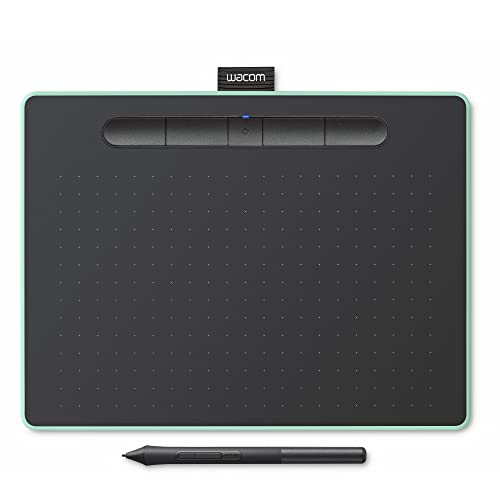
Wacom Intuos Medium Bluetooth Graphics Drawing Tablet, Portable for Teachers, Students and Creators, 4 Customizable ExpressKeys, Compatible with Chromebook Mac OS Android and Windows – Pistachio
Standing screen display size
10.4 Inches
RAM
1 MB
Item model number
CTL6100WLE0
Operating System
Windows, Mac OS
Item Weight
14.5 ounces
Product Dimensions
10.4 x 7.8 x 0.35 inches
Item Dimensions LxWxH
10.4 x 7.8 x 0.35 inches
Color
Pistachio
Flash Memory Size
2
Batteries
1 Lithium Ion batteries required. (included)
Manufacturer
Wacom Technology Corporation
ASIN
B079NWPZTF
Is Discontinued By Manufacturer
No
Date First Available
March 6, 2018
Test video – Wacom Intuos Medium Bluetooth Graphics Drawing Tablet, :
Product highlights :
Wireless Bluetooth Graphic Drawing Tablet: With it’s slim design and built in Bluetooth, the Intuos Drawing Tablet is easy to set-up and use anywhere; perfect for remote work, learning and creating
Certified Works with Chromebook: Wacom is the only drawing tablet that is certified to work with Chromebook for students, teachers and creators, Intuos is simple to use and set-up for any project
Customize Your Creative Process: The built-in pen tray hold pen in place and the pen’s 2 buttons are designed to make your creative process hassle-free so you can work quickly and easily
Natural Pen Experience: The included ergonomic EMR 4096 pressure sensitive battery-free pen is light, responsive and easy to control; it feels like you are writing on paper
Education Software: Register your Intuos on your Mac/PC to receive Kami App (6-Months), and 3 months of Collaboard, Explain Everything, Pear Deck, & Limnu as well as Foxit PDF Editor for Education
Questions & Answers – Wacom Intuos Medium Bluetooth Graphics Drawing Tablet, :
➕ What is the price of Wacom Intuos Medium Bluetooth Graphics Drawing Tablet, in Saudi Arabia ?
The price of Wacom Intuos Medium Bluetooth Graphics Drawing Tablet, in-store is 740 SAR VAT.
➕ When Wacom Intuos Medium Bluetooth Graphics Drawing Tablet, was released ?
The release date was March 6, 2018.
➕ What is the price of Wacom Intuos Medium Bluetooth Graphics Drawing Tablet, cheap used ?
The price of Wacom Intuos Medium Bluetooth Graphics Drawing Tablet, used is 510 SAR VAT.
➕ What are the main characteristics of Wacom Intuos Medium Bluetooth Graphics Drawing Tablet, ?
Special specifications :
Wireless Bluetooth Graphic Drawing Tablet: With it’s slim design and built in Bluetooth, the Intuos Drawing Tablet is easy to set-up and use anywhere; perfect for remote work, learning and creating
➕ Is it interesting to buy this product ?
The best people who can answer you are customers who have already bought and tested this product (See Customer Reviews). This product is rated 4.5 / 5 on Amazon.
➕ Where to buy Wacom Intuos Medium Bluetooth Graphics Drawing Tablet, in Saudi Arabia ?
Technical specifications – Wacom Intuos Medium Bluetooth Graphics Drawing Tablet, :
Brand
Wacom
Connectivity Technology
Bluetooth, USB
Pressure Sensitivity
4096 Levels
Operating System
Windows, Mac OS
Series
WCCTL6100WLE0RB
Purchase advice :
Warranty :
Check the duration of the warranty and also the faults and defects it covers. Is it complete or limited? and What is included in the warranty (parts, repairs or both)?
Shipping :
Is delivery offered? And how long does it take to get delivered (Delivery time)
Proof of purchase :
Does the shop give you an invoice ?
After-sales service :
Do they have an after-sales service to have information about the installation or operation (instructions for use). Also in case of problem, it is the seller who takes charge or you must contact the manufacturer or supplier yourself.
_____________________________
10 reviews for Wacom Intuos Medium Bluetooth Graphics Drawing Tablet,
O. R (verified owner)–
– Recebi a mesa no dia 18-04-2020. Desde então tenho usado praticamente todo dia para fazer video-aulas. Porém, observei dois fatos:
Rated 5 out of 5
F. D (verified owner)–
Great for my purposes – I’m helping my son with Calculus, but he lives in another state, so I needed a way to write easily on a screen (kind of like my own Khan Academy). This was an inexpensive option, and so far it has worked a charm. Even though it is very small, it maps to the whole screen, so it is easy to get around. At first, writing was a little awkward but it only took a few minutes to get the hang of it. Now it feels pretty natural. The two buttons on the pen don’t seem to do what the manual said they were going to do, but I’m not really focused on a lot of the features (since I am not doing art) so it doesn’t really matter. There are four programmable buttons on the pad, but I haven’t needed to program them yet.
Rated 4 out of 5
K. G (verified owner)–
Great for the price – I’ve used many Wacom products for the past 20 years
Rated 5 out of 5
S. A (verified owner)–
Since 2018 Still Love It and Working Great – Been using editors for 20 some years with a mouse because I was not sure, I could handle a tablet due to working an editor & computer with one hand and arm, so glad I got s gift card for a present. I still do everything slower than others, but the job gets done I love it
Rated 5 out of 5
F. D (verified owner)–
Great for my purposes – I’m helping my son with Calculus, but he lives in another state, so I needed a way to write easily on a screen (kind of like my own Khan Academy). This was an inexpensive option, and so far it has worked a charm. Even though it is very small, it maps to the whole screen, so it is easy to get around. At first, writing was a little awkward but it only took a few minutes to get the hang of it. Now it feels pretty natural. The two buttons on the pen don’t seem to do what the manual said they were going to do, but I’m not really focused on a lot of the features (since I am not doing art) so it doesn’t really matter. There are four programmable buttons on the pad, but I haven’t needed to program them yet.
Rated 4 out of 5
K. G (verified owner)–
Great for the price – I’ve used many Wacom products for the past 20 years
Rated 5 out of 5
S. A (verified owner)–
Since 2018 Still Love It and Working Great – Been using editors for 20 some years with a mouse because I was not sure, I could handle a tablet due to working an editor & computer with one hand and arm, so glad I got s gift card for a present. I still do everything slower than others, but the job gets done I love it
O. R (verified owner)–
– Recebi a mesa no dia 18-04-2020. Desde então tenho usado praticamente todo dia para fazer video-aulas. Porém, observei dois fatos:
N. Z (verified owner)–
– I purchased the tablet a few weeks ago, and the bluetooth works, though there’s a bit of a lag. I have a pretty powerful computer: 32 GB ram, i7 7700k 4.2 GHz, GTX 1080 ti. FOr non gamers/tech savvy people, this means that I can play most, if not all current games with highest settings. I assumed that the lagging/jitter that I noticed had to be the bluetooth. Plugging in the mircro-usb cable into the tablet confirmed what I believed, removing the jitter and lag all together.
N. Z (verified owner)–
– I purchased the tablet a few weeks ago, and the bluetooth works, though there’s a bit of a lag. I have a pretty powerful computer: 32 GB ram, i7 7700k 4.2 GHz, GTX 1080 ti. FOr non gamers/tech savvy people, this means that I can play most, if not all current games with highest settings. I assumed that the lagging/jitter that I noticed had to be the bluetooth. Plugging in the mircro-usb cable into the tablet confirmed what I believed, removing the jitter and lag all together.

O. R (verified owner) –
– Recebi a mesa no dia 18-04-2020. Desde então tenho usado praticamente todo dia para fazer video-aulas. Porém, observei dois fatos:
F. D (verified owner) –
Great for my purposes – I’m helping my son with Calculus, but he lives in another state, so I needed a way to write easily on a screen (kind of like my own Khan Academy). This was an inexpensive option, and so far it has worked a charm. Even though it is very small, it maps to the whole screen, so it is easy to get around. At first, writing was a little awkward but it only took a few minutes to get the hang of it. Now it feels pretty natural. The two buttons on the pen don’t seem to do what the manual said they were going to do, but I’m not really focused on a lot of the features (since I am not doing art) so it doesn’t really matter. There are four programmable buttons on the pad, but I haven’t needed to program them yet.
K. G (verified owner) –
Great for the price – I’ve used many Wacom products for the past 20 years
S. A (verified owner) –
Since 2018 Still Love It and Working Great – Been using editors for 20 some years with a mouse because I was not sure, I could handle a tablet due to working an editor & computer with one hand and arm, so glad I got s gift card for a present. I still do everything slower than others, but the job gets done I love it
F. D (verified owner) –
Great for my purposes – I’m helping my son with Calculus, but he lives in another state, so I needed a way to write easily on a screen (kind of like my own Khan Academy). This was an inexpensive option, and so far it has worked a charm. Even though it is very small, it maps to the whole screen, so it is easy to get around. At first, writing was a little awkward but it only took a few minutes to get the hang of it. Now it feels pretty natural. The two buttons on the pen don’t seem to do what the manual said they were going to do, but I’m not really focused on a lot of the features (since I am not doing art) so it doesn’t really matter. There are four programmable buttons on the pad, but I haven’t needed to program them yet.
K. G (verified owner) –
Great for the price – I’ve used many Wacom products for the past 20 years
S. A (verified owner) –
Since 2018 Still Love It and Working Great – Been using editors for 20 some years with a mouse because I was not sure, I could handle a tablet due to working an editor & computer with one hand and arm, so glad I got s gift card for a present. I still do everything slower than others, but the job gets done I love it
O. R (verified owner) –
– Recebi a mesa no dia 18-04-2020. Desde então tenho usado praticamente todo dia para fazer video-aulas. Porém, observei dois fatos:
N. Z (verified owner) –
– I purchased the tablet a few weeks ago, and the bluetooth works, though there’s a bit of a lag. I have a pretty powerful computer: 32 GB ram, i7 7700k 4.2 GHz, GTX 1080 ti. FOr non gamers/tech savvy people, this means that I can play most, if not all current games with highest settings. I assumed that the lagging/jitter that I noticed had to be the bluetooth. Plugging in the mircro-usb cable into the tablet confirmed what I believed, removing the jitter and lag all together.
N. Z (verified owner) –
– I purchased the tablet a few weeks ago, and the bluetooth works, though there’s a bit of a lag. I have a pretty powerful computer: 32 GB ram, i7 7700k 4.2 GHz, GTX 1080 ti. FOr non gamers/tech savvy people, this means that I can play most, if not all current games with highest settings. I assumed that the lagging/jitter that I noticed had to be the bluetooth. Plugging in the mircro-usb cable into the tablet confirmed what I believed, removing the jitter and lag all together.