VNOPN Micro Firewall Appliance, 4 Intel 2.5GbE – Features & Prices in Saudi Arabia :
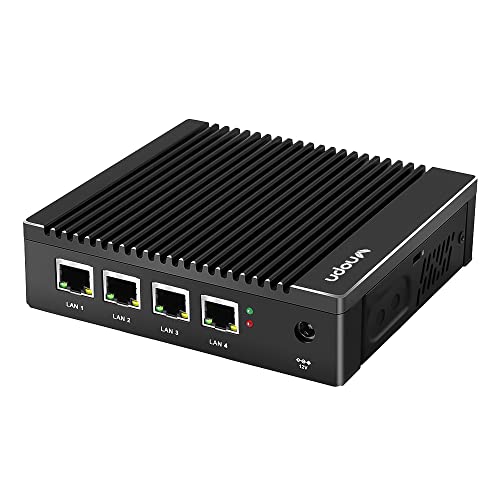
VNOPN Micro Firewall Appliance, 4 Intel 2.5GbE i225 LAN Ports Fanless Mini PC, Network Gateway Soft Router PC, Mini Computer Intel J4125 Quad Core, Support AES-NI, 8GB DDR4, 128GB mSATA SSD
Processor
2.5 GHz celeron
RAM
8 GB DDR4
Hard Drive
128 GB
Chipset Brand
Intel
Number of USB 3.0 Ports
2
Item Weight
2.4 pounds
Product Dimensions
5.28 x 5 x 1.46 inches
Item Dimensions LxWxH
5.28 x 5 x 1.46 inches
Processor Brand
Intel
Processor Count
1
Computer Memory Type
DDR4 SDRAM
Hard Drive Interface
Solid State
Power Source
DC
Batteries
1 CR2032 batteries required.
Test video – VNOPN Micro Firewall Appliance, 4 Intel 2.5GbE :
Product highlights :
✔【Processor & OS】This 4 nic mini pc uses Intel Quad cores J4125 Processor, up to 2.7GHz, supports AES NI. It’s pre-installed with Windows 10 Pro (Just for test, NO Windows license), tested with linux ubuntu, OPNsense and other popular open source firewall router software. Support Auto Power On, Wake on LAN, RTC wake and PXE boot (“DEL” key to enter BIOS).
✔【4x Intel 2.5GbE Ethernet Ports】This fanless mini pc all uses Intel i225 chip, supports 4x 2.5 Gigabit ethernet to keep stable and high speed. It has a good compatibility for soft routing, home firewall and other network appliances. This compact pc has more I/O Interface to meet your more needs: 1*HDMI, 1*VGA, 4*RJ45 LAN, 2*USB3.0, 1*DC IN.
✔【High Capacity Storage】This small firewall box comes with 8GB DDR4 RAM and 128GB mSATA SSD. The memory has 1x sodimm slot, max support to 16GB. The storage is 1x mSATA, max support to 512GB. Large storage can meet the vpn router box requirements of different network security firewall software and hypervisor applications.
✔【Portable & Silent】This small form factor PC built for micro firewall appliance and edge router use, it’s only 5.27 x 5 x 1.43 inch and 0.6kg and has a mounting bracket that allows it to be hung on the back of the monitor or TV to save more space. In addition, this mini computer uses fanless passive cooling design and has low power consumption to save energy and 7×24 hours quiet running.
✔【 Package List & Service】Vnopn firewall hardware*1, 12V/3A power adapter*1, US power plug*1, user manual*1, warranty card*1, Back mount bracket&Screws*1. We offer 7×24 hours customer service, 1 month free return, 3 year warranty and lifetime tech support. All of our products have obtained FCC, CE, RoHS Certifications.
➕ What is the price of VNOPN Micro Firewall Appliance, 4 Intel 2.5GbE in Saudi Arabia ?
The price of VNOPN Micro Firewall Appliance, 4 Intel 2.5GbE in-store is 1410 SAR VAT.
➕ When VNOPN Micro Firewall Appliance, 4 Intel 2.5GbE was released ?
The release date was .
➕ What is the price of VNOPN Micro Firewall Appliance, 4 Intel 2.5GbE cheap used ?
The price of VNOPN Micro Firewall Appliance, 4 Intel 2.5GbE used is 990 SAR VAT.
➕ What are the main characteristics of VNOPN Micro Firewall Appliance, 4 Intel 2.5GbE ?
Special specifications :
✔【Processor & OS】This 4 nic mini pc uses Intel Quad cores J4125 Processor, up to 2.7GHz, supports AES NI. It’s pre-installed with Windows 10 Pro (Just for test, NO Windows license), tested with linux ubuntu, OPNsense and other popular open source firewall router software. Support Auto Power On, Wake on LAN, RTC wake and PXE boot (“DEL” key to enter BIOS).
➕ Is it interesting to buy this product ?
The best people who can answer you are customers who have already bought and tested this product (See Customer Reviews). This product is rated 4.2 / 5 on Amazon.
➕ Where to buy VNOPN Micro Firewall Appliance, 4 Intel 2.5GbE in Saudi Arabia ?
Check the duration of the warranty and also the faults and defects it covers. Is it complete or limited? and What is included in the warranty (parts, repairs or both)?
Shipping :
Is delivery offered? And how long does it take to get delivered (Delivery time)
Proof of purchase :
Does the shop give you an invoice ?
After-sales service :
Do they have an after-sales service to have information about the installation or operation (instructions for use). Also in case of problem, it is the seller who takes charge or you must contact the manufacturer or supplier yourself.
_____________________________
14 reviews for VNOPN Micro Firewall Appliance, 4 Intel 2.5GbE
Rated 4 out of 5
C. O (verified owner)–
Finding ram that’s compatible is hard – I ran 16gb in this thing for a while cause the only stick I could find in my house that worked was out of my laptop. I ended up buying a cheap stick of used Samsung 2133 mhz pc4-17000 8gb on eBay and been very happy otherwise, running openwrt. I totally will be running home assistant on docker in this thing soon, it’s a beast! I just wish there were clear specs and that the pin headers were a bit more documented.
Rated 4 out of 5
S. S (verified owner)–
Solid box, some quirks – I purchased one of these to test its applicability for pfsense/opnsense in a Caribbean environment (think – hot and humid, and remote, so no moving parts to fail over time, and high heat tolerance).
Rated 3 out of 5
T. T (verified owner)–
Great replacement for an old Netgate 2100 – After upgrading our broadband service to > 1gig speeds, my old Netgate 2100 wasn’t cutting it. I was getting less than 500mbps when wired in and worse on WiFi.
Rated 4 out of 5
B. T (verified owner)–
Great box for a Linux router – I am running this sweet little unit as a router/firewall for my home network based on Ubuntu 20.04. I chose this because of the onboard Intel NICs and I have not been disappointed. It’s actually overkill for this purpose, but it’s nice not to have to worry about resource constraints. It runs quite cool (for a passive design) and of course is completely silent.
Rated 5 out of 5
K. B (verified owner)–
Fantastic for virtualizing pfsense within Proxmox but AES-NI isn’t on by default. – In Proxmox I had to set the CPU type to “host” so that the pfsense virtual machine could “see” all of the hardware features of the host CPU (including AES-NI). I also had to go into pfsense settings (System/Advanced/Miscellaneous) and turn on Cryptographic hardware AES-NI. After that, I could see that AES-NI was now being utilized on the pfsense dashboard status page. I gave my pfsense VM 2 cpu cores, 2gb ram, and 16gb of drive space. That was plenty of resources and it is running perfectly. I then added a ubuntu container and ran a unifi network appliance install script which fully set up that VM with only 1 cpu core, 1gb ram and 8gb drive space, again plenty of resources. Got a U6-LR access point and adopted it to the unifivm. Now my home network is screaming fast. I can’t wait to upgrade my network switch to a 2.5gb speed switch in the future, and now I’m future proofed for faster cable modem or fiber internet speeds when they eventually come to market. What a great piece of hardware this little box is, if you do your research and configuring everything properly. My network switch and cable modem are the only things bottlenecking my network now.
Rated 3 out of 5
O. F (verified owner)–
Difficult to find right RAM – Be careful with barebone since the RAM specs are not available online nor were they provided in box. This makes it difficult to get the unit going without on-hand options such as single and double rank. Speed required seems to be 2400 but PNY performance which support 2400 did not work. Unit might have been broken since it would not post past the del/esc prompt. Unit looked solid and well built. Supports msata and had a standard ssd connector with a tiny power connector. Did not see an internal way to mount ssd. No cables provided except power supply.
Rated 5 out of 5
K. B (verified owner)–
Fantastic for virtualizing pfsense within Proxmox but AES-NI isn’t on by default. – In Proxmox I had to set the CPU type to “host” so that the pfsense virtual machine could “see” all of the hardware features of the host CPU (including AES-NI). I also had to go into pfsense settings (System/Advanced/Miscellaneous) and turn on Cryptographic hardware AES-NI. After that, I could see that AES-NI was now being utilized on the pfsense dashboard status page. I gave my pfsense VM 2 cpu cores, 2gb ram, and 16gb of drive space. That was plenty of resources and it is running perfectly. I then added a ubuntu container and ran a unifi network appliance install script which fully set up that VM with only 1 cpu core, 1gb ram and 8gb drive space, again plenty of resources. Got a U6-LR access point and adopted it to the unifivm. Now my home network is screaming fast. I can’t wait to upgrade my network switch to a 2.5gb speed switch in the future, and now I’m future proofed for faster cable modem or fiber internet speeds when they eventually come to market. What a great piece of hardware this little box is, if you do your research and configuring everything properly. My network switch and cable modem are the only things bottlenecking my network now.
Rated 5 out of 5
D. J (verified owner)–
Works well – I got this as a prime day sale and installed opnsense firewall on it, was easy to do and it handles opnsense fine.
Rated 3 out of 5
T. T (verified owner)–
Great replacement for an old Netgate 2100 – After upgrading our broadband service to > 1gig speeds, my old Netgate 2100 wasn’t cutting it. I was getting less than 500mbps when wired in and worse on WiFi.
Rated 4 out of 5
B. T (verified owner)–
Great box for a Linux router – I am running this sweet little unit as a router/firewall for my home network based on Ubuntu 20.04. I chose this because of the onboard Intel NICs and I have not been disappointed. It’s actually overkill for this purpose, but it’s nice not to have to worry about resource constraints. It runs quite cool (for a passive design) and of course is completely silent.
Rated 3 out of 5
O. F (verified owner)–
Difficult to find right RAM – Be careful with barebone since the RAM specs are not available online nor were they provided in box. This makes it difficult to get the unit going without on-hand options such as single and double rank. Speed required seems to be 2400 but PNY performance which support 2400 did not work. Unit might have been broken since it would not post past the del/esc prompt. Unit looked solid and well built. Supports msata and had a standard ssd connector with a tiny power connector. Did not see an internal way to mount ssd. No cables provided except power supply.
Rated 4 out of 5
C. O (verified owner)–
Finding ram that’s compatible is hard – I ran 16gb in this thing for a while cause the only stick I could find in my house that worked was out of my laptop. I ended up buying a cheap stick of used Samsung 2133 mhz pc4-17000 8gb on eBay and been very happy otherwise, running openwrt. I totally will be running home assistant on docker in this thing soon, it’s a beast! I just wish there were clear specs and that the pin headers were a bit more documented.
Rated 5 out of 5
D. J (verified owner)–
Works well – I got this as a prime day sale and installed opnsense firewall on it, was easy to do and it handles opnsense fine.
Rated 4 out of 5
S. S (verified owner)–
Solid box, some quirks – I purchased one of these to test its applicability for pfsense/opnsense in a Caribbean environment (think – hot and humid, and remote, so no moving parts to fail over time, and high heat tolerance).





C. O (verified owner) –
Finding ram that’s compatible is hard – I ran 16gb in this thing for a while cause the only stick I could find in my house that worked was out of my laptop. I ended up buying a cheap stick of used Samsung 2133 mhz pc4-17000 8gb on eBay and been very happy otherwise, running openwrt. I totally will be running home assistant on docker in this thing soon, it’s a beast! I just wish there were clear specs and that the pin headers were a bit more documented.
S. S (verified owner) –
Solid box, some quirks – I purchased one of these to test its applicability for pfsense/opnsense in a Caribbean environment (think – hot and humid, and remote, so no moving parts to fail over time, and high heat tolerance).
T. T (verified owner) –
Great replacement for an old Netgate 2100 – After upgrading our broadband service to > 1gig speeds, my old Netgate 2100 wasn’t cutting it. I was getting less than 500mbps when wired in and worse on WiFi.
B. T (verified owner) –
Great box for a Linux router – I am running this sweet little unit as a router/firewall for my home network based on Ubuntu 20.04. I chose this because of the onboard Intel NICs and I have not been disappointed. It’s actually overkill for this purpose, but it’s nice not to have to worry about resource constraints. It runs quite cool (for a passive design) and of course is completely silent.
K. B (verified owner) –
Fantastic for virtualizing pfsense within Proxmox but AES-NI isn’t on by default. – In Proxmox I had to set the CPU type to “host” so that the pfsense virtual machine could “see” all of the hardware features of the host CPU (including AES-NI). I also had to go into pfsense settings (System/Advanced/Miscellaneous) and turn on Cryptographic hardware AES-NI. After that, I could see that AES-NI was now being utilized on the pfsense dashboard status page. I gave my pfsense VM 2 cpu cores, 2gb ram, and 16gb of drive space. That was plenty of resources and it is running perfectly. I then added a ubuntu container and ran a unifi network appliance install script which fully set up that VM with only 1 cpu core, 1gb ram and 8gb drive space, again plenty of resources. Got a U6-LR access point and adopted it to the unifivm. Now my home network is screaming fast. I can’t wait to upgrade my network switch to a 2.5gb speed switch in the future, and now I’m future proofed for faster cable modem or fiber internet speeds when they eventually come to market. What a great piece of hardware this little box is, if you do your research and configuring everything properly. My network switch and cable modem are the only things bottlenecking my network now.
O. F (verified owner) –
Difficult to find right RAM – Be careful with barebone since the RAM specs are not available online nor were they provided in box. This makes it difficult to get the unit going without on-hand options such as single and double rank. Speed required seems to be 2400 but PNY performance which support 2400 did not work. Unit might have been broken since it would not post past the del/esc prompt. Unit looked solid and well built. Supports msata and had a standard ssd connector with a tiny power connector. Did not see an internal way to mount ssd. No cables provided except power supply.
K. B (verified owner) –
Fantastic for virtualizing pfsense within Proxmox but AES-NI isn’t on by default. – In Proxmox I had to set the CPU type to “host” so that the pfsense virtual machine could “see” all of the hardware features of the host CPU (including AES-NI). I also had to go into pfsense settings (System/Advanced/Miscellaneous) and turn on Cryptographic hardware AES-NI. After that, I could see that AES-NI was now being utilized on the pfsense dashboard status page. I gave my pfsense VM 2 cpu cores, 2gb ram, and 16gb of drive space. That was plenty of resources and it is running perfectly. I then added a ubuntu container and ran a unifi network appliance install script which fully set up that VM with only 1 cpu core, 1gb ram and 8gb drive space, again plenty of resources. Got a U6-LR access point and adopted it to the unifivm. Now my home network is screaming fast. I can’t wait to upgrade my network switch to a 2.5gb speed switch in the future, and now I’m future proofed for faster cable modem or fiber internet speeds when they eventually come to market. What a great piece of hardware this little box is, if you do your research and configuring everything properly. My network switch and cable modem are the only things bottlenecking my network now.
D. J (verified owner) –
Works well – I got this as a prime day sale and installed opnsense firewall on it, was easy to do and it handles opnsense fine.
T. T (verified owner) –
Great replacement for an old Netgate 2100 – After upgrading our broadband service to > 1gig speeds, my old Netgate 2100 wasn’t cutting it. I was getting less than 500mbps when wired in and worse on WiFi.
B. T (verified owner) –
Great box for a Linux router – I am running this sweet little unit as a router/firewall for my home network based on Ubuntu 20.04. I chose this because of the onboard Intel NICs and I have not been disappointed. It’s actually overkill for this purpose, but it’s nice not to have to worry about resource constraints. It runs quite cool (for a passive design) and of course is completely silent.
O. F (verified owner) –
Difficult to find right RAM – Be careful with barebone since the RAM specs are not available online nor were they provided in box. This makes it difficult to get the unit going without on-hand options such as single and double rank. Speed required seems to be 2400 but PNY performance which support 2400 did not work. Unit might have been broken since it would not post past the del/esc prompt. Unit looked solid and well built. Supports msata and had a standard ssd connector with a tiny power connector. Did not see an internal way to mount ssd. No cables provided except power supply.
C. O (verified owner) –
Finding ram that’s compatible is hard – I ran 16gb in this thing for a while cause the only stick I could find in my house that worked was out of my laptop. I ended up buying a cheap stick of used Samsung 2133 mhz pc4-17000 8gb on eBay and been very happy otherwise, running openwrt. I totally will be running home assistant on docker in this thing soon, it’s a beast! I just wish there were clear specs and that the pin headers were a bit more documented.
D. J (verified owner) –
Works well – I got this as a prime day sale and installed opnsense firewall on it, was easy to do and it handles opnsense fine.
S. S (verified owner) –
Solid box, some quirks – I purchased one of these to test its applicability for pfsense/opnsense in a Caribbean environment (think – hot and humid, and remote, so no moving parts to fail over time, and high heat tolerance).