VNOPN Micro Firewall Appliance 4 Intel 2.5GbE – Features & Prices in Saudi Arabia :
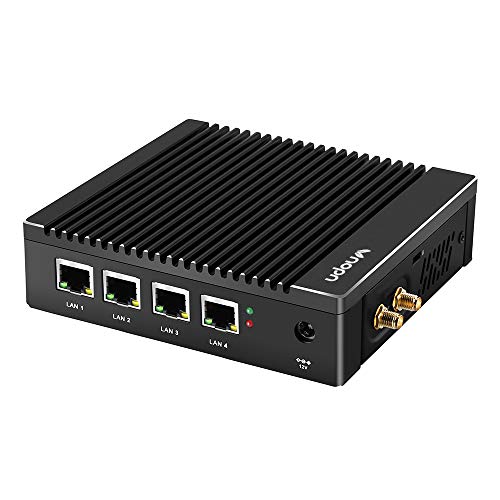
VNOPN Micro Firewall Appliance 4 Intel 2.5GbE NIC Ports Fanless Mini PC, Network Gateway Soft Router Mini Computer Intel N3700 Quad Core, Support AES-NI, 8GB DDR3, 128GB mSATA SSD
Processor
2.4 GHz pentium
RAM
8 GB DDR3
Hard Drive
128 GB
Chipset Brand
Intel
Card Description
Integrated
Wireless Type
802.11bgn
Number of USB 3.0 Ports
2
Item Dimensions LxWxH
5.28 x 5 x 1.46 inches
Color
8G+128G/N3700
Processor Brand
Intel
Processor Count
1
Computer Memory Type
DDR3L-1600 SDRAM
Flash Memory Size
128
Hard Drive Interface
Solid State
Power Source
DC
Batteries
1 CR2032 batteries required.
Test video – VNOPN Micro Firewall Appliance 4 Intel 2.5GbE :
Product highlights :
✔ Processor & OS—This 4 nic mini pc uses Intel N3700 Processor Quad core 4 threads 2M Cache at 1.6GHz (Burst up to 2.4GHz), supports AES-NI; The performance of CPU and GPU are better than J3160/N2940. It’s pre-installed with Windows 10 Pro (Just for test, NO Windows license) and also supports linux ubuntu, opnsense and more open-source firewall systems, etc. Support Auto Power On, Wake on LAN, RTC wake and PXE boot (“DEL” key to enter BIOS).
✔ 4 Intel 2.5Gigabit Ethernet ports—This fanless mini pcs all use Intel i225 network card chips, supports 4x 2.5gigabit ethernet to keep stable and high speed. It has a good compatibility for soft routing, firewall and other network applications. This compact pc has more I/O Interface to meet your more needs: 1*HDMI, 1*VGA, 4*RJ45 LAN, 2*USB3.0, 1*DC IN.
✔ High Capacity Storage—This little firewall box comes with 8GB DDR3L RAM and 128GB mSATA SSD. The memory is only 1x sodimm slot, max support 8GB. The storage is 1x mSATA, can be upgraded to 512GB. Large storage can meet the hardware requirements of different network security firewall software and hypervisor applications.
✔ Portable & Silent—This small form factor PC built for hardware firewall and router use, it’s only 5.27 x 5 x 1.43 inch and 0.6kg and has a mounting bracket that allows it to be hung on the back of the monitor or TV to save more space. In addition, this mini computer uses fanless passive cooling design and only has a 6W TDP to maintain low power consumption to save energy and 7×24 hours quiet running.
✔ Package List & Service—Vnopn Mini PC*1, 12V/3A power adapter*1, US power plug*1, user manual*1, warranty card*1, WiFi antenna*2, Back mount bracket&Screws*1. We offer 7×24 hours customer service, 1 month free return, 3 year warranty and lifetime tech support. All of our products have obtained FCC, CE, RoHS Certifications.
➕ What is the price of VNOPN Micro Firewall Appliance 4 Intel 2.5GbE in Saudi Arabia ?
The price of VNOPN Micro Firewall Appliance 4 Intel 2.5GbE in-store is 1290 SAR VAT.
➕ When VNOPN Micro Firewall Appliance 4 Intel 2.5GbE was released ?
The release date was .
➕ What is the price of VNOPN Micro Firewall Appliance 4 Intel 2.5GbE cheap used ?
The price of VNOPN Micro Firewall Appliance 4 Intel 2.5GbE used is 900 SAR VAT.
➕ What are the main characteristics of VNOPN Micro Firewall Appliance 4 Intel 2.5GbE ?
Special specifications :
✔ Processor & OS—This 4 nic mini pc uses Intel N3700 Processor Quad core 4 threads 2M Cache at 1.6GHz (Burst up to 2.4GHz), supports AES-NI; The performance of CPU and GPU are better than J3160/N2940. It’s pre-installed with Windows 10 Pro (Just for test, NO Windows license) and also supports linux ubuntu, opnsense and more open-source firewall systems, etc. Support Auto Power On, Wake on LAN, RTC wake and PXE boot (“DEL” key to enter BIOS).
➕ Is it interesting to buy this product ?
The best people who can answer you are customers who have already bought and tested this product (See Customer Reviews). This product is rated 4.3 / 5 on Amazon.
➕ Where to buy VNOPN Micro Firewall Appliance 4 Intel 2.5GbE in Saudi Arabia ?
Check the duration of the warranty and also the faults and defects it covers. Is it complete or limited? and What is included in the warranty (parts, repairs or both)?
Shipping :
Is delivery offered? And how long does it take to get delivered (Delivery time)
Proof of purchase :
Does the shop give you an invoice ?
After-sales service :
Do they have an after-sales service to have information about the installation or operation (instructions for use). Also in case of problem, it is the seller who takes charge or you must contact the manufacturer or supplier yourself.
_____________________________
6 reviews for VNOPN Micro Firewall Appliance 4 Intel 2.5GbE
Rated 5 out of 5
N. B (verified owner)–
Great box for Pfsense – Good box for Pfsense. Would recommend booting to install anything in bios set usb as initial boot over the internal drive. Kept getting host error though off boot menu I was selecting my usb. If installing Pfsense will you get CMS status command timeout error , let it attempt to correct it from 3 to 0. After that pfsense should install. May need to edit Pfsense with this command “vfs.zfs.trim.enabled=0” to /boot/loader.conf . Should hopefully solve that issue. If you do not attempt it then again will have to wait a little longer to boot each time when you do. Other that the box is great if you need a small form factor (if you do not wish to utilize your old pc if it has 2 or lan ports).
Rated 4 out of 5
G. A (verified owner)–
Good cheap pfsense router box with a couple minor gotchas that can be worked around – I went comparing, almost bought a NetGate box, but decided to go this route and stick to open source.
Rated 5 out of 5
N. B (verified owner)–
Great box for Pfsense – Good box for Pfsense. Would recommend booting to install anything in bios set usb as initial boot over the internal drive. Kept getting host error though off boot menu I was selecting my usb. If installing Pfsense will you get CMS status command timeout error , let it attempt to correct it from 3 to 0. After that pfsense should install. May need to edit Pfsense with this command “vfs.zfs.trim.enabled=0” to /boot/loader.conf . Should hopefully solve that issue. If you do not attempt it then again will have to wait a little longer to boot each time when you do. Other that the box is great if you need a small form factor (if you do not wish to utilize your old pc if it has 2 or lan ports).
Rated 5 out of 5
L. I (verified owner)–
Very Reasonable Value network appliance – I purchased this device and it has been running in my home for 8 months now and since I first wrote this review the device has had plenty of time to burn in and be evaluated.
Rated 5 out of 5
L. I (verified owner)–
Very Reasonable Value network appliance – I purchased this device and it has been running in my home for 8 months now and since I first wrote this review the device has had plenty of time to burn in and be evaluated.
Rated 4 out of 5
G. A (verified owner)–
Good cheap pfsense router box with a couple minor gotchas that can be worked around – I went comparing, almost bought a NetGate box, but decided to go this route and stick to open source.




N. B (verified owner) –
Great box for Pfsense – Good box for Pfsense. Would recommend booting to install anything in bios set usb as initial boot over the internal drive. Kept getting host error though off boot menu I was selecting my usb. If installing Pfsense will you get CMS status command timeout error , let it attempt to correct it from 3 to 0. After that pfsense should install. May need to edit Pfsense with this command “vfs.zfs.trim.enabled=0” to /boot/loader.conf . Should hopefully solve that issue. If you do not attempt it then again will have to wait a little longer to boot each time when you do. Other that the box is great if you need a small form factor (if you do not wish to utilize your old pc if it has 2 or lan ports).
G. A (verified owner) –
Good cheap pfsense router box with a couple minor gotchas that can be worked around – I went comparing, almost bought a NetGate box, but decided to go this route and stick to open source.
N. B (verified owner) –
Great box for Pfsense – Good box for Pfsense. Would recommend booting to install anything in bios set usb as initial boot over the internal drive. Kept getting host error though off boot menu I was selecting my usb. If installing Pfsense will you get CMS status command timeout error , let it attempt to correct it from 3 to 0. After that pfsense should install. May need to edit Pfsense with this command “vfs.zfs.trim.enabled=0” to /boot/loader.conf . Should hopefully solve that issue. If you do not attempt it then again will have to wait a little longer to boot each time when you do. Other that the box is great if you need a small form factor (if you do not wish to utilize your old pc if it has 2 or lan ports).
L. I (verified owner) –
Very Reasonable Value network appliance – I purchased this device and it has been running in my home for 8 months now and since I first wrote this review the device has had plenty of time to burn in and be evaluated.
L. I (verified owner) –
Very Reasonable Value network appliance – I purchased this device and it has been running in my home for 8 months now and since I first wrote this review the device has had plenty of time to burn in and be evaluated.
G. A (verified owner) –
Good cheap pfsense router box with a couple minor gotchas that can be worked around – I went comparing, almost bought a NetGate box, but decided to go this route and stick to open source.