USB C to Dual HDMI Adapter 4K – Features & Prices in Saudi Arabia :
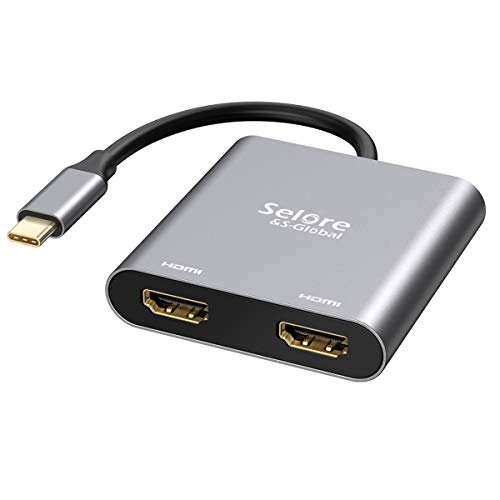
USB C to Dual HDMI Adapter 4K @60hz,Selore&S-Global Type C to HDMI Converter for MacBook Pro Air 2020/2019/2018,LenovoYoga 920/Thinkpad T480,Dell XPS 13/15,etc
Product Dimensions
2.5 x 2.4 x 0.6 inches
Item Weight
2.08 ounces
ASIN
B07QKVY23Q
Item model number
SEUC0703
Is Discontinued By Manufacturer
No
Other display features
Wireless
Colour
Spce Gray
Manufacturer
Selore&S-Global
Country of Origin
China
Date First Available
May 5, 2019
Test video – USB C to Dual HDMI Adapter 4K :
Product highlights :
USB-C to Dual HDMI Adapter 2 in 1: ❤️Attention: For Mac OS, it ONLY Mirror Mode, Can’t extend two different Screen, due to Mac OS limitation; Connect device with USB Type C (tunderbolt 3) port to two external monitors with 4K HDMI output; You can enjoy movies,games with your families on external ultra HD big screen; Windows OS supports both SST and MST mode, if you not sure how to setting, please contact us, or download the user guide in Product information->Product information.
Wide Compatibility: ❤️(Note: NOT for all USB-C port laptop, such as this adapter CANNOT work with HP Pavilion/Lenovo IdeaPad, You need to confirm that your host device’s C port supports video output or DP Alt Mode, and you can normally see the DP-logo next to the port if this is the case, ).This HDMI Reader works well with Thunderbolt 3 compatible devices,such as MacBook/MacBook Pro2020 2019 2018 2017,MacBook Air2020-2018,iPad Pro 2018 ,Dell XPS13/15,Samsung Galaxy S9/S9+,etc
Vivid 3D Effect Video Sync: This usb c to hdmi adapter resolution up to 4K(3840X2160P@60HZ), dual monitor with HDMI at 3840×2160@30Hz; Dual monitor USB C adapter also support 1440p and 1080p at 60Hz offered by the DisplayPort MST technology; with this high-performance USB-C adapter when you play games the screen without any millisecond delay.❤️ (Important: ONLY when your devices support 4K resolution, the video output will be 4K,please make sure to use a HDMI 2.0 cable or better.)
Hassle-Free Setup: Multi-stream transport offers an easy setup by natively working on device that supports DP Alt Mode over USB Type-C; plug-and-play, no drivers or software required.❤️ (NOTED:Please connect the monitor (HDMI port) first, then the laptop (usb c port), You may need to change the settings of “the default audio output device” on system preferences to deliver sound.)
What you get a: 1* USB Type C Adapter, 1* User Manual, At SELORE we offer 1-year defective product refund/replacement and friendly customer service; If there is any problem with this Dual HDMI Converter (such as: how to setting, how to use it…), please don’t hesitate to let me know. I will always do my best to help on it.
Questions & Answers – USB C to Dual HDMI Adapter 4K :
➕ What is the price of USB C to Dual HDMI Adapter 4K in Saudi Arabia ?
The price of USB C to Dual HDMI Adapter 4K in-store is 90 SAR VAT.
➕ When USB C to Dual HDMI Adapter 4K was released ?
The release date was May 5, 2019.
➕ What is the price of USB C to Dual HDMI Adapter 4K cheap used ?
The price of USB C to Dual HDMI Adapter 4K used is 60 SAR VAT.
➕ What are the main characteristics of USB C to Dual HDMI Adapter 4K ?
Special specifications :
USB-C to Dual HDMI Adapter 2 in 1: ❤️Attention: For Mac OS, it ONLY Mirror Mode, Can’t extend two different Screen, due to Mac OS limitation; Connect device with USB Type C (tunderbolt 3) port to two external monitors with 4K HDMI output; You can enjoy movies,games with your families on external ultra HD big screen; Windows OS supports both SST and MST mode, if you not sure how to setting, please contact us, or download the user guide in Product information->Product information.
Wide Compatibility: ❤️(Note: NOT for all USB-C port laptop, such as this adapter CANNOT work with HP Pavilion/Lenovo IdeaPad, You need to confirm that your host device’s C port supports video output or DP Alt Mode, and you can normally see the DP-logo next to the port if this is the case, ).This HDMI Reader works well with Thunderbolt 3 compatible devices,such as MacBook/MacBook Pro2020 2019 2018 2017,MacBook Air2020-2018,iPad Pro 2018 ,Dell XPS13/15,Samsung Galaxy S9/S9+,etc
➕ Is it interesting to buy this product ?
The best people who can answer you are customers who have already bought and tested this product (See Customer Reviews). This product is rated 4.3 / 5 on Amazon.
➕ Where to buy USB C to Dual HDMI Adapter 4K in Saudi Arabia ?
Technical specifications – USB C to Dual HDMI Adapter 4K :
Compatible Devices
,
Connector Type
HDMI
Connector Gender
Femal USB C port to 2* Male HDMI Port
Color
Spce Gray
Item Dimensions LxWxH
2.5 x 2.4 x 0.6 inches
Purchase advice :
Warranty :
Check the duration of the warranty and also the faults and defects it covers. Is it complete or limited? and What is included in the warranty (parts, repairs or both)?
Shipping :
Is delivery offered? And how long does it take to get delivered (Delivery time)
Proof of purchase :
Does the shop give you an invoice ?
After-sales service :
Do they have an after-sales service to have information about the installation or operation (instructions for use). Also in case of problem, it is the seller who takes charge or you must contact the manufacturer or supplier yourself.
_____________________________
16 reviews for USB C to Dual HDMI Adapter 4K
Rated 5 out of 5
D. C (verified owner)–
Simple solution for multiple monitors – I wanted a travel HDMI splitter for running 2 external monitors from my laptop. This works and doesn’t require external power. My laptop and monitors recognized it immediately. I’ve been using it for about 30-45 days and have had no issues with it. It does get warm, but not overly hot.
Rated 4 out of 5
Z. H (verified owner)–
Nice Device, But, Probably Me – Monitor Would Not Switch – I bought this to use with my old Lenovo Yoga 900 running Preview Windows 11. I currently use a USB to HDMI one port adapter to run my older Acer (S271HL) monitor. Using the older adapter, on the Acer itself I can change inputs between this and my work computer with no problem. However, using this new two port adapter, when I try to change to the Lenovo, you would hear the USB disconnect; the monitor would not find any signal/connect and go back to my work computer, and then of course the USB reconnect sound would sound. :-p
Rated 5 out of 5
D. C (verified owner)–
Simple solution for multiple monitors – I wanted a travel HDMI splitter for running 2 external monitors from my laptop. This works and doesn’t require external power. My laptop and monitors recognized it immediately. I’ve been using it for about 30-45 days and have had no issues with it. It does get warm, but not overly hot.
Rated 4 out of 5
S. H (verified owner)–
Changed my mind on previous 3 start rating – I bought two of these : one for a 2 monitor set up, one for 3 monitor. My two NUCs graphic cards, Win Pro 10 can out put three 4K video at 60Hz. The one I put in service has three cons… The USB to HDMI box it self runs very hot just sending two 1920x 1080 extended displays to Sceptre 27 inch monitors. The second con: the older monitor is very dim and Windows 10 “display” menu nor monitor menu can make it same brightness as the newer curved monitor. 3RD Con: sound out put is only to one of the two monitors Usually NOT the monitor playing some video, mildly annoying. I am still playing with set ups and HDMI 1 vs 2 to each monitor but getting frustrated and looking for a better USB ThunderBolt 3 to HDMI adapter
Rated 5 out of 5
K. S (verified owner)–
Linux on Lenovo. Happy Buyer – I bought this to, hopefully, make it easier to use my 27″ & 24″ Lenovo monitors with my work laptop.
Rated 5 out of 5
E. S (verified owner)–
Lenovo T490s + 2x Asus VA24EHE – Works perfect! – I have a Lenovo T490s and 2x Asus VA24EHE monitor. This adapter works perfect. Althogh its cable is short, therefore I also bought an Ainope USB-C extension cable. Now the setup is excellent!
Rated 5 out of 5
O. D (verified owner)–
Great buy! – This item is compact and does the job with no additional software needing to be downloaded. Although I’m not able to run 3 screens (the 3rd one being my laptop), I’m perfectly content with the ability to extend my displays to project different screens, which is exactly what I needed.
Rated 5 out of 5
K. S (verified owner)–
Linux on Lenovo. Happy Buyer – I bought this to, hopefully, make it easier to use my 27″ & 24″ Lenovo monitors with my work laptop.
Rated 5 out of 5
E. S (verified owner)–
Lenovo T490s + 2x Asus VA24EHE – Works perfect! – I have a Lenovo T490s and 2x Asus VA24EHE monitor. This adapter works perfect. Althogh its cable is short, therefore I also bought an Ainope USB-C extension cable. Now the setup is excellent!
Rated 4 out of 5
S. C (verified owner)–
Simple and works… just minor inconveniences – This adapter works great; does exactly what it was designed to do and I have tried it on nearly 10-year-old 1080p monitors as well as new 4k ones and it works perfectly. Only hiccup was I needed to go into device manager and scan for hardware changes to get it to be detected, but that might be Windows’s fault, not its own.
Rated 5 out of 5
S. T (verified owner)–
Works like I expected-Dual monitors at 2560×1080 – Our company upgraded our monitors to high resolution monitors but we use laptops with one HDMI port and docking stations that don’t support the higher resolution. This little adapter did the trick!
Rated 4 out of 5
Z. H (verified owner)–
Nice Device, But, Probably Me – Monitor Would Not Switch – I bought this to use with my old Lenovo Yoga 900 running Preview Windows 11. I currently use a USB to HDMI one port adapter to run my older Acer (S271HL) monitor. Using the older adapter, on the Acer itself I can change inputs between this and my work computer with no problem. However, using this new two port adapter, when I try to change to the Lenovo, you would hear the USB disconnect; the monitor would not find any signal/connect and go back to my work computer, and then of course the USB reconnect sound would sound. :-p
Rated 4 out of 5
S. C (verified owner)–
Simple and works… just minor inconveniences – This adapter works great; does exactly what it was designed to do and I have tried it on nearly 10-year-old 1080p monitors as well as new 4k ones and it works perfectly. Only hiccup was I needed to go into device manager and scan for hardware changes to get it to be detected, but that might be Windows’s fault, not its own.
Rated 5 out of 5
O. D (verified owner)–
Great buy! – This item is compact and does the job with no additional software needing to be downloaded. Although I’m not able to run 3 screens (the 3rd one being my laptop), I’m perfectly content with the ability to extend my displays to project different screens, which is exactly what I needed.
Rated 4 out of 5
S. H (verified owner)–
Changed my mind on previous 3 start rating – I bought two of these : one for a 2 monitor set up, one for 3 monitor. My two NUCs graphic cards, Win Pro 10 can out put three 4K video at 60Hz. The one I put in service has three cons… The USB to HDMI box it self runs very hot just sending two 1920x 1080 extended displays to Sceptre 27 inch monitors. The second con: the older monitor is very dim and Windows 10 “display” menu nor monitor menu can make it same brightness as the newer curved monitor. 3RD Con: sound out put is only to one of the two monitors Usually NOT the monitor playing some video, mildly annoying. I am still playing with set ups and HDMI 1 vs 2 to each monitor but getting frustrated and looking for a better USB ThunderBolt 3 to HDMI adapter
Rated 5 out of 5
S. T (verified owner)–
Works like I expected-Dual monitors at 2560×1080 – Our company upgraded our monitors to high resolution monitors but we use laptops with one HDMI port and docking stations that don’t support the higher resolution. This little adapter did the trick!


D. C (verified owner) –
Simple solution for multiple monitors – I wanted a travel HDMI splitter for running 2 external monitors from my laptop. This works and doesn’t require external power. My laptop and monitors recognized it immediately. I’ve been using it for about 30-45 days and have had no issues with it. It does get warm, but not overly hot.
Z. H (verified owner) –
Nice Device, But, Probably Me – Monitor Would Not Switch – I bought this to use with my old Lenovo Yoga 900 running Preview Windows 11. I currently use a USB to HDMI one port adapter to run my older Acer (S271HL) monitor. Using the older adapter, on the Acer itself I can change inputs between this and my work computer with no problem. However, using this new two port adapter, when I try to change to the Lenovo, you would hear the USB disconnect; the monitor would not find any signal/connect and go back to my work computer, and then of course the USB reconnect sound would sound. :-p
D. C (verified owner) –
Simple solution for multiple monitors – I wanted a travel HDMI splitter for running 2 external monitors from my laptop. This works and doesn’t require external power. My laptop and monitors recognized it immediately. I’ve been using it for about 30-45 days and have had no issues with it. It does get warm, but not overly hot.
S. H (verified owner) –
Changed my mind on previous 3 start rating – I bought two of these : one for a 2 monitor set up, one for 3 monitor. My two NUCs graphic cards, Win Pro 10 can out put three 4K video at 60Hz. The one I put in service has three cons… The USB to HDMI box it self runs very hot just sending two 1920x 1080 extended displays to Sceptre 27 inch monitors. The second con: the older monitor is very dim and Windows 10 “display” menu nor monitor menu can make it same brightness as the newer curved monitor. 3RD Con: sound out put is only to one of the two monitors Usually NOT the monitor playing some video, mildly annoying. I am still playing with set ups and HDMI 1 vs 2 to each monitor but getting frustrated and looking for a better USB ThunderBolt 3 to HDMI adapter
K. S (verified owner) –
Linux on Lenovo. Happy Buyer – I bought this to, hopefully, make it easier to use my 27″ & 24″ Lenovo monitors with my work laptop.
E. S (verified owner) –
Lenovo T490s + 2x Asus VA24EHE – Works perfect! – I have a Lenovo T490s and 2x Asus VA24EHE monitor. This adapter works perfect. Althogh its cable is short, therefore I also bought an Ainope USB-C extension cable. Now the setup is excellent!
O. D (verified owner) –
Great buy! – This item is compact and does the job with no additional software needing to be downloaded. Although I’m not able to run 3 screens (the 3rd one being my laptop), I’m perfectly content with the ability to extend my displays to project different screens, which is exactly what I needed.
K. S (verified owner) –
Linux on Lenovo. Happy Buyer – I bought this to, hopefully, make it easier to use my 27″ & 24″ Lenovo monitors with my work laptop.
E. S (verified owner) –
Lenovo T490s + 2x Asus VA24EHE – Works perfect! – I have a Lenovo T490s and 2x Asus VA24EHE monitor. This adapter works perfect. Althogh its cable is short, therefore I also bought an Ainope USB-C extension cable. Now the setup is excellent!
S. C (verified owner) –
Simple and works… just minor inconveniences – This adapter works great; does exactly what it was designed to do and I have tried it on nearly 10-year-old 1080p monitors as well as new 4k ones and it works perfectly. Only hiccup was I needed to go into device manager and scan for hardware changes to get it to be detected, but that might be Windows’s fault, not its own.
S. T (verified owner) –
Works like I expected-Dual monitors at 2560×1080 – Our company upgraded our monitors to high resolution monitors but we use laptops with one HDMI port and docking stations that don’t support the higher resolution. This little adapter did the trick!
Z. H (verified owner) –
Nice Device, But, Probably Me – Monitor Would Not Switch – I bought this to use with my old Lenovo Yoga 900 running Preview Windows 11. I currently use a USB to HDMI one port adapter to run my older Acer (S271HL) monitor. Using the older adapter, on the Acer itself I can change inputs between this and my work computer with no problem. However, using this new two port adapter, when I try to change to the Lenovo, you would hear the USB disconnect; the monitor would not find any signal/connect and go back to my work computer, and then of course the USB reconnect sound would sound. :-p
S. C (verified owner) –
Simple and works… just minor inconveniences – This adapter works great; does exactly what it was designed to do and I have tried it on nearly 10-year-old 1080p monitors as well as new 4k ones and it works perfectly. Only hiccup was I needed to go into device manager and scan for hardware changes to get it to be detected, but that might be Windows’s fault, not its own.
O. D (verified owner) –
Great buy! – This item is compact and does the job with no additional software needing to be downloaded. Although I’m not able to run 3 screens (the 3rd one being my laptop), I’m perfectly content with the ability to extend my displays to project different screens, which is exactly what I needed.
S. H (verified owner) –
Changed my mind on previous 3 start rating – I bought two of these : one for a 2 monitor set up, one for 3 monitor. My two NUCs graphic cards, Win Pro 10 can out put three 4K video at 60Hz. The one I put in service has three cons… The USB to HDMI box it self runs very hot just sending two 1920x 1080 extended displays to Sceptre 27 inch monitors. The second con: the older monitor is very dim and Windows 10 “display” menu nor monitor menu can make it same brightness as the newer curved monitor. 3RD Con: sound out put is only to one of the two monitors Usually NOT the monitor playing some video, mildly annoying. I am still playing with set ups and HDMI 1 vs 2 to each monitor but getting frustrated and looking for a better USB ThunderBolt 3 to HDMI adapter
S. T (verified owner) –
Works like I expected-Dual monitors at 2560×1080 – Our company upgraded our monitors to high resolution monitors but we use laptops with one HDMI port and docking stations that don’t support the higher resolution. This little adapter did the trick!