
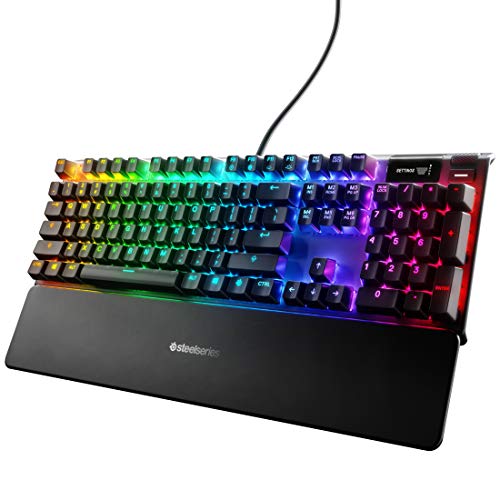
Description
SteelSeries Apex Pro Mechanical Gaming Keyboard – – Features & Prices in Saudi Arabia :
SteelSeries Apex Pro Mechanical Gaming Keyboard – Adjustable Actuation Switches – World’s Fastest Mechanical Keyboard – OLED Smart Display – RGB Backlit
Brand
SteelSeries
Series
Apex
Item model number
64626
Hardware Platform
PC
Operating System
Windows, Mac OS X, Xbox, and PlayStation. USB port required
Item Weight
2.14 pounds
Product Dimensions
5.5 x 17.2 x 1.6 inches
Item Dimensions LxWxH
5.5 x 17.2 x 1.6 inches
Color
RGB Backlit
Manufacturer
SteelSeries
Language
English
ASIN
B07SVJJCP3
Country of Origin
China
Date First Available
June 24, 2019
Test video – SteelSeries Apex Pro Mechanical Gaming Keyboard – :
Product highlights :
Questions & Answers – SteelSeries Apex Pro Mechanical Gaming Keyboard – :
Technical specifications – SteelSeries Apex Pro Mechanical Gaming Keyboard – :
Brand
SteelSeries
Compatible Devices
Game Consoles
Connectivity Technology
USB
Keyboard Description
Gaming
Special Feature
Wrist Rest
Color
RGB Backlit
Operating System
Windows, Mac OS X, Xbox, and PlayStation. USB port required
Number of Keys
104
Keyboard backlighting color support
RGB
Style
Wired
Purchase advice :
-
Warranty :
Check the duration of the warranty and also the faults and defects it covers. Is it complete or limited? and What is included in the warranty (parts, repairs or both)?
-
Shipping :
Is delivery offered? And how long does it take to get delivered (Delivery time)
-
Proof of purchase :
Does the shop give you an invoice ?
-
After-sales service :
Do they have an after-sales service to have information about the installation or operation (instructions for use). Also in case of problem, it is the seller who takes charge or you must contact the manufacturer or supplier yourself.
_____________________________
![Syntech USB C to USB Adapter [2 Pack] USB C Male to USB3 Female Adapter Compatible with iMac 2021 iPad Mini/Pro 2021 MacBook Pro 2020 MacBook Air 2020 and Other Type C Devices](/wp-content/uploads/2023/05/41nSZMNmLGL-300x225.jpg)
F. O (verified owner) –
Among the best keyboards I’ve used, BUT… (updated review) – UPDATE: I still really like this keyboard, but I was starting to notice that I actually type really inaccurately on it – it does get annoying. I just make a lot of mistakes, and I’ve been typing for 40 years and normally type about 100wpm. I was trying to figure out why this is, and lately I’ve had my old IBM Model M in the room hooked up to another computer and have felt the obvious difference in accuracy. (The Model M is where the modern keyboard layout comes from.) I still just type much better on the Model M. So I directly compared the two keyboards to figure out what the difference is.
G. P (verified owner) –
Takes some getting used to. – This mini keyboard was a major change from my previous keyboard. The first major shock I had when I needed the grave/tilde key for programming, thankfully with the SteelSeries GG program I was able to program the grave/tilde key into the escape key with a modifier. In Minecraft as well some of the F3 functions needed to be mapped because there is no function row. After some getting used to I am just as fast on this keyboard as my previous one. There was a quirk I could not figure out without some googling however, if you hold the SteelSeries logo and the windows button it locks the windows button and changes it’s color to white. Doing it again will re-enable the windows button.
O. H (verified owner) –
Product was close to good enough… – I liked the keyboard, but couldn’t adjust sensitivity of keys enough for me not to have a few additional keystrokes. Everything else was great. Only returned due to the above mentioned nuisance and previous history of faulty products from SteelSeries.
S. Z (verified owner) –
Almost perfect, if not for the competition – TLDR: If you don’t want to deal with pre-ordering the Wooting60HE or just really like Steelseries products, this is a really good 60% option.
O. H (verified owner) –
Product was close to good enough… – I liked the keyboard, but couldn’t adjust sensitivity of keys enough for me not to have a few additional keystrokes. Everything else was great. Only returned due to the above mentioned nuisance and previous history of faulty products from SteelSeries.
G. P (verified owner) –
Takes some getting used to. – This mini keyboard was a major change from my previous keyboard. The first major shock I had when I needed the grave/tilde key for programming, thankfully with the SteelSeries GG program I was able to program the grave/tilde key into the escape key with a modifier. In Minecraft as well some of the F3 functions needed to be mapped because there is no function row. After some getting used to I am just as fast on this keyboard as my previous one. There was a quirk I could not figure out without some googling however, if you hold the SteelSeries logo and the windows button it locks the windows button and changes it’s color to white. Doing it again will re-enable the windows button.
F. O (verified owner) –
Among the best keyboards I’ve used, BUT… (updated review) – UPDATE: I still really like this keyboard, but I was starting to notice that I actually type really inaccurately on it – it does get annoying. I just make a lot of mistakes, and I’ve been typing for 40 years and normally type about 100wpm. I was trying to figure out why this is, and lately I’ve had my old IBM Model M in the room hooked up to another computer and have felt the obvious difference in accuracy. (The Model M is where the modern keyboard layout comes from.) I still just type much better on the Model M. So I directly compared the two keyboards to figure out what the difference is.
S. Z (verified owner) –
Almost perfect, if not for the competition – TLDR: If you don’t want to deal with pre-ordering the Wooting60HE or just really like Steelseries products, this is a really good 60% option.
F. C (verified owner) –
– Both not to like. Son uses it for online Gaming
F. C (verified owner) –
– Both not to like. Son uses it for online Gaming