StarTech.com USB 3.0 to Dual HDMI Adapter – Features & Prices in Saudi Arabia :
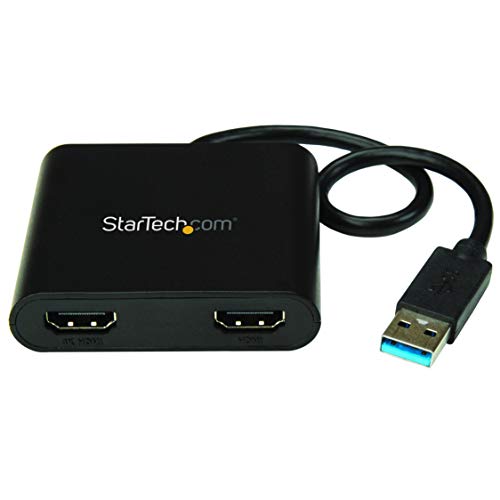
StarTech.com USB 3.0 to Dual HDMI Adapter – 1x 4K 30Hz & 1x 1080p – External Video & Graphics Card – USB Type-A to HDMI Dual Monitor Display Adapter – Supports Windows Only – Black (USB32HD2)
Product Dimensions
12.4 x 2.6 x 0.6 inches
Item Weight
1.97 ounces
ASIN
B0725K1MHH
Item model number
USB32HD2
Is Discontinued By Manufacturer
No
Date First Available
May 11, 2017
Department
Audio, Video Adapters
Manufacturer
STARTECH.COM
Test video – StarTech.com USB 3.0 to Dual HDMI Adapter :
Product highlights :
PERFORMANCE: USB 3.0 to Dual HDMI adapter lets you extend your desktop by adding up to two HDMI monitors to your laptop or desktop computer using a single USB Type-A port | 1x output for up to 4K 30Hz (UHD) & 1x 1080p | 2ch audio (through HDMI) | HDCP 1.4.Compatibility Options: Windows 10 logo, Windows 10 (32/64), Windows 8 / 8.1 (32/64), Windows 7(32/64)
INCREASE PRODUCTIVITY: Supports a total of 3 displays in extended mode (incl. laptop screen) at your workstation or working remotely from home | USB bus-powered; no extra power supply required | 4K port supports ultrawide displays up to 2560×1080
EASY SETUP: 10″ (25cm) attached cable for added distance between the adapter & host device for multi-monitor workspace or HDTV boardroom setup; Auto driver install; Works w/ Windows system even if 4K output is not natively supported by laptop/video card
WINDOWS ONLY: This USB-A to dual HDMI monitor adapter is only compatible with Windows operating systems and does not support macOS or Linux | External USB 3.0 (USB 3.1 Gen 1) Graphics Card Adapter to connect multiple screens
Questions & Answers – StarTech.com USB 3.0 to Dual HDMI Adapter :
➕ What is the price of StarTech.com USB 3.0 to Dual HDMI Adapter in Saudi Arabia ?
The price of StarTech.com USB 3.0 to Dual HDMI Adapter in-store is 220 SAR VAT.
➕ When StarTech.com USB 3.0 to Dual HDMI Adapter was released ?
The release date was May 11, 2017.
➕ What is the price of StarTech.com USB 3.0 to Dual HDMI Adapter cheap used ?
The price of StarTech.com USB 3.0 to Dual HDMI Adapter used is 150 SAR VAT.
➕ What are the main characteristics of StarTech.com USB 3.0 to Dual HDMI Adapter ?
Special specifications :
PERFORMANCE: USB 3.0 to Dual HDMI adapter lets you extend your desktop by adding up to two HDMI monitors to your laptop or desktop computer using a single USB Type-A port | 1x output for up to 4K 30Hz (UHD) & 1x 1080p | 2ch audio (through HDMI) | HDCP 1.4.Compatibility Options: Windows 10 logo, Windows 10 (32/64), Windows 8 / 8.1 (32/64), Windows 7(32/64)
➕ Is it interesting to buy this product ?
The best people who can answer you are customers who have already bought and tested this product (See Customer Reviews). This product is rated 4.5 / 5 on Amazon.
➕ Where to buy StarTech.com USB 3.0 to Dual HDMI Adapter in Saudi Arabia ?
Technical specifications – StarTech.com USB 3.0 to Dual HDMI Adapter :
Compatible Devices
Monitors
Connector Type
HDMI/USB
Connector Gender
Male-to-Female
Color
Black
Item Dimensions LxWxH
12.4 x 2.6 x 0.6 inches
Purchase advice :
Warranty :
Check the duration of the warranty and also the faults and defects it covers. Is it complete or limited? and What is included in the warranty (parts, repairs or both)?
Shipping :
Is delivery offered? And how long does it take to get delivered (Delivery time)
Proof of purchase :
Does the shop give you an invoice ?
After-sales service :
Do they have an after-sales service to have information about the installation or operation (instructions for use). Also in case of problem, it is the seller who takes charge or you must contact the manufacturer or supplier yourself.
_____________________________
16 reviews for StarTech.com USB 3.0 to Dual HDMI Adapter
Rated 5 out of 5
Z. F (verified owner)–
I wanted to use 3 monitors for say trading. This works. – I purchased this hoping I could successfully have 3 monitors to have multiple things on my 3 monitors. This allowed me to achieve this. I have 3 separate monitors connect to 1 PC now. I recommend buying the long HDMI cords as well.
Rated 5 out of 5
F. R (verified owner)–
Worth the leap of faith! – A few extra steps and a few leaps of faith, but it works literally as effectively as I’d hoped!
Rated 5 out of 5
M. P (verified owner)–
Dont even Question It…. – Trust me…Im you….I was looking for a resolution and was using the traditional thought process as my guide. (How silly of me)
Rated 5 out of 5
S. B (verified owner)–
Exceeded my expectations. – I am using this with and acer nitro 5(Ryzen 5 and GTX 1650). I have 2 32″ external monitors. One direct to HDMI port on the laptop and the other to this device which is plugged into a usb 3.0(blue) port. I was expecting lag and jittering, but mine is smooth as silk. I can watch YouTube on it and it looks great. I know some have had issues with lag but not on mine. It appears to be as smooth as my HDMI monitor honestly. Your mileage my vary but mine is great and I would purchase again.
Rated 5 out of 5
S. B (verified owner)–
Exceeded my expectations. – I am using this with and acer nitro 5(Ryzen 5 and GTX 1650). I have 2 32″ external monitors. One direct to HDMI port on the laptop and the other to this device which is plugged into a usb 3.0(blue) port. I was expecting lag and jittering, but mine is smooth as silk. I can watch YouTube on it and it looks great. I know some have had issues with lag but not on mine. It appears to be as smooth as my HDMI monitor honestly. Your mileage my vary but mine is great and I would purchase again.
Rated 5 out of 5
R. I (verified owner)–
Finally – what I was looking for! – I bought a Lenovo that I later learned was not compatible with my Lenovo docking station, so I wanted a USB to HDMI in order to plug in a second minotor (already had one in my laptops regulad HDMI port). I looked everywhere but only found usb-c to HDMI and HDMI splitters that just mirror the screen on two monitors. This is what I needed: turns my USB-A port into HDMI, and can be used to connect 2 additional monitors insteas of just 1.
Rated 5 out of 5
Z. O (verified owner)–
Simple and effective. – This product does as advertised and further impresses with small conveniences (eg. the model name is intuitive “USB32HD2” and printed on the device so its easy to find when you go to update the drivers). Compact. Not too hot. Etc.
Rated 5 out of 5
T. L (verified owner)–
Exactly what I needed for VR. – We use our gaming laptop for VR, and also output the screen to a larger tv for people to watch. Unfortunately our new laptop only had 1 hdmi port, so we weren’t able to do both at the same time (both require 1 hdmi cable). But with this device, we can! We use this in a USB slot to output the screen to the TV, while using the only hdmi port for the VR headset.
Rated 5 out of 5
T. L (verified owner)–
Exactly what I needed for VR. – We use our gaming laptop for VR, and also output the screen to a larger tv for people to watch. Unfortunately our new laptop only had 1 hdmi port, so we weren’t able to do both at the same time (both require 1 hdmi cable). But with this device, we can! We use this in a USB slot to output the screen to the TV, while using the only hdmi port for the VR headset.
Rated 5 out of 5
Z. F (verified owner)–
I wanted to use 3 monitors for say trading. This works. – I purchased this hoping I could successfully have 3 monitors to have multiple things on my 3 monitors. This allowed me to achieve this. I have 3 separate monitors connect to 1 PC now. I recommend buying the long HDMI cords as well.
Rated 5 out of 5
R. I (verified owner)–
Finally – what I was looking for! – I bought a Lenovo that I later learned was not compatible with my Lenovo docking station, so I wanted a USB to HDMI in order to plug in a second minotor (already had one in my laptops regulad HDMI port). I looked everywhere but only found usb-c to HDMI and HDMI splitters that just mirror the screen on two monitors. This is what I needed: turns my USB-A port into HDMI, and can be used to connect 2 additional monitors insteas of just 1.
Rated 5 out of 5
Z. O (verified owner)–
Simple and effective. – This product does as advertised and further impresses with small conveniences (eg. the model name is intuitive “USB32HD2” and printed on the device so its easy to find when you go to update the drivers). Compact. Not too hot. Etc.
Rated 5 out of 5
G. M (verified owner)–
Professional product – I bought this after another brand failed to work for my hp laptop and monitors. It was really easy and straightforward, and I have no complaints so far. it’s a little bit expensive but if you don’t want headache, go for it.
Rated 5 out of 5
G. M (verified owner)–
Professional product – I bought this after another brand failed to work for my hp laptop and monitors. It was really easy and straightforward, and I have no complaints so far. it’s a little bit expensive but if you don’t want headache, go for it.
Rated 5 out of 5
M. P (verified owner)–
Dont even Question It…. – Trust me…Im you….I was looking for a resolution and was using the traditional thought process as my guide. (How silly of me)
Rated 5 out of 5
F. R (verified owner)–
Worth the leap of faith! – A few extra steps and a few leaps of faith, but it works literally as effectively as I’d hoped!

![Syntech USB C to USB Adapter [2 Pack] USB C Male to USB3 Female Adapter Compatible with iMac 2021 iPad Mini/Pro 2021 MacBook Pro 2020 MacBook Air 2020 and Other Type C Devices](/wp-content/uploads/2023/05/41nSZMNmLGL-300x225.jpg)
Z. F (verified owner) –
I wanted to use 3 monitors for say trading. This works. – I purchased this hoping I could successfully have 3 monitors to have multiple things on my 3 monitors. This allowed me to achieve this. I have 3 separate monitors connect to 1 PC now. I recommend buying the long HDMI cords as well.
F. R (verified owner) –
Worth the leap of faith! – A few extra steps and a few leaps of faith, but it works literally as effectively as I’d hoped!
M. P (verified owner) –
Dont even Question It…. – Trust me…Im you….I was looking for a resolution and was using the traditional thought process as my guide. (How silly of me)
S. B (verified owner) –
Exceeded my expectations. – I am using this with and acer nitro 5(Ryzen 5 and GTX 1650). I have 2 32″ external monitors. One direct to HDMI port on the laptop and the other to this device which is plugged into a usb 3.0(blue) port. I was expecting lag and jittering, but mine is smooth as silk. I can watch YouTube on it and it looks great. I know some have had issues with lag but not on mine. It appears to be as smooth as my HDMI monitor honestly. Your mileage my vary but mine is great and I would purchase again.
S. B (verified owner) –
Exceeded my expectations. – I am using this with and acer nitro 5(Ryzen 5 and GTX 1650). I have 2 32″ external monitors. One direct to HDMI port on the laptop and the other to this device which is plugged into a usb 3.0(blue) port. I was expecting lag and jittering, but mine is smooth as silk. I can watch YouTube on it and it looks great. I know some have had issues with lag but not on mine. It appears to be as smooth as my HDMI monitor honestly. Your mileage my vary but mine is great and I would purchase again.
R. I (verified owner) –
Finally – what I was looking for! – I bought a Lenovo that I later learned was not compatible with my Lenovo docking station, so I wanted a USB to HDMI in order to plug in a second minotor (already had one in my laptops regulad HDMI port). I looked everywhere but only found usb-c to HDMI and HDMI splitters that just mirror the screen on two monitors. This is what I needed: turns my USB-A port into HDMI, and can be used to connect 2 additional monitors insteas of just 1.
Z. O (verified owner) –
Simple and effective. – This product does as advertised and further impresses with small conveniences (eg. the model name is intuitive “USB32HD2” and printed on the device so its easy to find when you go to update the drivers). Compact. Not too hot. Etc.
T. L (verified owner) –
Exactly what I needed for VR. – We use our gaming laptop for VR, and also output the screen to a larger tv for people to watch. Unfortunately our new laptop only had 1 hdmi port, so we weren’t able to do both at the same time (both require 1 hdmi cable). But with this device, we can! We use this in a USB slot to output the screen to the TV, while using the only hdmi port for the VR headset.
T. L (verified owner) –
Exactly what I needed for VR. – We use our gaming laptop for VR, and also output the screen to a larger tv for people to watch. Unfortunately our new laptop only had 1 hdmi port, so we weren’t able to do both at the same time (both require 1 hdmi cable). But with this device, we can! We use this in a USB slot to output the screen to the TV, while using the only hdmi port for the VR headset.
Z. F (verified owner) –
I wanted to use 3 monitors for say trading. This works. – I purchased this hoping I could successfully have 3 monitors to have multiple things on my 3 monitors. This allowed me to achieve this. I have 3 separate monitors connect to 1 PC now. I recommend buying the long HDMI cords as well.
R. I (verified owner) –
Finally – what I was looking for! – I bought a Lenovo that I later learned was not compatible with my Lenovo docking station, so I wanted a USB to HDMI in order to plug in a second minotor (already had one in my laptops regulad HDMI port). I looked everywhere but only found usb-c to HDMI and HDMI splitters that just mirror the screen on two monitors. This is what I needed: turns my USB-A port into HDMI, and can be used to connect 2 additional monitors insteas of just 1.
Z. O (verified owner) –
Simple and effective. – This product does as advertised and further impresses with small conveniences (eg. the model name is intuitive “USB32HD2” and printed on the device so its easy to find when you go to update the drivers). Compact. Not too hot. Etc.
G. M (verified owner) –
Professional product – I bought this after another brand failed to work for my hp laptop and monitors. It was really easy and straightforward, and I have no complaints so far. it’s a little bit expensive but if you don’t want headache, go for it.
G. M (verified owner) –
Professional product – I bought this after another brand failed to work for my hp laptop and monitors. It was really easy and straightforward, and I have no complaints so far. it’s a little bit expensive but if you don’t want headache, go for it.
M. P (verified owner) –
Dont even Question It…. – Trust me…Im you….I was looking for a resolution and was using the traditional thought process as my guide. (How silly of me)
F. R (verified owner) –
Worth the leap of faith! – A few extra steps and a few leaps of faith, but it works literally as effectively as I’d hoped!