Description
Mini PC Windows 11 Pro GK41 Mini – Features & Prices in Saudi Arabia :
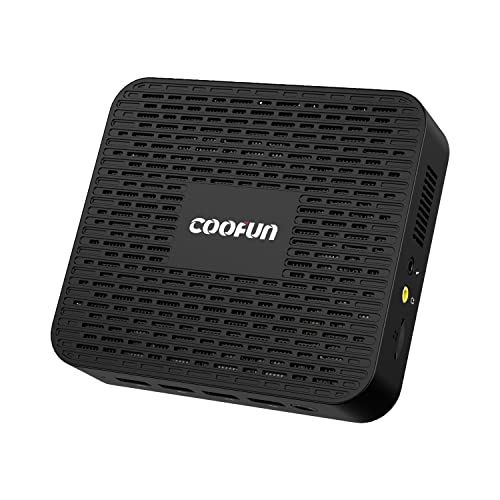
Mini PC Windows 11 Pro GK41 Mini Desktop Computers 8GB DDR4 128GB SSD Intel Celeron J4125 Processor Dual LAN Mini PC, Digital Mic, Business Small PC 4K HDMI/DisplayPort HTPC, Dual Band Wi-Fi Micro PC
Hard Drive Rotational Speed
Test video – Mini PC Windows 11 Pro GK41 Mini :
Product highlights :
1.【Intel Celeron J4125】Comes with Intel Celeron J4125 processor,2.00 GHz -2.70 GHz processor frequency,Intel UHD Graphics 600,GK41 Mini Computer brings more powerful performance and wonderful experience. It supports windows 11 pro system.
2.【SPECS】Equipped with DDR4 8GB Memory, the DDR frequency can be up to 2133 MHz.TDP unlocker and Superb cooling system enhances system performances and can efficiently operate for a long time.
3.【Flexible Capacity】 GK41 has installed 128GB Solid State Drives and can expand the storage via M.2 2280 SATA SSD, 2.5 inch SATA HDD or a TF card(up to 128GB) for your personal needs.
4.【HD Dual Screen】GK41 is equipped with HDMI 2.0 and DP display,which enable you to multi-task with ease.Stream 4K video, edit media, work from home, or finish your homework. Get ready for incredible graphics, sound, and performance.
5.【Additional Feature】 COOFUN 7/24 Care +. 24 MONTHS warranty and lifetime technical support. 4 x USB 3.0 ports ,2 x Gigabit Ethernet ports,3.5mm Audio Jack and a Digital Mic. Besides,it includes mounting bracket.
Questions & Answers – Mini PC Windows 11 Pro GK41 Mini :
➕ What is the price of Mini PC Windows 11 Pro GK41 Mini in Saudi Arabia ?
The price of Mini PC Windows 11 Pro GK41 Mini in-store is 760 SAR VAT.
➕ When Mini PC Windows 11 Pro GK41 Mini was released ?
The release date was .
➕ What is the price of Mini PC Windows 11 Pro GK41 Mini cheap used ?
The price of Mini PC Windows 11 Pro GK41 Mini used is 530 SAR VAT.
➕ What are the main characteristics of Mini PC Windows 11 Pro GK41 Mini ?
Special specifications :
1.【Intel Celeron J4125】Comes with Intel Celeron J4125 processor,2.00 GHz -2.70 GHz processor frequency,Intel UHD Graphics 600,GK41 Mini Computer brings more powerful performance and wonderful experience. It supports windows 11 pro system.
➕ Is it interesting to buy this product ?
The best people who can answer you are customers who have already bought and tested
this product (
See Customer Reviews). This product is rated 4.4 / 5
on Amazon.
➕ Where to buy Mini PC Windows 11 Pro GK41 Mini in Saudi Arabia ?
Mall, Supermarkets, Amazon, Specialized stores, ….
Technical specifications – Mini PC Windows 11 Pro GK41 Mini :
Specific Uses For Product
Multimedia, Personal, Business, Education, Commercial, Entertainment, Content creation
Personal computer design type
Windows 11 Pro, Linux,Ubuntu
Ram Memory Installed Size
4X USB 3.0 Ports, Dual Ethernet mini pc, Support Win11, Intel Celeron J4125 Processor
Purchase advice :
-
Warranty :
Check the duration of the warranty and also the faults and defects it covers. Is it complete or limited? and What is included in the warranty (parts, repairs or both)?
-
Shipping :
Is delivery offered? And how long does it take to get delivered (Delivery time)
-
Proof of purchase :
Does the shop give you an invoice ?
-
After-sales service :
Do they have an after-sales service to have information about the installation or operation (instructions for use). Also in case of problem, it is the seller who takes charge or you must contact the manufacturer or supplier yourself.
_____________________________


O. H (verified owner) –
Works, windows 11 licensed and preinstalled, but great for linux home media and camera setups – This was a good purchase, picked it up at $150 before Black Friday, comes with an OEM licensed Windows 11 preinstalled which is a perpetual license for the hardware, that is very handy. It’s small, compact, and quiet. Light on power consumption as well. I don’t feel bad running this 24/7.
O. H (verified owner) –
Works, windows 11 licensed and preinstalled, but great for linux home media and camera setups – This was a good purchase, picked it up at $150 before Black Friday, comes with an OEM licensed Windows 11 preinstalled which is a perpetual license for the hardware, that is very handy. It’s small, compact, and quiet. Light on power consumption as well. I don’t feel bad running this 24/7.
M. J (verified owner) –
Power Sipper – Possible Home Server or Media Computer – Product: Coofun GK41 – 128GB
J. F (verified owner) –
Hardware as described – Hardware shipped was exactly as described including all cables and screws. The box was marked as having 1, 16GB SO-DIMM, but the PC has 2, 8GB SO-DIMMs as described. The firmware ships with Secure Boot off but available. This is my first AMD system in a long time but there appears to be a full set of options inside. I got into the firmware without fail with “Del” and was able to easily boot Clonezilla off a USB stick to clone a virgin drive image before ever running off the internal drive. Overnight memory testing showed no trouble.
K. H (verified owner) –
Follow the instructions in the Email they send you before doing anything! – So far this is quite, fantastic 4K images, and fast. Set-up was frustrating as it auto connected to the internet and then required a work or student account. Contacted the seller, they provided a solution that worked perfectly! The only thing hated is Windows 11 tries to force only Microsoft apps. You have turn off the firewall and Microsoft antivirus to load anything. Recommend replace this as soon as you can with a real anti-virus malware app as Microsoft will permanently delete your application set-up files from your set-up location or drive. Microsoft doesn’t want you to use anything which is anything not Microsoft. For this reason, Microsoft is not a preferred operating system. Microsoft is to intrusive and a bully these days. You can set this PC up without connecting to a Microsoft account which is highly recommended to keep priority business work private. The only reason to keep Microsoft is because some apps require it to work, else it would be ditched because of its attempts to force only Microsoft products and Microsoft tries to control everything you do including wiping out your application setup files. So make sure you back up all of your set up files before trying to add them to this machine. Make sure you turn off Windows Firewall and Microsoft Anti-virus before trying to install any applications. Install your applications, load a real antivirus software like Vipre or other, run a scan, make sure you new anti-virus is functional and you should be good to go except turning off Microsoft annoying attempts to get you to log into a Microsoft account, very annoying!
K. H (verified owner) –
Follow the instructions in the Email they send you before doing anything! – So far this is quite, fantastic 4K images, and fast. Set-up was frustrating as it auto connected to the internet and then required a work or student account. Contacted the seller, they provided a solution that worked perfectly! The only thing hated is Windows 11 tries to force only Microsoft apps. You have turn off the firewall and Microsoft antivirus to load anything. Recommend replace this as soon as you can with a real anti-virus malware app as Microsoft will permanently delete your application set-up files from your set-up location or drive. Microsoft doesn’t want you to use anything which is anything not Microsoft. For this reason, Microsoft is not a preferred operating system. Microsoft is to intrusive and a bully these days. You can set this PC up without connecting to a Microsoft account which is highly recommended to keep priority business work private. The only reason to keep Microsoft is because some apps require it to work, else it would be ditched because of its attempts to force only Microsoft products and Microsoft tries to control everything you do including wiping out your application setup files. So make sure you back up all of your set up files before trying to add them to this machine. Make sure you turn off Windows Firewall and Microsoft Anti-virus before trying to install any applications. Install your applications, load a real antivirus software like Vipre or other, run a scan, make sure you new anti-virus is functional and you should be good to go except turning off Microsoft annoying attempts to get you to log into a Microsoft account, very annoying!
J. F (verified owner) –
Hardware as described – Hardware shipped was exactly as described including all cables and screws. The box was marked as having 1, 16GB SO-DIMM, but the PC has 2, 8GB SO-DIMMs as described. The firmware ships with Secure Boot off but available. This is my first AMD system in a long time but there appears to be a full set of options inside. I got into the firmware without fail with “Del” and was able to easily boot Clonezilla off a USB stick to clone a virgin drive image before ever running off the internal drive. Overnight memory testing showed no trouble.
M. J (verified owner) –
Power Sipper – Possible Home Server or Media Computer – Product: Coofun GK41 – 128GB