Microsoft Sculpt Ergonomic Wireless Desktop Keyboard and is available in Saudi Arabia.
Find out all you need to know about Microsoft Sculpt Ergonomic Wireless Desktop Keyboard and before buying : Price, Test video, Datasheet, Similar products.
Microsoft Sculpt Ergonomic Wireless Desktop Keyboard and – Features & Prices in Saudi Arabia :
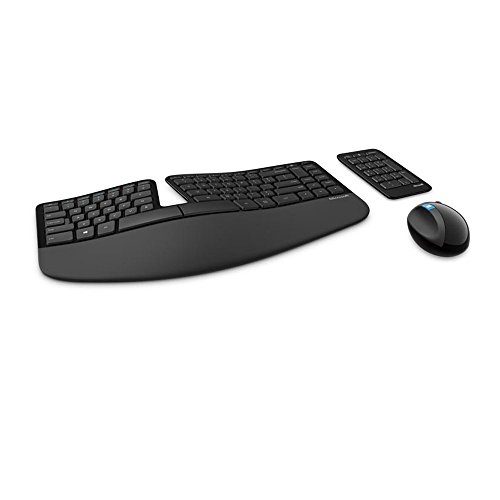
Microsoft Sculpt Ergonomic Wireless Desktop Keyboard and Mouse – Black. Wireless , Comfortable, Ergonomic Keyboard and Mouse Combo with Split Design and Palm Rest.
Standing screen display size
17.8 Inches
Wireless Type
2.4 GHz Radio Frequency
Average Battery Life (in hours)
3 years
Hardware Platform
PC
Operating System
Microsoft
Item Weight
2.2 pounds
Product Dimensions
8.86 x 21.06 x 1.77 inches
Item Dimensions LxWxH
8.86 x 21.06 x 1.77 inches
Color
Black
Power Source
Battery Powered
Batteries
3 AA batteries required. (included)
Manufacturer
Microsoft
ASIN
B00CYX54C0
Country of Origin
China
Is Discontinued By Manufacturer
No
Date First Available
August 13, 2013
Test video – Microsoft Sculpt Ergonomic Wireless Desktop Keyboard and :
Product highlights :
Cushioned palm rest provides support and promotes a neutral wrist position. This keyboard features Advanced Encryption Standard (AES) technology, which is designed to help protect your information by encrypting your keystrokes.Dimensions for Mouse -Length-3.87 inch. Width-3.13 inch
Split keyset design helps to position wrists and forearms in a natural, relaxed position. Thumb scoop helps to maintain the correct ergonomic hand and wrist position
Natural Arc key layout mimics the curved shape of the finger tips. Domed keyboard design Domed keyboard design positions wrists at a natural, relaxed angle.
Separate number pad Separate number pad provides greater flexibility for workspace setup.Required Hard Drive Space:150 MB Hard Drive
Includes Keyboard, Mouse, Number Pad, 2x AAA Batteries, Bluetooth USB module. Compatible-Win 10 64 bit,Win 10 32 bit,Win 8.1 32 bit,Win 8.1 64 bit,Win 8 32 bit,Win 8 64 bit,Win RT 8.1,Win RT 8
Questions & Answers – Microsoft Sculpt Ergonomic Wireless Desktop Keyboard and :
➕ What is the price of Microsoft Sculpt Ergonomic Wireless Desktop Keyboard and in Saudi Arabia ?
The price of Microsoft Sculpt Ergonomic Wireless Desktop Keyboard and in-store is 350 SAR VAT.
➕ When Microsoft Sculpt Ergonomic Wireless Desktop Keyboard and was released ?
The release date was August 13, 2013.
➕ What is the price of Microsoft Sculpt Ergonomic Wireless Desktop Keyboard and cheap used ?
The price of Microsoft Sculpt Ergonomic Wireless Desktop Keyboard and used is 240 SAR VAT.
➕ What are the main characteristics of Microsoft Sculpt Ergonomic Wireless Desktop Keyboard and ?
Special specifications :
Cushioned palm rest provides support and promotes a neutral wrist position. This keyboard features Advanced Encryption Standard (AES) technology, which is designed to help protect your information by encrypting your keystrokes.Dimensions for Mouse -Length-3.87 inch. Width-3.13 inch
➕ Is it interesting to buy this product ?
The best people who can answer you are customers who have already bought and tested this product (See Customer Reviews). This product is rated 4.4 / 5 on Amazon.
➕ Where to buy Microsoft Sculpt Ergonomic Wireless Desktop Keyboard and in Saudi Arabia ?
Technical specifications – Microsoft Sculpt Ergonomic Wireless Desktop Keyboard and :
Brand
Microsoft
Color
Black
Connectivity Technology
Wireless
Special Feature
Split Keyset Design
Compatible Devices
Personal Computer
Purchase advice :
Warranty :
Check the duration of the warranty and also the faults and defects it covers. Is it complete or limited? and What is included in the warranty (parts, repairs or both)?
Shipping :
Is delivery offered? And how long does it take to get delivered (Delivery time)
Proof of purchase :
Does the shop give you an invoice ?
After-sales service :
Do they have an after-sales service to have information about the installation or operation (instructions for use). Also in case of problem, it is the seller who takes charge or you must contact the manufacturer or supplier yourself.
_____________________________
10 reviews for Microsoft Sculpt Ergonomic Wireless Desktop Keyboard and
K. C (verified owner)–
– O produto não tenho nem o que falar! É sensacional.
Rated 4 out of 5
A. L (verified owner)–
The mouse is garbo, they keyboard is perfect. – Get it without the ball mouse if you can. Holy cow it’s dumb. It’s not useful on any surface at all, be it flat on a desk or on the arm of your couch as you use this with your laptop.
M. R (verified owner)–
– It has started typing multiple letters after few months , can anyone help ?
Rated 4 out of 5
A. L (verified owner)–
The mouse is garbo, they keyboard is perfect. – Get it without the ball mouse if you can. Holy cow it’s dumb. It’s not useful on any surface at all, be it flat on a desk or on the arm of your couch as you use this with your laptop.
Rated 4 out of 5
O. J (verified owner)–
New Advancement in Ergo Equipment – I purchased this keyboard since I have been experience pains in my arms since I work all day long on a computer. I already had a Microsoft Natural Ergonomic Keyboard 4000 with my work computer however I wasn’t happy with the spacebar on this keyboard. I also wanted a much better mouse since the standard mouse that I was using on my PC wasn’t cutting it. I was getting pains in my wrists and that was pretty unpleasant. So when I heard about this new ergo keyboard that Microsoft announced I became very interested in it for multiple reasons.
Rated 4 out of 5
M. F (verified owner)–
Updated: It’s a keeper! Was: okay after about 5 days but I am really hoping to update and improve this rating – Update #3 Oct 8_______________
K. C (verified owner)–
– O produto não tenho nem o que falar! É sensacional.
Rated 4 out of 5
M. F (verified owner)–
Updated: It’s a keeper! Was: okay after about 5 days but I am really hoping to update and improve this rating – Update #3 Oct 8_______________
Rated 4 out of 5
O. J (verified owner)–
New Advancement in Ergo Equipment – I purchased this keyboard since I have been experience pains in my arms since I work all day long on a computer. I already had a Microsoft Natural Ergonomic Keyboard 4000 with my work computer however I wasn’t happy with the spacebar on this keyboard. I also wanted a much better mouse since the standard mouse that I was using on my PC wasn’t cutting it. I was getting pains in my wrists and that was pretty unpleasant. So when I heard about this new ergo keyboard that Microsoft announced I became very interested in it for multiple reasons.
M. R (verified owner)–
– It has started typing multiple letters after few months , can anyone help ?
K. C (verified owner) –
– O produto não tenho nem o que falar! É sensacional.
A. L (verified owner) –
The mouse is garbo, they keyboard is perfect. – Get it without the ball mouse if you can. Holy cow it’s dumb. It’s not useful on any surface at all, be it flat on a desk or on the arm of your couch as you use this with your laptop.
M. R (verified owner) –
– It has started typing multiple letters after few months , can anyone help ?
A. L (verified owner) –
The mouse is garbo, they keyboard is perfect. – Get it without the ball mouse if you can. Holy cow it’s dumb. It’s not useful on any surface at all, be it flat on a desk or on the arm of your couch as you use this with your laptop.
O. J (verified owner) –
New Advancement in Ergo Equipment – I purchased this keyboard since I have been experience pains in my arms since I work all day long on a computer. I already had a Microsoft Natural Ergonomic Keyboard 4000 with my work computer however I wasn’t happy with the spacebar on this keyboard. I also wanted a much better mouse since the standard mouse that I was using on my PC wasn’t cutting it. I was getting pains in my wrists and that was pretty unpleasant. So when I heard about this new ergo keyboard that Microsoft announced I became very interested in it for multiple reasons.
M. F (verified owner) –
Updated: It’s a keeper! Was: okay after about 5 days but I am really hoping to update and improve this rating – Update #3 Oct 8_______________
K. C (verified owner) –
– O produto não tenho nem o que falar! É sensacional.
M. F (verified owner) –
Updated: It’s a keeper! Was: okay after about 5 days but I am really hoping to update and improve this rating – Update #3 Oct 8_______________
O. J (verified owner) –
New Advancement in Ergo Equipment – I purchased this keyboard since I have been experience pains in my arms since I work all day long on a computer. I already had a Microsoft Natural Ergonomic Keyboard 4000 with my work computer however I wasn’t happy with the spacebar on this keyboard. I also wanted a much better mouse since the standard mouse that I was using on my PC wasn’t cutting it. I was getting pains in my wrists and that was pretty unpleasant. So when I heard about this new ergo keyboard that Microsoft announced I became very interested in it for multiple reasons.
M. R (verified owner) –
– It has started typing multiple letters after few months , can anyone help ?