Logitech Signature M650 L Full Size Wireless – Features & Prices in Saudi Arabia :
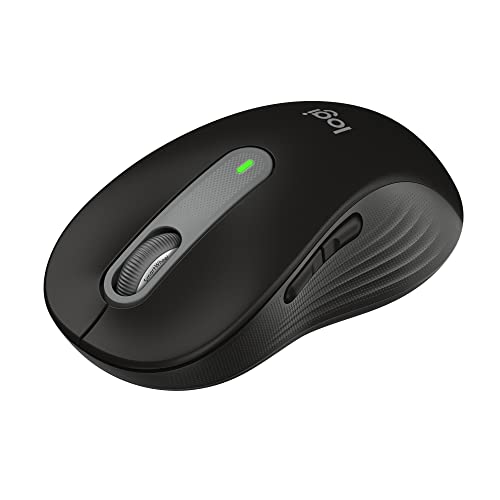
Logitech Signature M650 L Full Size Wireless Mouse – For Large Sized Hands, 2-Year Battery, Silent Clicks, Customizable Side Buttons, Bluetooth, Multi-Device Compatibility – Black
Average Battery Life (in hours)
24 months
Series
M650 L
Item model number
910-006265
Hardware Platform
PC, Linux, Mac
Operating System
Linux, Chrome OS
Item Weight
3.92 ounces
Product Dimensions
4.65 x 2.58 x 1.63 inches
Item Dimensions LxWxH
4.65 x 2.58 x 1.63 inches
Color
Black
Power Source
Battery Powered
Manufacturer
Logitech
ASIN
B09KX9P829
Country of Origin
China
Date First Available
January 11, 2022
Test video – Logitech Signature M650 L Full Size Wireless :
Product highlights :
Scroll smarter: With Logitech Signature M650 Wireless Mouse you get line-by-line precision for documents and super-fast scrolling for long web pages; simply switch modes with a flick of the SmartWheel
The optimal fit for your hand: This comfortable full size mouse is designed for larger hands, for the optimal fit
Upgrade your comfort: This work mouse provides long hours of comfort thanks to a contoured shape, soft thumb area, and rubber side grips that keep your hand snug and in place
Connect the way you like: Connect this cordless computer mouse in an instant via Bluetooth Low Energy or Logi Bolt USB receiver
Less noise, more focus: Whether working at the office or at home, Logitech Signature M650 is a quiet mouse, allowing you to enjoy 90 percent less click noise with SilentTouch technology
Customizable side buttons: Customize the side buttons on the computer mouse with Logitech Options plus, available on Windows and macOS, to your favorite shortcuts – like back/forward or copy/paste
Questions & Answers – Logitech Signature M650 L Full Size Wireless :
➕ What is the price of Logitech Signature M650 L Full Size Wireless in Saudi Arabia ?
The price of Logitech Signature M650 L Full Size Wireless in-store is 130 SAR VAT.
➕ When Logitech Signature M650 L Full Size Wireless was released ?
The release date was January 11, 2022.
➕ What is the price of Logitech Signature M650 L Full Size Wireless cheap used ?
The price of Logitech Signature M650 L Full Size Wireless used is 90 SAR VAT.
➕ What are the main characteristics of Logitech Signature M650 L Full Size Wireless ?
Special specifications :
Scroll smarter: With Logitech Signature M650 Wireless Mouse you get line-by-line precision for documents and super-fast scrolling for long web pages; simply switch modes with a flick of the SmartWheel
➕ Is it interesting to buy this product ?
The best people who can answer you are customers who have already bought and tested this product (See Customer Reviews). This product is rated 4.6 / 5 on Amazon.
➕ Where to buy Logitech Signature M650 L Full Size Wireless in Saudi Arabia ?
Technical specifications – Logitech Signature M650 L Full Size Wireless :
Brand
Logitech
Color
Black
Connectivity Technology
Bluetooth, Radio Frequency
Special Feature
Wireless, Portable, Lightweight, Soundless
Movement Detection Technology
Optical
Purchase advice :
Warranty :
Check the duration of the warranty and also the faults and defects it covers. Is it complete or limited? and What is included in the warranty (parts, repairs or both)?
Shipping :
Is delivery offered? And how long does it take to get delivered (Delivery time)
Proof of purchase :
Does the shop give you an invoice ?
After-sales service :
Do they have an after-sales service to have information about the installation or operation (instructions for use). Also in case of problem, it is the seller who takes charge or you must contact the manufacturer or supplier yourself.
_____________________________
10 reviews for Logitech Signature M650 L Full Size Wireless
Rated 5 out of 5
N. H (verified owner)–
Super cute, comfortable to hold and easy to use <3 - The mouse is so adorable, comfortable to use, and easy to connect the Bluetooth. My USB port is rusted and I can't get any USB connector to get in it, but I wanted a mouse that I could use both Bluetooth and USB in case I get a different laptop in the future and want to use the USB connector, or in case a friend or family member wants to use it with the USB connector.
G. D (verified owner)–
– O mouse cumpre o que promete, apesar do custo elevado , para quem trabalha no mínimo 8 horas por dia com um mouse na mão creio que vale o custo, tendo em vista que ele é ergonômico e tem aliviado minhas dores de tendinite, sem contar o material impecável da Logitech
Rated 5 out of 5
N. H (verified owner)–
Super cute, comfortable to hold and easy to use <3 - The mouse is so adorable, comfortable to use, and easy to connect the Bluetooth. My USB port is rusted and I can't get any USB connector to get in it, but I wanted a mouse that I could use both Bluetooth and USB in case I get a different laptop in the future and want to use the USB connector, or in case a friend or family member wants to use it with the USB connector.
Rated 5 out of 5
F. B (verified owner)–
Silent buttons are a must! Even if I’m gamer. – I’ve used the large and small versions of this mouse, as well as the silent plus before I used to use this.
Rated 5 out of 5
T. E (verified owner)–
Great feeling mouse, but had difficulty changing connection type – When choosing a mouse there are hundreds of options available, but Logitech is known in the industry as the strongest and best mice out there which is why I selected this one although it is a little more expensive than the knock-off Chinese mice, and don’t have some of the added features like RGB. This is a wireless mouse and has two types of connecting wirelessly: (1) Using the included Logi Bolt connector; and (2) using generic Bluetooth if your computer has that. The advantage of using Bluetooth is you spare the extra USB port which, otherwise, would be occupied by the Logi Bolt dongle. The disadvantage of using Bluetooth is if you want to use mouse functions while making BIOS settings, that’s not available, since Bluetooth is established after the operating system (Windows) is booted up. I didn’t find this out until I tried it and noticed to my disappointment the mouse didn’t work which making adjustments in BIOS. This may not be a problem for most people if you don’t go into your BIOS settings, but for me I’m setting up a new computer and need the mouse to work in BIOS.
Rated 5 out of 5
F. B (verified owner)–
Silent buttons are a must! Even if I’m gamer. – I’ve used the large and small versions of this mouse, as well as the silent plus before I used to use this.
Rated 5 out of 5
T. E (verified owner)–
Great feeling mouse, but had difficulty changing connection type – When choosing a mouse there are hundreds of options available, but Logitech is known in the industry as the strongest and best mice out there which is why I selected this one although it is a little more expensive than the knock-off Chinese mice, and don’t have some of the added features like RGB. This is a wireless mouse and has two types of connecting wirelessly: (1) Using the included Logi Bolt connector; and (2) using generic Bluetooth if your computer has that. The advantage of using Bluetooth is you spare the extra USB port which, otherwise, would be occupied by the Logi Bolt dongle. The disadvantage of using Bluetooth is if you want to use mouse functions while making BIOS settings, that’s not available, since Bluetooth is established after the operating system (Windows) is booted up. I didn’t find this out until I tried it and noticed to my disappointment the mouse didn’t work which making adjustments in BIOS. This may not be a problem for most people if you don’t go into your BIOS settings, but for me I’m setting up a new computer and need the mouse to work in BIOS.
G. D (verified owner)–
– O mouse cumpre o que promete, apesar do custo elevado , para quem trabalha no mínimo 8 horas por dia com um mouse na mão creio que vale o custo, tendo em vista que ele é ergonômico e tem aliviado minhas dores de tendinite, sem contar o material impecável da Logitech
N. H (verified owner) –
Super cute, comfortable to hold and easy to use <3 - The mouse is so adorable, comfortable to use, and easy to connect the Bluetooth. My USB port is rusted and I can't get any USB connector to get in it, but I wanted a mouse that I could use both Bluetooth and USB in case I get a different laptop in the future and want to use the USB connector, or in case a friend or family member wants to use it with the USB connector.
G. D (verified owner) –
– O mouse cumpre o que promete, apesar do custo elevado , para quem trabalha no mínimo 8 horas por dia com um mouse na mão creio que vale o custo, tendo em vista que ele é ergonômico e tem aliviado minhas dores de tendinite, sem contar o material impecável da Logitech
N. H (verified owner) –
Super cute, comfortable to hold and easy to use <3 - The mouse is so adorable, comfortable to use, and easy to connect the Bluetooth. My USB port is rusted and I can't get any USB connector to get in it, but I wanted a mouse that I could use both Bluetooth and USB in case I get a different laptop in the future and want to use the USB connector, or in case a friend or family member wants to use it with the USB connector.
F. B (verified owner) –
Silent buttons are a must! Even if I’m gamer. – I’ve used the large and small versions of this mouse, as well as the silent plus before I used to use this.
T. E (verified owner) –
Great feeling mouse, but had difficulty changing connection type – When choosing a mouse there are hundreds of options available, but Logitech is known in the industry as the strongest and best mice out there which is why I selected this one although it is a little more expensive than the knock-off Chinese mice, and don’t have some of the added features like RGB. This is a wireless mouse and has two types of connecting wirelessly: (1) Using the included Logi Bolt connector; and (2) using generic Bluetooth if your computer has that. The advantage of using Bluetooth is you spare the extra USB port which, otherwise, would be occupied by the Logi Bolt dongle. The disadvantage of using Bluetooth is if you want to use mouse functions while making BIOS settings, that’s not available, since Bluetooth is established after the operating system (Windows) is booted up. I didn’t find this out until I tried it and noticed to my disappointment the mouse didn’t work which making adjustments in BIOS. This may not be a problem for most people if you don’t go into your BIOS settings, but for me I’m setting up a new computer and need the mouse to work in BIOS.
F. B (verified owner) –
Silent buttons are a must! Even if I’m gamer. – I’ve used the large and small versions of this mouse, as well as the silent plus before I used to use this.
T. E (verified owner) –
Great feeling mouse, but had difficulty changing connection type – When choosing a mouse there are hundreds of options available, but Logitech is known in the industry as the strongest and best mice out there which is why I selected this one although it is a little more expensive than the knock-off Chinese mice, and don’t have some of the added features like RGB. This is a wireless mouse and has two types of connecting wirelessly: (1) Using the included Logi Bolt connector; and (2) using generic Bluetooth if your computer has that. The advantage of using Bluetooth is you spare the extra USB port which, otherwise, would be occupied by the Logi Bolt dongle. The disadvantage of using Bluetooth is if you want to use mouse functions while making BIOS settings, that’s not available, since Bluetooth is established after the operating system (Windows) is booted up. I didn’t find this out until I tried it and noticed to my disappointment the mouse didn’t work which making adjustments in BIOS. This may not be a problem for most people if you don’t go into your BIOS settings, but for me I’m setting up a new computer and need the mouse to work in BIOS.
G. D (verified owner) –
– O mouse cumpre o que promete, apesar do custo elevado , para quem trabalha no mínimo 8 horas por dia com um mouse na mão creio que vale o custo, tendo em vista que ele é ergonômico e tem aliviado minhas dores de tendinite, sem contar o material impecável da Logitech
P. M (verified owner) –
– TL;DR
P. M (verified owner) –
– TL;DR