
Description
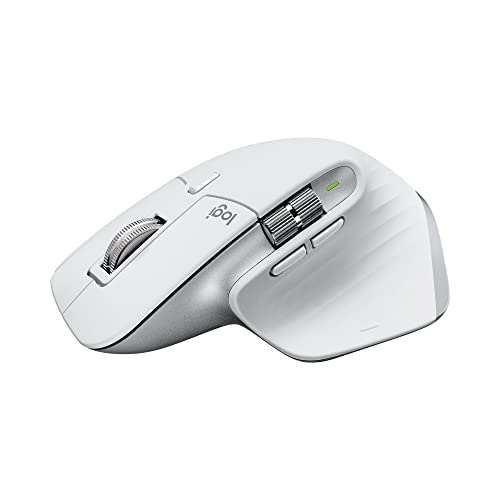
Logitech MX Master 3S – Wireless Performance – Features & Prices in Saudi Arabia :
Logitech MX Master 3S – Wireless Performance Mouse with Ultra-fast Scrolling, Ergo, 8K DPI, Track on Glass, Quiet Clicks, USB-C, Bluetooth, Windows, Linux, Chrome – Pale Grey
Brand
Logitech
Series
MX Master 3S
Item model number
910-006558
Hardware Platform
PC, Mac
Operating System
Linux, Chrome OS
Item Weight
5 ounces
Product Dimensions
7.2 x 5.5 x 2.8 inches
Item Dimensions LxWxH
7.2 x 5.5 x 2.8 inches
Color
Pale Grey
Power Source
Battery Powered
Batteries
1 Lithium Polymer batteries required. (included)
Manufacturer
Logitech
ASIN
B09HMKFDXC
Country of Origin
China
Date First Available
May 24, 2022
Test video – Logitech MX Master 3S – Wireless Performance :
Product highlights :
Questions & Answers – Logitech MX Master 3S – Wireless Performance :
Technical specifications – Logitech MX Master 3S – Wireless Performance :
Brand
Logitech
Color
Pale Grey
Connectivity Technology
Bluetooth, USB, Radio Frequency
Special Feature
Wireless, Portable, Lightweight, Rechargeable
Movement Detection Technology
Optical
Purchase advice :
-
Warranty :
Check the duration of the warranty and also the faults and defects it covers. Is it complete or limited? and What is included in the warranty (parts, repairs or both)?
-
Shipping :
Is delivery offered? And how long does it take to get delivered (Delivery time)
-
Proof of purchase :
Does the shop give you an invoice ?
-
After-sales service :
Do they have an after-sales service to have information about the installation or operation (instructions for use). Also in case of problem, it is the seller who takes charge or you must contact the manufacturer or supplier yourself.
_____________________________

A. J (verified owner) –
Best mouse scroll wheel, thumb rest, and programmability on the market, period! – I wish that there was a fusion between the Logitech G502 Hero wireless mouse, Logitech MX 3 mouse, and the ReDragon M801P Sniper Pro wireless mouse and the Razer Basilisk Ultimate. I don’t understand why all other mice on the market do not have a hyper scroll capability yet. If the ReDragon M801P mouse had this hyper scroll wheel. I would love it because of the format of being able to wrest my ring finger on the mouse channel. It is so hard to find a good ergonomic mouse on the market today with great features.
A. J (verified owner) –
Best mouse scroll wheel, thumb rest, and programmability on the market, period! – I wish that there was a fusion between the Logitech G502 Hero wireless mouse, Logitech MX 3 mouse, and the ReDragon M801P Sniper Pro wireless mouse and the Razer Basilisk Ultimate. I don’t understand why all other mice on the market do not have a hyper scroll capability yet. If the ReDragon M801P mouse had this hyper scroll wheel. I would love it because of the format of being able to wrest my ring finger on the mouse channel. It is so hard to find a good ergonomic mouse on the market today with great features.
J. E (verified owner) –
– I have two of the previous generation and this is an improvement in every way.
F. K (verified owner) –
– This mouse quality built is good and feels nice in the hand. But the scroll wheel do not work properly. when you try to scroll up it doesn’t recognize the scroll sometimes. Only in ratchet mode it doesn’t work. but when you put it in free mode i think its called it works. read online this is a issue for this mouse… the first mouse had the problem so i was thinking it was a defect but when i bought a 2nd mouse same issue. Read online a lot of people have same issue. going to return it and try a different mouse i really like this mouse too.
R. B (verified owner) –
Four steps backwards, four steps forward – Pros:
R. B (verified owner) –
Four steps backwards, four steps forward – Pros:
J. E (verified owner) –
– I have two of the previous generation and this is an improvement in every way.
H. F (verified owner) –
Outstanding for video or photo editing! with one minor caveat. – The is one negative (with an easy fix) BUT firstly, let me just say… speaking as a videographer and photographer who uses all of adobe creative cloud software on a daily basis… I absolutely love this mouse! If I had to guess, I would conservatively say that my overall editing speed is about 30% faster compared to a my old way using a standard mouse and using the keyboard shortcuts. . Yes, it does take some time to assign each function button for each individual program that you use. And then train your brain to use those buttons instead of keycard shortcuts BUT your editing speed will increase tremendously. Lightroom, Photoshop, Ae, Ai, and definitely Pr for me. Which by the way, was very easing using the Logi options software provided with the purchase. As a graphic arts and video editor. It a win win for me. The warning… I had lag and connection issues using my blue USB 3.0 ports, until, just for Sheetz and giggles, I decided to test the USB 2.0 port and VOILÀ! Lag and connection issues 100% solved. My fancy MX3 is quick and slick like a valence electron on Adderall. So, my particular MX3 mouse/dongle and PC… The USB 3.0 was an issue. It may be fine for others but keep that in mind if you buy it and notice lag… go 2.0. And if you are an artist, creator and/or editor, you will learn to love the upgrade. Word on the streets that It works the great with DaVinci Resolve and most all major editing programs on the market. But I didn’t do any YouTube research so say otherwise. Time is Money! Get the MX3 or 3s. Cheers!
H. F (verified owner) –
Outstanding for video or photo editing! with one minor caveat. – The is one negative (with an easy fix) BUT firstly, let me just say… speaking as a videographer and photographer who uses all of adobe creative cloud software on a daily basis… I absolutely love this mouse! If I had to guess, I would conservatively say that my overall editing speed is about 30% faster compared to a my old way using a standard mouse and using the keyboard shortcuts. . Yes, it does take some time to assign each function button for each individual program that you use. And then train your brain to use those buttons instead of keycard shortcuts BUT your editing speed will increase tremendously. Lightroom, Photoshop, Ae, Ai, and definitely Pr for me. Which by the way, was very easing using the Logi options software provided with the purchase. As a graphic arts and video editor. It a win win for me. The warning… I had lag and connection issues using my blue USB 3.0 ports, until, just for Sheetz and giggles, I decided to test the USB 2.0 port and VOILÀ! Lag and connection issues 100% solved. My fancy MX3 is quick and slick like a valence electron on Adderall. So, my particular MX3 mouse/dongle and PC… The USB 3.0 was an issue. It may be fine for others but keep that in mind if you buy it and notice lag… go 2.0. And if you are an artist, creator and/or editor, you will learn to love the upgrade. Word on the streets that It works the great with DaVinci Resolve and most all major editing programs on the market. But I didn’t do any YouTube research so say otherwise. Time is Money! Get the MX3 or 3s. Cheers!
F. K (verified owner) –
– This mouse quality built is good and feels nice in the hand. But the scroll wheel do not work properly. when you try to scroll up it doesn’t recognize the scroll sometimes. Only in ratchet mode it doesn’t work. but when you put it in free mode i think its called it works. read online this is a issue for this mouse… the first mouse had the problem so i was thinking it was a defect but when i bought a 2nd mouse same issue. Read online a lot of people have same issue. going to return it and try a different mouse i really like this mouse too.