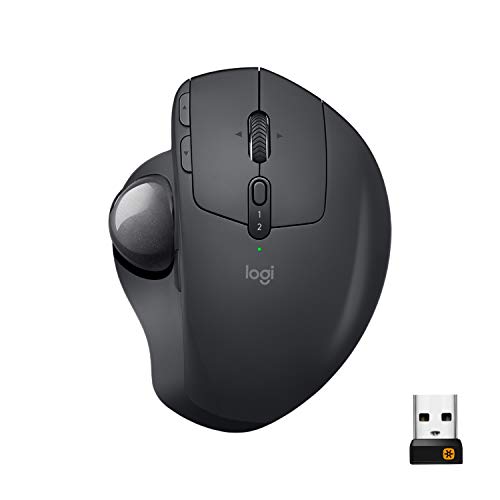
Logitech MX Ergo Wireless Trackball Mouse Adjustable is available in Saudi Arabia.
Find out all you need to know about Logitech MX Ergo Wireless Trackball Mouse Adjustable before buying : Price, Test video, Datasheet, Similar products.
Logitech MX Ergo Wireless Trackball Mouse Adjustable – Features & Prices in Saudi Arabia :
Logitech MX Ergo Wireless Trackball Mouse Adjustable Ergonomic Design, Control and Move Text/Images/Files Between 2 Windows and Apple Mac Computers (Bluetooth or USB), Rechargeable, Graphite – Black
Wireless Type
2.4 GHz Radio Frequency
Average Battery Life (in hours)
4 months
Item model number
910-005177
Hardware Platform
Laptop, PC
Operating System
Windows 10, 11 or later, macOS Mac OS X 10.8 or later, iPadOS 13.4 or later (+no software support legal footnote)
Item Weight
5.8 ounces
Product Dimensions
3.92 x 5.21 x 2.02 inches
Item Dimensions LxWxH
3.92 x 5.21 x 2.02 inches
Color
Black
Rear Webcam Resolution
4000 MP
Power Source
Battery Powered
Batteries
1 Lithium Metal batteries required. (included)
Manufacturer
Logitech
ASIN
B0753P1GTS
Is Discontinued By Manufacturer
No
Date First Available
August 23, 2017
Test video – Logitech MX Ergo Wireless Trackball Mouse Adjustable :
Product highlights :
Ergonomic sculpted design – unique adjustable hinge allows you to customize the trackball angle from 0 to 20 degrees for a more natural, comfortable hand position, and reduced muscle strain
Cross-computer control- game-changing capacity to navigate seamlessly on 2 computers, and copy-paste text, images, and files from one to the other using Logitech flow
Dual connectivity- use with up to 3 Windows or Mac computers via included Unifying receiver or Bluetooth smart wireless technology
Rechargeable battery- up to 70 days of power on a single charge; Nominal value : 380 dpi
Precision scroll-wheel – tilt and middle click wheel allows for precise scrolling and other Convenient controls such as horizontal scrolling
➕ What is the price of Logitech MX Ergo Wireless Trackball Mouse Adjustable in Saudi Arabia ?
The price of Logitech MX Ergo Wireless Trackball Mouse Adjustable in-store is 350 SAR VAT.
➕ When Logitech MX Ergo Wireless Trackball Mouse Adjustable was released ?
The release date was August 23, 2017.
➕ What is the price of Logitech MX Ergo Wireless Trackball Mouse Adjustable cheap used ?
The price of Logitech MX Ergo Wireless Trackball Mouse Adjustable used is 240 SAR VAT.
➕ What are the main characteristics of Logitech MX Ergo Wireless Trackball Mouse Adjustable ?
Special specifications :
Ergonomic sculpted design – unique adjustable hinge allows you to customize the trackball angle from 0 to 20 degrees for a more natural, comfortable hand position, and reduced muscle strain
➕ Is it interesting to buy this product ?
The best people who can answer you are customers who have already bought and tested this product (See Customer Reviews). This product is rated 4.6 / 5 on Amazon.
➕ Where to buy Logitech MX Ergo Wireless Trackball Mouse Adjustable in Saudi Arabia ?
Check the duration of the warranty and also the faults and defects it covers. Is it complete or limited? and What is included in the warranty (parts, repairs or both)?
Shipping :
Is delivery offered? And how long does it take to get delivered (Delivery time)
Proof of purchase :
Does the shop give you an invoice ?
After-sales service :
Do they have an after-sales service to have information about the installation or operation (instructions for use). Also in case of problem, it is the seller who takes charge or you must contact the manufacturer or supplier yourself.
_____________________________
10 reviews for Logitech MX Ergo Wireless Trackball Mouse Adjustable
Rated 4 out of 5
J. D (verified owner)–
Almost Perfect Trackball – I have been using Trackballs since the late 90’s, and I spend a ton of time with the old trackman marble wheel sized trackball before it finally gave out and I had to “upgrade” to the M570. The big complaint for me about the M570 was that it was too small, and so I either needed a wrist rest (which was never perfectly adjusted cause it was a bean bag type of thing) or more realistically I just worked with my hand in a really bad position.
K. Z (verified owner)–
– I love track ball mice and the MX Ergo was great at first. However, after about a year the left click button started dieing slowly and the mouse would routinely double click (unintentionally), miss a click or fail when dragging and dropping (would read as the mouse button being released while it was still down). It only got worse from that point and now it is almost impossible to use for anything that needs precision, dragging and dropping or highlighting text.
K. Z (verified owner)–
– I love track ball mice and the MX Ergo was great at first. However, after about a year the left click button started dieing slowly and the mouse would routinely double click (unintentionally), miss a click or fail when dragging and dropping (would read as the mouse button being released while it was still down). It only got worse from that point and now it is almost impossible to use for anything that needs precision, dragging and dropping or highlighting text.
Rated 4 out of 5
J. E (verified owner)–
Stick with the classic blue ball – I’ve had this one for a while now, I have 4 of the old blue ball M570s. The blue ball wins, both have pros and cons, so I’ll list them from this product’s POV.
I. F (verified owner)–
– Gostei muito, fiquei com uma pequena insegurança quando comprei, medi de não me adaptar. Quando chegou, me adaptei super rápido, eu ando com dor no pulso por causa e por isso comprei. Movimentar o cursor é super tranquilo, não senti aquele impulso de movimentar o mouse, ele é pesado e acho que isso ajuda. Material super de qualidade, consegui parear um macbook air e um Asus com Windows, achei excelente, o easy switch funciona de forma rápida intuitiva e conexão bluetooth sem falhas! Bateria dura bastante mesmo, vem cabo usb normal, de otima qualidade como o proprio mouse, mas com a carga que o mouse já tinha quando eu recebi, deu para trabalhar bastante hoje! Comprei ontem e recebi hoje, como sempre, a Amazon desponta na qualidade da experiencia do cliente!
Rated 4 out of 5
J. E (verified owner)–
Stick with the classic blue ball – I’ve had this one for a while now, I have 4 of the old blue ball M570s. The blue ball wins, both have pros and cons, so I’ll list them from this product’s POV.
Rated 5 out of 5
I. A (verified owner)–
Would not go back to a ‘normal’ mouse – It is my first time using a trackball mouse, and I love it. My desk can be cluttered on some days and I can still use my mouse easily. It takes some time to get used to it, maybe a couple of days, but afterwards you would be able to control it naturally. The Logi Options app lets you customize the extra buttons for different apps and it is very useful: I use the 2 arrow buttons as undo, redo on some apps, and on browsers they function as back and forward. If I press the middle button and move left/right, I can switch apps, if I move up, I can see all the apps that are open. The only downside is I have to clean the track ball once/twice a week. The micro-USB does not bother too much because I already have a speaker on my desk that needs to be charged with the same cable.
I. F (verified owner)–
– Gostei muito, fiquei com uma pequena insegurança quando comprei, medi de não me adaptar. Quando chegou, me adaptei super rápido, eu ando com dor no pulso por causa e por isso comprei. Movimentar o cursor é super tranquilo, não senti aquele impulso de movimentar o mouse, ele é pesado e acho que isso ajuda. Material super de qualidade, consegui parear um macbook air e um Asus com Windows, achei excelente, o easy switch funciona de forma rápida intuitiva e conexão bluetooth sem falhas! Bateria dura bastante mesmo, vem cabo usb normal, de otima qualidade como o proprio mouse, mas com a carga que o mouse já tinha quando eu recebi, deu para trabalhar bastante hoje! Comprei ontem e recebi hoje, como sempre, a Amazon desponta na qualidade da experiencia do cliente!
Rated 4 out of 5
J. D (verified owner)–
Almost Perfect Trackball – I have been using Trackballs since the late 90’s, and I spend a ton of time with the old trackman marble wheel sized trackball before it finally gave out and I had to “upgrade” to the M570. The big complaint for me about the M570 was that it was too small, and so I either needed a wrist rest (which was never perfectly adjusted cause it was a bean bag type of thing) or more realistically I just worked with my hand in a really bad position.
Rated 5 out of 5
I. A (verified owner)–
Would not go back to a ‘normal’ mouse – It is my first time using a trackball mouse, and I love it. My desk can be cluttered on some days and I can still use my mouse easily. It takes some time to get used to it, maybe a couple of days, but afterwards you would be able to control it naturally. The Logi Options app lets you customize the extra buttons for different apps and it is very useful: I use the 2 arrow buttons as undo, redo on some apps, and on browsers they function as back and forward. If I press the middle button and move left/right, I can switch apps, if I move up, I can see all the apps that are open. The only downside is I have to clean the track ball once/twice a week. The micro-USB does not bother too much because I already have a speaker on my desk that needs to be charged with the same cable.

![Syntech USB C to USB Adapter [2 Pack] USB C Male to USB3 Female Adapter Compatible with iMac 2021 iPad Mini/Pro 2021 MacBook Pro 2020 MacBook Air 2020 and Other Type C Devices](/wp-content/uploads/2023/05/41nSZMNmLGL-300x225.jpg)
J. D (verified owner) –
Almost Perfect Trackball – I have been using Trackballs since the late 90’s, and I spend a ton of time with the old trackman marble wheel sized trackball before it finally gave out and I had to “upgrade” to the M570. The big complaint for me about the M570 was that it was too small, and so I either needed a wrist rest (which was never perfectly adjusted cause it was a bean bag type of thing) or more realistically I just worked with my hand in a really bad position.
K. Z (verified owner) –
– I love track ball mice and the MX Ergo was great at first. However, after about a year the left click button started dieing slowly and the mouse would routinely double click (unintentionally), miss a click or fail when dragging and dropping (would read as the mouse button being released while it was still down). It only got worse from that point and now it is almost impossible to use for anything that needs precision, dragging and dropping or highlighting text.
K. Z (verified owner) –
– I love track ball mice and the MX Ergo was great at first. However, after about a year the left click button started dieing slowly and the mouse would routinely double click (unintentionally), miss a click or fail when dragging and dropping (would read as the mouse button being released while it was still down). It only got worse from that point and now it is almost impossible to use for anything that needs precision, dragging and dropping or highlighting text.
J. E (verified owner) –
Stick with the classic blue ball – I’ve had this one for a while now, I have 4 of the old blue ball M570s. The blue ball wins, both have pros and cons, so I’ll list them from this product’s POV.
I. F (verified owner) –
– Gostei muito, fiquei com uma pequena insegurança quando comprei, medi de não me adaptar. Quando chegou, me adaptei super rápido, eu ando com dor no pulso por causa e por isso comprei. Movimentar o cursor é super tranquilo, não senti aquele impulso de movimentar o mouse, ele é pesado e acho que isso ajuda. Material super de qualidade, consegui parear um macbook air e um Asus com Windows, achei excelente, o easy switch funciona de forma rápida intuitiva e conexão bluetooth sem falhas! Bateria dura bastante mesmo, vem cabo usb normal, de otima qualidade como o proprio mouse, mas com a carga que o mouse já tinha quando eu recebi, deu para trabalhar bastante hoje! Comprei ontem e recebi hoje, como sempre, a Amazon desponta na qualidade da experiencia do cliente!
J. E (verified owner) –
Stick with the classic blue ball – I’ve had this one for a while now, I have 4 of the old blue ball M570s. The blue ball wins, both have pros and cons, so I’ll list them from this product’s POV.
I. A (verified owner) –
Would not go back to a ‘normal’ mouse – It is my first time using a trackball mouse, and I love it. My desk can be cluttered on some days and I can still use my mouse easily. It takes some time to get used to it, maybe a couple of days, but afterwards you would be able to control it naturally. The Logi Options app lets you customize the extra buttons for different apps and it is very useful: I use the 2 arrow buttons as undo, redo on some apps, and on browsers they function as back and forward. If I press the middle button and move left/right, I can switch apps, if I move up, I can see all the apps that are open. The only downside is I have to clean the track ball once/twice a week. The micro-USB does not bother too much because I already have a speaker on my desk that needs to be charged with the same cable.
I. F (verified owner) –
– Gostei muito, fiquei com uma pequena insegurança quando comprei, medi de não me adaptar. Quando chegou, me adaptei super rápido, eu ando com dor no pulso por causa e por isso comprei. Movimentar o cursor é super tranquilo, não senti aquele impulso de movimentar o mouse, ele é pesado e acho que isso ajuda. Material super de qualidade, consegui parear um macbook air e um Asus com Windows, achei excelente, o easy switch funciona de forma rápida intuitiva e conexão bluetooth sem falhas! Bateria dura bastante mesmo, vem cabo usb normal, de otima qualidade como o proprio mouse, mas com a carga que o mouse já tinha quando eu recebi, deu para trabalhar bastante hoje! Comprei ontem e recebi hoje, como sempre, a Amazon desponta na qualidade da experiencia do cliente!
J. D (verified owner) –
Almost Perfect Trackball – I have been using Trackballs since the late 90’s, and I spend a ton of time with the old trackman marble wheel sized trackball before it finally gave out and I had to “upgrade” to the M570. The big complaint for me about the M570 was that it was too small, and so I either needed a wrist rest (which was never perfectly adjusted cause it was a bean bag type of thing) or more realistically I just worked with my hand in a really bad position.
I. A (verified owner) –
Would not go back to a ‘normal’ mouse – It is my first time using a trackball mouse, and I love it. My desk can be cluttered on some days and I can still use my mouse easily. It takes some time to get used to it, maybe a couple of days, but afterwards you would be able to control it naturally. The Logi Options app lets you customize the extra buttons for different apps and it is very useful: I use the 2 arrow buttons as undo, redo on some apps, and on browsers they function as back and forward. If I press the middle button and move left/right, I can switch apps, if I move up, I can see all the apps that are open. The only downside is I have to clean the track ball once/twice a week. The micro-USB does not bother too much because I already have a speaker on my desk that needs to be charged with the same cable.