KODLIX Mini PC Celeron N4020(up to 2.8GHz), – Features & Prices in Saudi Arabia :
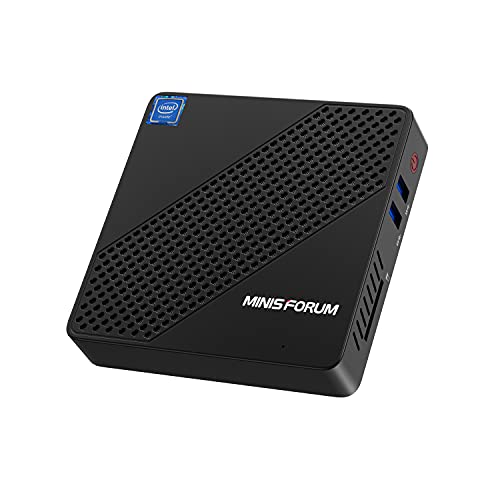
KODLIX Mini PC Celeron N4020(up to 2.8GHz), DDR4 4GB/64GB eMMC Mini PC Fanless UHD 4k@60Hz, Mini Computer Support HDMI&VGA, USB3.0, 2.4/5.8G Wi-Fi, DIY NGFF 2242 SSD
Processor
2.8 GHz celeron
RAM
4 GB DDR4
Hard Drive
64 GB eMMC
Graphics Coprocessor
Intel UHD Graphics 600
Chipset Brand
Intel
Wireless Type
802.11ac
Product Dimensions
4.7 x 4.7 x 1 inches
Item Dimensions LxWxH
4.7 x 4.7 x 1 inches
Color
Black
Processor Brand
Intel
Processor Count
4
Computer Memory Type
DDR4 SDRAM
Flash Memory Size
128 GB
Hard Drive Interface
Serial ATA-600
Test video – KODLIX Mini PC Celeron N4020(up to 2.8GHz), :
Product highlights :
【Running Worry-free】N40 Mini PC Intel Celeron Processor N4020 Pre-installed, which is the upgraded version for N4000 , operating frequency up to 2.8 GHz. N40 PC computer supports 2.4G+ 5.8G dual Band Wi-Fi, BT4.2 and 1000Mbps LAN, running faster brings you a good use experience.
【UHD 4K@60Hz】The mini desktop computer with Intel UHD Graphics 600 equipped HDMI2.0a supports 4k@60Hz ultra-high-definition and 4K video smoothly, that also equipped VGA port make you can enjoy DUAL screen display.
【EXPAND STORAGE】DDR4 4GB & eMMC 64GB system storage. It supports the expansion of storage with up to 128GB of SD card and M.2 2242 NGFF SSD up to 1TB, SATA3.06.0Gb/s(not included), 2TB mobile hard disk box via USB3.0 interface.
【No Noise & Portable】The fanless design di this PC mini enables electricity savings and zero noise. Unique shell design and energy efficient components make cooling faster and more efficient. We give away a mounting bracket in the package that can be easily fixed to the back of the monitor for saving a lot of space.
【Comprehensive Quality Upgrade】 mini computer we developed, it‘s good value for money. Each product includes LIFETIME technical support, a worry-free 30-day return and a 1-year after-sales service.
Questions & Answers – KODLIX Mini PC Celeron N4020(up to 2.8GHz), :
➕ What is the price of KODLIX Mini PC Celeron N4020(up to 2.8GHz), in Saudi Arabia ?
The price of KODLIX Mini PC Celeron N4020(up to 2.8GHz), in-store is 480 SAR VAT.
➕ When KODLIX Mini PC Celeron N4020(up to 2.8GHz), was released ?
The release date was .
➕ What is the price of KODLIX Mini PC Celeron N4020(up to 2.8GHz), cheap used ?
The price of KODLIX Mini PC Celeron N4020(up to 2.8GHz), used is 330 SAR VAT.
➕ What are the main characteristics of KODLIX Mini PC Celeron N4020(up to 2.8GHz), ?
Special specifications :
【Running Worry-free】N40 Mini PC Intel Celeron Processor N4020 Pre-installed, which is the upgraded version for N4000 , operating frequency up to 2.8 GHz. N40 PC computer supports 2.4G+ 5.8G dual Band Wi-Fi, BT4.2 and 1000Mbps LAN, running faster brings you a good use experience.
➕ Is it interesting to buy this product ?
The best people who can answer you are customers who have already bought and tested this product (See Customer Reviews). This product is rated 4.4 / 5 on Amazon.
➕ Where to buy KODLIX Mini PC Celeron N4020(up to 2.8GHz), in Saudi Arabia ?
Technical specifications – KODLIX Mini PC Celeron N4020(up to 2.8GHz), :
Brand
KODLIX
Personal computer design type
Mini PC
Operating System
Windows 10
Memory Storage Capacity
128 GB
Ram Memory Installed Size
4 GB
Series
N40 Mini PC
CPU Model
Celeron
Color
Black
CPU Manufacturer
Intel
CPU Speed
2.8 GHz
Purchase advice :
Warranty :
Check the duration of the warranty and also the faults and defects it covers. Is it complete or limited? and What is included in the warranty (parts, repairs or both)?
Shipping :
Is delivery offered? And how long does it take to get delivered (Delivery time)
Proof of purchase :
Does the shop give you an invoice ?
After-sales service :
Do they have an after-sales service to have information about the installation or operation (instructions for use). Also in case of problem, it is the seller who takes charge or you must contact the manufacturer or supplier yourself.
_____________________________
16 reviews for KODLIX Mini PC Celeron N4020(up to 2.8GHz),
Rated 5 out of 5
K. R (verified owner)–
I use it as a little docker host – I use this to run a few containers on my home network: the Ubiquity Unify app, HomeAssistant, and PiHole. It’s been running for months with no issues. Really easy to set up and use.
Rated 4 out of 5
O. S (verified owner)–
Great, BUT… It’s supposed to be silent, but it makes buzzing noises. – Everything is great except it makes subtle buzzing noises whenever it’s processing something or I scroll down a web page or move a window on the screen. The noise is not coming from the monitor, speakers, or power supply. It’s coming from within the unit itself and the frequency and loudness changes depending on how busy the unit is and how much I interact with it. It’s annoying in a quiet room.
Rated 4 out of 5
I. O (verified owner)–
Doesn’t do two 4k outputs at once – Even two blu ray videos cause lag, but I am not surprised. I use it for only one monitor and mostly content creation, so I have a mic, drawing tablet, DAC, and it can handle all my applications like Blender, Krita, and Helm. 1080p 60fps youtube playback on one screen (or two if mirrored) is smooth and nice, don’t expect steam games if they are better of on a 4,000$ gaming machine. Visuals novels, emulators, and browing the web work great on this machine, I use Linux Debian.
Rated 5 out of 5
K. R (verified owner)–
I use it as a little docker host – I use this to run a few containers on my home network: the Ubiquity Unify app, HomeAssistant, and PiHole. It’s been running for months with no issues. Really easy to set up and use.
Rated 5 out of 5
C. M (verified owner)–
Very Nice PC ‘In a box’! – I’ve only had this N40 computer for a day .. so this review is preliminary. A few comments:
Rated 5 out of 5
D. D (verified owner)–
Nice Little Machine! – For what most people do with their PCs, this one takes the cake. The HDMI video is sharp and the audio is Hi-Fi. If you do most of your time for reading messages and e-mail, reading the news or listening to music, than 64 GB is more than sufficient, even for watching videos. Somewhere someone has tried to trick us into thinking that you need hundreds of gigabytes; they haven’t watched or listened to one of these. If my downstairs PC croaks, I would definitely consider another one of these.
Rated 5 out of 5
E. T (verified owner)–
Was I surprised – I got this 3 days ago and plugged it into my TV and off to the race it went. It comes with Windows 10 version 1909 and updating took a while but I expected that so I just let it sit and do its thing. Now you only have 64gig of space on the drive so after all the updates and apps that come in windows, you will have to do some cleaning up.
Rated 5 out of 5
C. M (verified owner)–
Very Nice PC ‘In a box’! – I’ve only had this N40 computer for a day .. so this review is preliminary. A few comments:
Rated 5 out of 5
T. B (verified owner)–
Wonderful tiny, silent file server – Installed Ubuntu server 22.04LTS very easily. Only challenge was I never figured out the magic key to get into the bios during start-up, so I had to set up windows just to access the bios, to get the system to boot first off the usb stick holding the installation system.
Rated 5 out of 5
P. Z (verified owner)–
Great as an HTPC! – I turned this baby into a nice 4k KODI HTPC running version 20 Nexus! Works like a charm. Runs Linux like a dream. For those of you who are looking to boot this via iPXE, you’ll need the snp.efi (not the snponly.efi or ipxe.efi) boot image. I couldn’t find this information anywhere, so I hope this information helps someone.
Rated 5 out of 5
E. T (verified owner)–
Was I surprised – I got this 3 days ago and plugged it into my TV and off to the race it went. It comes with Windows 10 version 1909 and updating took a while but I expected that so I just let it sit and do its thing. Now you only have 64gig of space on the drive so after all the updates and apps that come in windows, you will have to do some cleaning up.
Rated 5 out of 5
P. Z (verified owner)–
Great as an HTPC! – I turned this baby into a nice 4k KODI HTPC running version 20 Nexus! Works like a charm. Runs Linux like a dream. For those of you who are looking to boot this via iPXE, you’ll need the snp.efi (not the snponly.efi or ipxe.efi) boot image. I couldn’t find this information anywhere, so I hope this information helps someone.
Rated 5 out of 5
D. D (verified owner)–
Nice Little Machine! – For what most people do with their PCs, this one takes the cake. The HDMI video is sharp and the audio is Hi-Fi. If you do most of your time for reading messages and e-mail, reading the news or listening to music, than 64 GB is more than sufficient, even for watching videos. Somewhere someone has tried to trick us into thinking that you need hundreds of gigabytes; they haven’t watched or listened to one of these. If my downstairs PC croaks, I would definitely consider another one of these.
Rated 4 out of 5
O. S (verified owner)–
Great, BUT… It’s supposed to be silent, but it makes buzzing noises. – Everything is great except it makes subtle buzzing noises whenever it’s processing something or I scroll down a web page or move a window on the screen. The noise is not coming from the monitor, speakers, or power supply. It’s coming from within the unit itself and the frequency and loudness changes depending on how busy the unit is and how much I interact with it. It’s annoying in a quiet room.
Rated 5 out of 5
T. B (verified owner)–
Wonderful tiny, silent file server – Installed Ubuntu server 22.04LTS very easily. Only challenge was I never figured out the magic key to get into the bios during start-up, so I had to set up windows just to access the bios, to get the system to boot first off the usb stick holding the installation system.
Rated 4 out of 5
I. O (verified owner)–
Doesn’t do two 4k outputs at once – Even two blu ray videos cause lag, but I am not surprised. I use it for only one monitor and mostly content creation, so I have a mic, drawing tablet, DAC, and it can handle all my applications like Blender, Krita, and Helm. 1080p 60fps youtube playback on one screen (or two if mirrored) is smooth and nice, don’t expect steam games if they are better of on a 4,000$ gaming machine. Visuals novels, emulators, and browing the web work great on this machine, I use Linux Debian.



K. R (verified owner) –
I use it as a little docker host – I use this to run a few containers on my home network: the Ubiquity Unify app, HomeAssistant, and PiHole. It’s been running for months with no issues. Really easy to set up and use.
O. S (verified owner) –
Great, BUT… It’s supposed to be silent, but it makes buzzing noises. – Everything is great except it makes subtle buzzing noises whenever it’s processing something or I scroll down a web page or move a window on the screen. The noise is not coming from the monitor, speakers, or power supply. It’s coming from within the unit itself and the frequency and loudness changes depending on how busy the unit is and how much I interact with it. It’s annoying in a quiet room.
I. O (verified owner) –
Doesn’t do two 4k outputs at once – Even two blu ray videos cause lag, but I am not surprised. I use it for only one monitor and mostly content creation, so I have a mic, drawing tablet, DAC, and it can handle all my applications like Blender, Krita, and Helm. 1080p 60fps youtube playback on one screen (or two if mirrored) is smooth and nice, don’t expect steam games if they are better of on a 4,000$ gaming machine. Visuals novels, emulators, and browing the web work great on this machine, I use Linux Debian.
K. R (verified owner) –
I use it as a little docker host – I use this to run a few containers on my home network: the Ubiquity Unify app, HomeAssistant, and PiHole. It’s been running for months with no issues. Really easy to set up and use.
C. M (verified owner) –
Very Nice PC ‘In a box’! – I’ve only had this N40 computer for a day .. so this review is preliminary. A few comments:
D. D (verified owner) –
Nice Little Machine! – For what most people do with their PCs, this one takes the cake. The HDMI video is sharp and the audio is Hi-Fi. If you do most of your time for reading messages and e-mail, reading the news or listening to music, than 64 GB is more than sufficient, even for watching videos. Somewhere someone has tried to trick us into thinking that you need hundreds of gigabytes; they haven’t watched or listened to one of these. If my downstairs PC croaks, I would definitely consider another one of these.
E. T (verified owner) –
Was I surprised – I got this 3 days ago and plugged it into my TV and off to the race it went. It comes with Windows 10 version 1909 and updating took a while but I expected that so I just let it sit and do its thing. Now you only have 64gig of space on the drive so after all the updates and apps that come in windows, you will have to do some cleaning up.
C. M (verified owner) –
Very Nice PC ‘In a box’! – I’ve only had this N40 computer for a day .. so this review is preliminary. A few comments:
T. B (verified owner) –
Wonderful tiny, silent file server – Installed Ubuntu server 22.04LTS very easily. Only challenge was I never figured out the magic key to get into the bios during start-up, so I had to set up windows just to access the bios, to get the system to boot first off the usb stick holding the installation system.
P. Z (verified owner) –
Great as an HTPC! – I turned this baby into a nice 4k KODI HTPC running version 20 Nexus! Works like a charm. Runs Linux like a dream. For those of you who are looking to boot this via iPXE, you’ll need the snp.efi (not the snponly.efi or ipxe.efi) boot image. I couldn’t find this information anywhere, so I hope this information helps someone.
E. T (verified owner) –
Was I surprised – I got this 3 days ago and plugged it into my TV and off to the race it went. It comes with Windows 10 version 1909 and updating took a while but I expected that so I just let it sit and do its thing. Now you only have 64gig of space on the drive so after all the updates and apps that come in windows, you will have to do some cleaning up.
P. Z (verified owner) –
Great as an HTPC! – I turned this baby into a nice 4k KODI HTPC running version 20 Nexus! Works like a charm. Runs Linux like a dream. For those of you who are looking to boot this via iPXE, you’ll need the snp.efi (not the snponly.efi or ipxe.efi) boot image. I couldn’t find this information anywhere, so I hope this information helps someone.
D. D (verified owner) –
Nice Little Machine! – For what most people do with their PCs, this one takes the cake. The HDMI video is sharp and the audio is Hi-Fi. If you do most of your time for reading messages and e-mail, reading the news or listening to music, than 64 GB is more than sufficient, even for watching videos. Somewhere someone has tried to trick us into thinking that you need hundreds of gigabytes; they haven’t watched or listened to one of these. If my downstairs PC croaks, I would definitely consider another one of these.
O. S (verified owner) –
Great, BUT… It’s supposed to be silent, but it makes buzzing noises. – Everything is great except it makes subtle buzzing noises whenever it’s processing something or I scroll down a web page or move a window on the screen. The noise is not coming from the monitor, speakers, or power supply. It’s coming from within the unit itself and the frequency and loudness changes depending on how busy the unit is and how much I interact with it. It’s annoying in a quiet room.
T. B (verified owner) –
Wonderful tiny, silent file server – Installed Ubuntu server 22.04LTS very easily. Only challenge was I never figured out the magic key to get into the bios during start-up, so I had to set up windows just to access the bios, to get the system to boot first off the usb stick holding the installation system.
I. O (verified owner) –
Doesn’t do two 4k outputs at once – Even two blu ray videos cause lag, but I am not surprised. I use it for only one monitor and mostly content creation, so I have a mic, drawing tablet, DAC, and it can handle all my applications like Blender, Krita, and Helm. 1080p 60fps youtube playback on one screen (or two if mirrored) is smooth and nice, don’t expect steam games if they are better of on a 4,000$ gaming machine. Visuals novels, emulators, and browing the web work great on this machine, I use Linux Debian.