HUION Kamvas 13 Graphics Drawing Tablet with – Features & Prices in Saudi Arabia :
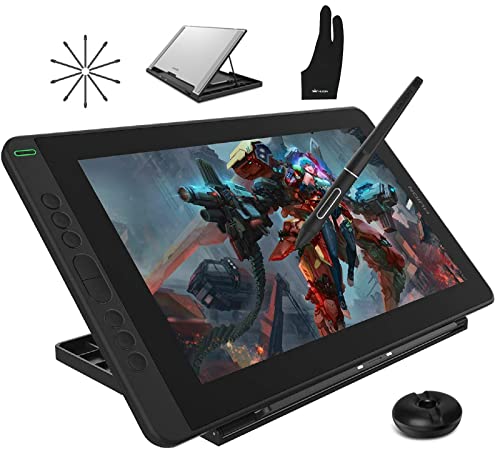
HUION Kamvas 13 Graphics Drawing Tablet with Screen Full Laminated Battery-free Pen 8192 Level Pressure Tilt 8 Hot Keys with Adjustable Stand, 13.3inch Pen Display for Android/Mac/Linux/Windows, Black
Product Dimensions
14.43 x 8.56 x 0.46 inches
Item Weight
2.16 pounds
ASIN
B083W88L5H
Item model number
Huion Kamvas 13
Date First Available
March 12, 2020
Manufacturer
Shenzhen Huion Animation Technology Limited
Country of Origin
China
Test video – HUION Kamvas 13 Graphics Drawing Tablet with :
Product highlights :
Full Lamination Screen: Kamvas 13 is a more affordable drawing monitor with a full laminated IPS screen, seamlessly combining the glass and screen to bring precise cursor positioning and the lowest parallax. Features a 1920 x 1080 FHD display with 16.7 million colors, 120%sRGB (85% NTSC) color gamut volume, and 178° viewing angle. It comes with an anti-glare film that can be scratch-resistant and offers a clear picture under bright light.
Android Devices Supported: Kamvas 13 pen display could work with Mac, Windows, and Linux, it also supports connection with Android devices via a full-featured Type-C cable (not included). The portable drawing tablet is easy to carry for outdoor drawing.
Easy Cable Connection: No need to connect with an AC power adapter anymore! The computer graphic tablet could be powered easily by a laptop that runs on 5 volts or above via the included 3-in-1 HDMI cables with or full-featured Type-C cable (sold separately). A USB extension cable is included to help extends the connection to your computer by 1.2m.
Advanced Pen Technology: Battery-free Stylus PW517 is optimized with Capacitive Pressure Sensor and stable pen nibs providing you the most natural and highly-sensitive drawing experience as using a regular pen. Together with 8192 levels of pen pressure, 60 degrees of tilt function, and 266pps of report rate, PW517 immediately reacts to the tilt and each movement of your hand with amazing precision and control.
Optimize your Workflow: 8 shortcut keys are designed on the left to be customized as needed. It is devoted to simplifying your workflow and creating your ideas faster and more efficiently. You could draw with Kamvas 13 in any creative software including Illustrator, Photoshop, Painter, SAI, Krita, Medibang, and so on!【 An adjustable stand is included】 to allow you to create at your best angle.
HUION Kamvas 13 drawing pen display is not a standalone product, it must be used with a computer or android device which runs windows, mac, Linux, and Android OS.
➕ What is the price of HUION Kamvas 13 Graphics Drawing Tablet with in Saudi Arabia ?
The price of HUION Kamvas 13 Graphics Drawing Tablet with in-store is 830 SAR VAT.
➕ When HUION Kamvas 13 Graphics Drawing Tablet with was released ?
The release date was March 12, 2020.
➕ What is the price of HUION Kamvas 13 Graphics Drawing Tablet with cheap used ?
The price of HUION Kamvas 13 Graphics Drawing Tablet with used is 580 SAR VAT.
➕ What are the main characteristics of HUION Kamvas 13 Graphics Drawing Tablet with ?
Special specifications :
Full Lamination Screen: Kamvas 13 is a more affordable drawing monitor with a full laminated IPS screen, seamlessly combining the glass and screen to bring precise cursor positioning and the lowest parallax. Features a 1920 x 1080 FHD display with 16.7 million colors, 120%sRGB (85% NTSC) color gamut volume, and 178° viewing angle. It comes with an anti-glare film that can be scratch-resistant and offers a clear picture under bright light.
➕ Is it interesting to buy this product ?
The best people who can answer you are customers who have already bought and tested this product (See Customer Reviews). This product is rated 4.5 / 5 on Amazon.
➕ Where to buy HUION Kamvas 13 Graphics Drawing Tablet with in Saudi Arabia ?
Windows 7 or later, Mac OS 10.12 or later, Linux Ubuntu and Android 6.0 or later
Special Feature
,
Model Name
Kamvas 13
Purchase advice :
Warranty :
Check the duration of the warranty and also the faults and defects it covers. Is it complete or limited? and What is included in the warranty (parts, repairs or both)?
Shipping :
Is delivery offered? And how long does it take to get delivered (Delivery time)
Proof of purchase :
Does the shop give you an invoice ?
After-sales service :
Do they have an after-sales service to have information about the installation or operation (instructions for use). Also in case of problem, it is the seller who takes charge or you must contact the manufacturer or supplier yourself.
_____________________________
16 reviews for HUION Kamvas 13 Graphics Drawing Tablet with
Rated 5 out of 5
K. E (verified owner)–
Muy bien pero … – Me encanto ,funciona perfectamente el único detalle es que uno de los cables que van en la PC queda un poco flojo y cualquier movimiento brusco la desconecta ,pero en general muy complacida (la use por 3 días por ahora )
Rated 4 out of 5
T. G (verified owner)–
Perfect for beginners – I Wish I could give it 5 stars but oh gods, there is a single con with this product. There are NO EXTENSION CORDS I can use for a longer range from my PC desktop. I want to be able to draw from a certain amount away from my tower. It’s sad to say that not even Male UBS C cords work.
Rated 5 out of 5
K. R (verified owner)–
I love it, amazing quality. – I bought it thinking it would be just ok because of the price (It’s not cheap by itself, but it’s one of the cheapest ones out there), but I am trully impressed by the quality of the device.
Rated 5 out of 5
K. E (verified owner)–
Muy bien pero … – Me encanto ,funciona perfectamente el único detalle es que uno de los cables que van en la PC queda un poco flojo y cualquier movimiento brusco la desconecta ,pero en general muy complacida (la use por 3 días por ahora )
Rated 5 out of 5
R. T (verified owner)–
Great value, incredible pen response, junk drivers – Warning! If you are left handed, this thing is going to piss you off. Apparently, nobody at Huion is left handed. If you are using this tablet as a duplicate of your main monitor, then using it left handed will display the screen upside-down. You can mess with the windows settings to flip things around, but that also won’t work. The only thing you can do is physically spin your monitor upside down, and then flip landscape in the settings. Only then will the tablet, and main monitor display correctly.
Rated 5 out of 5
F. L (verified owner)–
Awesome Drawing tablet – So it’s been Two years I’ve owned this thing and there’s not much negative things I can say about this little tablet, I love it oh so much. I recently upgraded to a kamvas 22 Plus which I might write a review of later on after more usage, but I feel like that should speak volumes of how Huion is caught up with Wacom.
Rated 5 out of 5
K. R (verified owner)–
I love it, amazing quality. – I bought it thinking it would be just ok because of the price (It’s not cheap by itself, but it’s one of the cheapest ones out there), but I am trully impressed by the quality of the device.
Rated 5 out of 5
F. L (verified owner)–
Awesome Drawing tablet – So it’s been Two years I’ve owned this thing and there’s not much negative things I can say about this little tablet, I love it oh so much. I recently upgraded to a kamvas 22 Plus which I might write a review of later on after more usage, but I feel like that should speak volumes of how Huion is caught up with Wacom.
Rated 4 out of 5
D. I (verified owner)–
Excellent product with only one complaint. – Exactly what I wanted and needed, with the only exception being that the USB-C ports are shielded so the cable must be VERY specific. It comes with one that splits into three, two USB 3.1 and an HDMI. It works well, but the USB-C cable must be very precise… and they sell them for another $25.
Rated 4 out of 5
T. G (verified owner)–
Perfect for beginners – I Wish I could give it 5 stars but oh gods, there is a single con with this product. There are NO EXTENSION CORDS I can use for a longer range from my PC desktop. I want to be able to draw from a certain amount away from my tower. It’s sad to say that not even Male UBS C cords work.
Rated 4 out of 5
D. I (verified owner)–
Excellent product with only one complaint. – Exactly what I wanted and needed, with the only exception being that the USB-C ports are shielded so the cable must be VERY specific. It comes with one that splits into three, two USB 3.1 and an HDMI. It works well, but the USB-C cable must be very precise… and they sell them for another $25.
Rated 5 out of 5
P. E (verified owner)–
Good for beginners like myself – Love it! I’m not an expert artist, I use GIMP to draw, but I have so much fun using this tablet. Great pressure sensitivity, programming runs smooth, works perfectly on my art program. Buttons on the side are easy to program. The pen doesn’t need batteries like some brands do. The stand it comes with is extremely useful too. Definitely recommend this tablet.
Rated 5 out of 5
R. T (verified owner)–
Great value, incredible pen response, junk drivers – Warning! If you are left handed, this thing is going to piss you off. Apparently, nobody at Huion is left handed. If you are using this tablet as a duplicate of your main monitor, then using it left handed will display the screen upside-down. You can mess with the windows settings to flip things around, but that also won’t work. The only thing you can do is physically spin your monitor upside down, and then flip landscape in the settings. Only then will the tablet, and main monitor display correctly.
Rated 5 out of 5
K. E (verified owner)–
NOW WORKS, REALLY GOOD – The tablet felt really great & worked as an alternate monitor/mouse to use upon first connecting, but unfortunately that’s just about it for the good things. Not only did the clear screen filter meant to peel off easily leave a messy spread of glue I had to clean up, but the drivers I installed never detected the tablet. I searched both HUION’s website & the rest of the internet, but was never detected by the driver despite my computer recognizing it. Which is a shame considering it was feeling very promising up until it wasn’t connected to the driver [ergo the pressure sensitivity didn’t work, the buttons couldn’t be mapped, etc]. Will update if I can fix.
Rated 5 out of 5
K. E (verified owner)–
NOW WORKS, REALLY GOOD – The tablet felt really great & worked as an alternate monitor/mouse to use upon first connecting, but unfortunately that’s just about it for the good things. Not only did the clear screen filter meant to peel off easily leave a messy spread of glue I had to clean up, but the drivers I installed never detected the tablet. I searched both HUION’s website & the rest of the internet, but was never detected by the driver despite my computer recognizing it. Which is a shame considering it was feeling very promising up until it wasn’t connected to the driver [ergo the pressure sensitivity didn’t work, the buttons couldn’t be mapped, etc]. Will update if I can fix.
Rated 5 out of 5
P. E (verified owner)–
Good for beginners like myself – Love it! I’m not an expert artist, I use GIMP to draw, but I have so much fun using this tablet. Great pressure sensitivity, programming runs smooth, works perfectly on my art program. Buttons on the side are easy to program. The pen doesn’t need batteries like some brands do. The stand it comes with is extremely useful too. Definitely recommend this tablet.

K. E (verified owner) –
Muy bien pero … – Me encanto ,funciona perfectamente el único detalle es que uno de los cables que van en la PC queda un poco flojo y cualquier movimiento brusco la desconecta ,pero en general muy complacida (la use por 3 días por ahora )
T. G (verified owner) –
Perfect for beginners – I Wish I could give it 5 stars but oh gods, there is a single con with this product. There are NO EXTENSION CORDS I can use for a longer range from my PC desktop. I want to be able to draw from a certain amount away from my tower. It’s sad to say that not even Male UBS C cords work.
K. R (verified owner) –
I love it, amazing quality. – I bought it thinking it would be just ok because of the price (It’s not cheap by itself, but it’s one of the cheapest ones out there), but I am trully impressed by the quality of the device.
K. E (verified owner) –
Muy bien pero … – Me encanto ,funciona perfectamente el único detalle es que uno de los cables que van en la PC queda un poco flojo y cualquier movimiento brusco la desconecta ,pero en general muy complacida (la use por 3 días por ahora )
R. T (verified owner) –
Great value, incredible pen response, junk drivers – Warning! If you are left handed, this thing is going to piss you off. Apparently, nobody at Huion is left handed. If you are using this tablet as a duplicate of your main monitor, then using it left handed will display the screen upside-down. You can mess with the windows settings to flip things around, but that also won’t work. The only thing you can do is physically spin your monitor upside down, and then flip landscape in the settings. Only then will the tablet, and main monitor display correctly.
F. L (verified owner) –
Awesome Drawing tablet – So it’s been Two years I’ve owned this thing and there’s not much negative things I can say about this little tablet, I love it oh so much. I recently upgraded to a kamvas 22 Plus which I might write a review of later on after more usage, but I feel like that should speak volumes of how Huion is caught up with Wacom.
K. R (verified owner) –
I love it, amazing quality. – I bought it thinking it would be just ok because of the price (It’s not cheap by itself, but it’s one of the cheapest ones out there), but I am trully impressed by the quality of the device.
F. L (verified owner) –
Awesome Drawing tablet – So it’s been Two years I’ve owned this thing and there’s not much negative things I can say about this little tablet, I love it oh so much. I recently upgraded to a kamvas 22 Plus which I might write a review of later on after more usage, but I feel like that should speak volumes of how Huion is caught up with Wacom.
D. I (verified owner) –
Excellent product with only one complaint. – Exactly what I wanted and needed, with the only exception being that the USB-C ports are shielded so the cable must be VERY specific. It comes with one that splits into three, two USB 3.1 and an HDMI. It works well, but the USB-C cable must be very precise… and they sell them for another $25.
T. G (verified owner) –
Perfect for beginners – I Wish I could give it 5 stars but oh gods, there is a single con with this product. There are NO EXTENSION CORDS I can use for a longer range from my PC desktop. I want to be able to draw from a certain amount away from my tower. It’s sad to say that not even Male UBS C cords work.
D. I (verified owner) –
Excellent product with only one complaint. – Exactly what I wanted and needed, with the only exception being that the USB-C ports are shielded so the cable must be VERY specific. It comes with one that splits into three, two USB 3.1 and an HDMI. It works well, but the USB-C cable must be very precise… and they sell them for another $25.
P. E (verified owner) –
Good for beginners like myself – Love it! I’m not an expert artist, I use GIMP to draw, but I have so much fun using this tablet. Great pressure sensitivity, programming runs smooth, works perfectly on my art program. Buttons on the side are easy to program. The pen doesn’t need batteries like some brands do. The stand it comes with is extremely useful too. Definitely recommend this tablet.
R. T (verified owner) –
Great value, incredible pen response, junk drivers – Warning! If you are left handed, this thing is going to piss you off. Apparently, nobody at Huion is left handed. If you are using this tablet as a duplicate of your main monitor, then using it left handed will display the screen upside-down. You can mess with the windows settings to flip things around, but that also won’t work. The only thing you can do is physically spin your monitor upside down, and then flip landscape in the settings. Only then will the tablet, and main monitor display correctly.
K. E (verified owner) –
NOW WORKS, REALLY GOOD – The tablet felt really great & worked as an alternate monitor/mouse to use upon first connecting, but unfortunately that’s just about it for the good things. Not only did the clear screen filter meant to peel off easily leave a messy spread of glue I had to clean up, but the drivers I installed never detected the tablet. I searched both HUION’s website & the rest of the internet, but was never detected by the driver despite my computer recognizing it. Which is a shame considering it was feeling very promising up until it wasn’t connected to the driver [ergo the pressure sensitivity didn’t work, the buttons couldn’t be mapped, etc]. Will update if I can fix.
K. E (verified owner) –
NOW WORKS, REALLY GOOD – The tablet felt really great & worked as an alternate monitor/mouse to use upon first connecting, but unfortunately that’s just about it for the good things. Not only did the clear screen filter meant to peel off easily leave a messy spread of glue I had to clean up, but the drivers I installed never detected the tablet. I searched both HUION’s website & the rest of the internet, but was never detected by the driver despite my computer recognizing it. Which is a shame considering it was feeling very promising up until it wasn’t connected to the driver [ergo the pressure sensitivity didn’t work, the buttons couldn’t be mapped, etc]. Will update if I can fix.
P. E (verified owner) –
Good for beginners like myself – Love it! I’m not an expert artist, I use GIMP to draw, but I have so much fun using this tablet. Great pressure sensitivity, programming runs smooth, works perfectly on my art program. Buttons on the side are easy to program. The pen doesn’t need batteries like some brands do. The stand it comes with is extremely useful too. Definitely recommend this tablet.