HP Chromebook 14-inch HD Laptop, Intel Celeron – Features & Prices in Saudi Arabia :
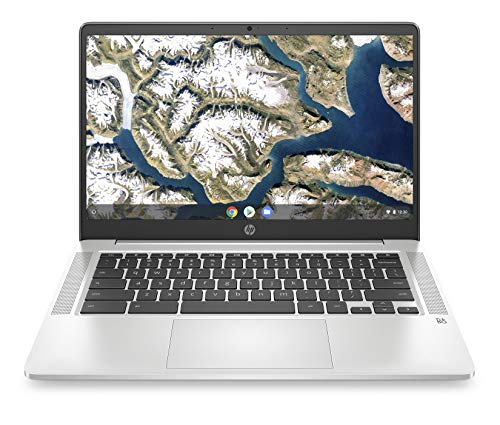
HP Chromebook 14-inch HD Laptop, Intel Celeron N4000, 4 GB RAM, 32 GB eMMC, Chrome (14a-na0010nr, Mineral Silver)
Standing screen display size
14 Inches
Max Screen Resolution
1366 x 768 Pixels
Processor
1.1 GHz celeron_n
RAM
4 GB LPDDR4
Memory Speed
2.6 GHz
Hard Drive
32 GB Embedded MultiMediaCard
Graphics Coprocessor
Intel Celeron
Chipset Brand
Intel
Card Description
Integrated
Wireless Type
Bluetooth
Average Battery Life (in hours)
13.5 Hours
Flash Memory Size
4
Optical Drive Type
No Optical Drive
Power Source
Battery Powered
Batteries
1 Lithium Metal batteries required. (included)
Test video – HP Chromebook 14-inch HD Laptop, Intel Celeron :
Product highlights :
Google Play Store: The millions of Android apps you know and love on your phone and tablet can now run on your Chrome device without compromising their speed, simplicity or security
Sleek, responsive design: Keep going comfortably with the backlit keyboard and multi-touch touchpad that supports four finger gestures set in a sleek design for moving from room to room or on the road
Binge watch while you work: Equipped with an Intel(R) processor, 14″ display, stereo speakers tuned by audio experts at B&O and a long battery life to get more done while having fun
Environmentally conscious: Low halogen, mercury-free display backlights, arsenic-free display glass in this ENERGY STAR(R) certified, EPEAT(R) Silver registered Chromebook
Dual-core Intel(R) processor: Intel(R) Celeron(R) N4000, Dual-Core, 1.1 GHz base frequency, up to 2.6 GHz burst frequency
Display: 14.0-inch diagonal HD SVA anti-glare micro-edge WLED-backlit display (1366 x 768); 82% screen to body ratio
Questions & Answers – HP Chromebook 14-inch HD Laptop, Intel Celeron :
➕ What is the price of HP Chromebook 14-inch HD Laptop, Intel Celeron in Saudi Arabia ?
The price of HP Chromebook 14-inch HD Laptop, Intel Celeron in-store is 820 SAR VAT.
➕ When HP Chromebook 14-inch HD Laptop, Intel Celeron was released ?
The release date was .
➕ What is the price of HP Chromebook 14-inch HD Laptop, Intel Celeron cheap used ?
The price of HP Chromebook 14-inch HD Laptop, Intel Celeron used is 570 SAR VAT.
➕ What are the main characteristics of HP Chromebook 14-inch HD Laptop, Intel Celeron ?
Special specifications :
Google Play Store: The millions of Android apps you know and love on your phone and tablet can now run on your Chrome device without compromising their speed, simplicity or security
➕ Is it interesting to buy this product ?
The best people who can answer you are customers who have already bought and tested this product (See Customer Reviews). This product is rated 4.4 / 5 on Amazon.
➕ Where to buy HP Chromebook 14-inch HD Laptop, Intel Celeron in Saudi Arabia ?
Technical specifications – HP Chromebook 14-inch HD Laptop, Intel Celeron :
Brand
HP
Series
Chromebook
Screen Size
14 Inches
Color
Mineral Silver
Hard Disk Size
32 GB
CPU Model
Celeron N
Ram Memory Installed Size
4 GB
Operating System
Chrome OS
Card Description
Integrated
Graphics Coprocessor
Intel Celeron
Purchase advice :
Warranty :
Check the duration of the warranty and also the faults and defects it covers. Is it complete or limited? and What is included in the warranty (parts, repairs or both)?
Shipping :
Is delivery offered? And how long does it take to get delivered (Delivery time)
Proof of purchase :
Does the shop give you an invoice ?
After-sales service :
Do they have an after-sales service to have information about the installation or operation (instructions for use). Also in case of problem, it is the seller who takes charge or you must contact the manufacturer or supplier yourself.
_____________________________
10 reviews for HP Chromebook 14-inch HD Laptop, Intel Celeron
Rated 4 out of 5
T. S (verified owner)–
Its ok for an 11year old – I bought this for my 11 year old son as we are still doing ALL schooling online here in my country (St. Lucia). It is awesome for accessing google classroom, google meet, zoom et. Which are the platforms used here. But its not touchscreen so I don’t know why there’s a rating for that. Also it only uses google docs which my son isnt entirely familiar with yet, but i’ll teach him and he’ll be fine. I don’t like the fact that it doesn’t have an HDMI port and only has ONE USB port… so basically if you have a mouse plugged in (like i had to do for my son) you can’t pug in an external drive. Also if your printer isn’t wifi enabled, don’t hope to print from this computer. BUT………… with 3 kids, a car loan and a mortgage, it was the best value for money on short notice! My son hasn’t complained and neither shall it. I just hope it stands up to a year of online class. Also, based on some of the reviews I read, I ONLY use this for his school work. NO video games, NO movie websites etc. Just class, homework and research and we’re good!
Rated 4 out of 5
A. M (verified owner)–
Very good shape and working machine great for web work, the most needed now days. – Good machine but better to find another seller. They offer a back light keyboard but it is not true.
Rated 3 out of 5
Z. I (verified owner)–
Cumbersome Use of Apps-Limited – I really needed an economic device to work from home when needed. So the device would need to accommodate apps like word, excel, adobe, outlook, zoom, and the like. Note, although you can download most of these apps, the device itself severely limits what you can perform in those apps. For example, in word, you cannot manipulate images or paste from a clipboard; in Adobe Acrobat Pro DC, you cannot convert documents into different formats (e.g. JPEG to PDF, Word doc to PDF, or the like) even though this is one of the primary benefits of purchasing this software; and in outlook you cannot add certain email options like request read receipt, request delivery receipt, add on you signature block, add reminder to follow up on the email, or the like. Again, primary benefits of using a certain app. Note, Zoom meeting is not compatible with this device at all. So you cannot download the app. Adobe Manager is not compatible with this device at all although you can download Adobe Acrobat.
Rated 4 out of 5
T. S (verified owner)–
Its ok for an 11year old – I bought this for my 11 year old son as we are still doing ALL schooling online here in my country (St. Lucia). It is awesome for accessing google classroom, google meet, zoom et. Which are the platforms used here. But its not touchscreen so I don’t know why there’s a rating for that. Also it only uses google docs which my son isnt entirely familiar with yet, but i’ll teach him and he’ll be fine. I don’t like the fact that it doesn’t have an HDMI port and only has ONE USB port… so basically if you have a mouse plugged in (like i had to do for my son) you can’t pug in an external drive. Also if your printer isn’t wifi enabled, don’t hope to print from this computer. BUT………… with 3 kids, a car loan and a mortgage, it was the best value for money on short notice! My son hasn’t complained and neither shall it. I just hope it stands up to a year of online class. Also, based on some of the reviews I read, I ONLY use this for his school work. NO video games, NO movie websites etc. Just class, homework and research and we’re good!
Rated 5 out of 5
J. A (verified owner)–
Day 1 – Just got it today. Great price! Love the sleek look and it’s super light. The size is perfect for me. I flipped it open and it turned right on. Easy to add my Google stuff, both home and work. I really want to jump for joy and shout “I love it”…but it is day 1. Wish me luck!
Rated 5 out of 5
I. E (verified owner)–
Feels a little fragile but other than that it’s great!! – It’s not touch screen but I don’t mind that. Battery charged to 100% and only took less than two hours for me and I love that because I would be doing my work and before I know it it’s fully charged. And yes it’s very light weight I’m pretty sure because of its frame but what scares me is that it might be a little to fragile and break if something were to happen but other than that I think it’s great. Very happy with mine!!!
Rated 5 out of 5
J. A (verified owner)–
Day 1 – Just got it today. Great price! Love the sleek look and it’s super light. The size is perfect for me. I flipped it open and it turned right on. Easy to add my Google stuff, both home and work. I really want to jump for joy and shout “I love it”…but it is day 1. Wish me luck!
Rated 5 out of 5
I. E (verified owner)–
Feels a little fragile but other than that it’s great!! – It’s not touch screen but I don’t mind that. Battery charged to 100% and only took less than two hours for me and I love that because I would be doing my work and before I know it it’s fully charged. And yes it’s very light weight I’m pretty sure because of its frame but what scares me is that it might be a little to fragile and break if something were to happen but other than that I think it’s great. Very happy with mine!!!
Rated 3 out of 5
Z. I (verified owner)–
Cumbersome Use of Apps-Limited – I really needed an economic device to work from home when needed. So the device would need to accommodate apps like word, excel, adobe, outlook, zoom, and the like. Note, although you can download most of these apps, the device itself severely limits what you can perform in those apps. For example, in word, you cannot manipulate images or paste from a clipboard; in Adobe Acrobat Pro DC, you cannot convert documents into different formats (e.g. JPEG to PDF, Word doc to PDF, or the like) even though this is one of the primary benefits of purchasing this software; and in outlook you cannot add certain email options like request read receipt, request delivery receipt, add on you signature block, add reminder to follow up on the email, or the like. Again, primary benefits of using a certain app. Note, Zoom meeting is not compatible with this device at all. So you cannot download the app. Adobe Manager is not compatible with this device at all although you can download Adobe Acrobat.
Rated 4 out of 5
A. M (verified owner)–
Very good shape and working machine great for web work, the most needed now days. – Good machine but better to find another seller. They offer a back light keyboard but it is not true.
T. S (verified owner) –
Its ok for an 11year old – I bought this for my 11 year old son as we are still doing ALL schooling online here in my country (St. Lucia). It is awesome for accessing google classroom, google meet, zoom et. Which are the platforms used here. But its not touchscreen so I don’t know why there’s a rating for that. Also it only uses google docs which my son isnt entirely familiar with yet, but i’ll teach him and he’ll be fine. I don’t like the fact that it doesn’t have an HDMI port and only has ONE USB port… so basically if you have a mouse plugged in (like i had to do for my son) you can’t pug in an external drive. Also if your printer isn’t wifi enabled, don’t hope to print from this computer. BUT………… with 3 kids, a car loan and a mortgage, it was the best value for money on short notice! My son hasn’t complained and neither shall it. I just hope it stands up to a year of online class. Also, based on some of the reviews I read, I ONLY use this for his school work. NO video games, NO movie websites etc. Just class, homework and research and we’re good!
A. M (verified owner) –
Very good shape and working machine great for web work, the most needed now days. – Good machine but better to find another seller. They offer a back light keyboard but it is not true.
Z. I (verified owner) –
Cumbersome Use of Apps-Limited – I really needed an economic device to work from home when needed. So the device would need to accommodate apps like word, excel, adobe, outlook, zoom, and the like. Note, although you can download most of these apps, the device itself severely limits what you can perform in those apps. For example, in word, you cannot manipulate images or paste from a clipboard; in Adobe Acrobat Pro DC, you cannot convert documents into different formats (e.g. JPEG to PDF, Word doc to PDF, or the like) even though this is one of the primary benefits of purchasing this software; and in outlook you cannot add certain email options like request read receipt, request delivery receipt, add on you signature block, add reminder to follow up on the email, or the like. Again, primary benefits of using a certain app. Note, Zoom meeting is not compatible with this device at all. So you cannot download the app. Adobe Manager is not compatible with this device at all although you can download Adobe Acrobat.
T. S (verified owner) –
Its ok for an 11year old – I bought this for my 11 year old son as we are still doing ALL schooling online here in my country (St. Lucia). It is awesome for accessing google classroom, google meet, zoom et. Which are the platforms used here. But its not touchscreen so I don’t know why there’s a rating for that. Also it only uses google docs which my son isnt entirely familiar with yet, but i’ll teach him and he’ll be fine. I don’t like the fact that it doesn’t have an HDMI port and only has ONE USB port… so basically if you have a mouse plugged in (like i had to do for my son) you can’t pug in an external drive. Also if your printer isn’t wifi enabled, don’t hope to print from this computer. BUT………… with 3 kids, a car loan and a mortgage, it was the best value for money on short notice! My son hasn’t complained and neither shall it. I just hope it stands up to a year of online class. Also, based on some of the reviews I read, I ONLY use this for his school work. NO video games, NO movie websites etc. Just class, homework and research and we’re good!
J. A (verified owner) –
Day 1 – Just got it today. Great price! Love the sleek look and it’s super light. The size is perfect for me. I flipped it open and it turned right on. Easy to add my Google stuff, both home and work. I really want to jump for joy and shout “I love it”…but it is day 1. Wish me luck!
I. E (verified owner) –
Feels a little fragile but other than that it’s great!! – It’s not touch screen but I don’t mind that. Battery charged to 100% and only took less than two hours for me and I love that because I would be doing my work and before I know it it’s fully charged. And yes it’s very light weight I’m pretty sure because of its frame but what scares me is that it might be a little to fragile and break if something were to happen but other than that I think it’s great. Very happy with mine!!!
J. A (verified owner) –
Day 1 – Just got it today. Great price! Love the sleek look and it’s super light. The size is perfect for me. I flipped it open and it turned right on. Easy to add my Google stuff, both home and work. I really want to jump for joy and shout “I love it”…but it is day 1. Wish me luck!
I. E (verified owner) –
Feels a little fragile but other than that it’s great!! – It’s not touch screen but I don’t mind that. Battery charged to 100% and only took less than two hours for me and I love that because I would be doing my work and before I know it it’s fully charged. And yes it’s very light weight I’m pretty sure because of its frame but what scares me is that it might be a little to fragile and break if something were to happen but other than that I think it’s great. Very happy with mine!!!
Z. I (verified owner) –
Cumbersome Use of Apps-Limited – I really needed an economic device to work from home when needed. So the device would need to accommodate apps like word, excel, adobe, outlook, zoom, and the like. Note, although you can download most of these apps, the device itself severely limits what you can perform in those apps. For example, in word, you cannot manipulate images or paste from a clipboard; in Adobe Acrobat Pro DC, you cannot convert documents into different formats (e.g. JPEG to PDF, Word doc to PDF, or the like) even though this is one of the primary benefits of purchasing this software; and in outlook you cannot add certain email options like request read receipt, request delivery receipt, add on you signature block, add reminder to follow up on the email, or the like. Again, primary benefits of using a certain app. Note, Zoom meeting is not compatible with this device at all. So you cannot download the app. Adobe Manager is not compatible with this device at all although you can download Adobe Acrobat.
A. M (verified owner) –
Very good shape and working machine great for web work, the most needed now days. – Good machine but better to find another seller. They offer a back light keyboard but it is not true.