
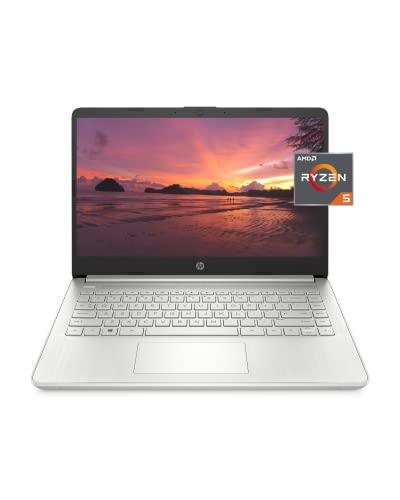
Description
HP 14 Laptop, AMD Ryzen 5 5500U, – Features & Prices in Saudi Arabia :
HP 14 Laptop, AMD Ryzen 5 5500U, 8 GB RAM, 256 GB SSD Storage, 14-inch Full HD Display, Windows 11 Home, Thin & Portable, Micro-edge & Anti-glare Screen, Long Battery Life (14-fq1025nr, 2021)
Standing screen display size
14 Inches
Screen Resolution
1920 x 1080 pixels
Max Screen Resolution
1920 x 1080 Pixels
Processor
4 GHz amd_ryzen_5_5500u
RAM
8 GB 8 GB DDR4
Hard Drive
256 GB SSD
Graphics Coprocessor
AMD Radeon
Chipset Brand
AMD
Card Description
Integrated
Wireless Type
Bluetooth, 802.11ax
Number of USB 3.0 Ports
3
Average Battery Life (in hours)
9.15 Hours
Hard Drive Rotational Speed
5400 RPM
Optical Drive Type
No Optical Storage Device
Power Source
Battery Powered
Batteries
1 Lithium Ion batteries required. (included)
Test video – HP 14 Laptop, AMD Ryzen 5 5500U, :
Product highlights :
Questions & Answers – HP 14 Laptop, AMD Ryzen 5 5500U, :
Technical specifications – HP 14 Laptop, AMD Ryzen 5 5500U, :
Brand
HP
Series
14-fq1025nr
Screen Size
14 Inches
Color
Natural Silver
Hard Disk Size
256 GB
CPU Model
AMD Ryzen 5 5500U
Ram Memory Installed Size
8 GB
Operating System
Windows 11 Home
Special Feature
Anti Glare Coating
Card Description
Integrated
Purchase advice :
-
Warranty :
Check the duration of the warranty and also the faults and defects it covers. Is it complete or limited? and What is included in the warranty (parts, repairs or both)?
-
Shipping :
Is delivery offered? And how long does it take to get delivered (Delivery time)
-
Proof of purchase :
Does the shop give you an invoice ?
-
After-sales service :
Do they have an after-sales service to have information about the installation or operation (instructions for use). Also in case of problem, it is the seller who takes charge or you must contact the manufacturer or supplier yourself.
_____________________________
P. G (verified owner) –
A Nice Little Computer – I needed a new laptop computer just for general use and this one from Amazon seemed like it would do the job. So far I’ve been very pleased with the machine. I’ve been using it for web browsing using Chrome and some general light computing work and it has worked great.
I. F (verified owner) –
– no se me activo dual channel ala ram al ponerle otro modulo
P. G (verified owner) –
A Nice Little Computer – I needed a new laptop computer just for general use and this one from Amazon seemed like it would do the job. So far I’ve been very pleased with the machine. I’ve been using it for web browsing using Chrome and some general light computing work and it has worked great.
I. F (verified owner) –
– no se me activo dual channel ala ram al ponerle otro modulo
D. O (verified owner) –
It works!! – If you can afford $400, go for this one. I’ve tried getting cheaper computers on Amazon. One was $150 which didn’t work and I it had to be returned. The second was $250 and that didn’t work and had to be returned.
L. K (verified owner) –
Been 1 month & already a burned out pixel. Poor airflow. Don’t plan on keeping it long. Warranty it. – This doesn’t have touch screen on my model. The FHD display really surprised me. It’s better picture than a lot of these TVs. As with all products they hide the defects from you until a month later. As soon as the 33th day rolled on I turned on the laptop and discovered sure enough it’s got a burnt pixel. No way to fix that without replacing the screen. Unless you have 5+ burned out pixels, good luck getting a return or any repairs. HP is still shady in that regard. I fully upgraded the machine when I got it. 16GB ram, 1TB Samsung 980 SSD. The performance actually is comparable to my tower in many respects. I have a Geforce 980, an octocore AMD CPU, and 24GB DDR3 ram in my tower. This laptop of course has a little less RAM, but it plays games about just as well as on my tower. I really am surprised at this. The cooling situation is absolutely garbage with this laptop. The engineers put the CPU exhaust port pointing directly into the hinge portion of the case. This makes it so the computer is actively fighting by blowing air into a 1/5 CM gap. There is just a row of holes in the bottle for air intake. I picked up a tray with a cooling fan pad and that solved the heat problem. I see it having problems in the future just because of how they designed the fan. The excess heat not only kills your hardware lifespan but it slows your machine down by auto throttling. If I could I would have installed heat spreaders all over the inside of this machine, but there just isn’t room. They couldn’t even be bothered to make the air inlets in the front of the case. It is asking to burn up after so many years deliberately. I had problems with HP in the past, they screwed up a laptop return I sent in, then blamed me for water damage when I had before and after pictures, so I’m not shocked at how they treat customers. I swore I’d not buy another HP but this one was just too cheap to pass up. It’s super light weight. The camera is nothing fancy, in Windows 11, you will find you lack all of your audio enhancement options. It’s instead been replaced by this crap HP audio tool. Ditch it as soon as you can and find something like Pulse audio so you can hear out of the cheap cheap cheap dog szzz cheap speakers. You’ll also want to get a good set of headphones. The performance is a little low unless you do add that second stick of RAM as so many other people have pointed out. The machine simply wasn’t designed properly, and they are taking it out of the consumers pocket by keeping them ignorant and not showing important aspects such as showing how the fan is smack dab in the middle of a 1/2cm gap. When you close the lid and open it after 20 minutes you’ll find it’s incredibly warm if you have it hooked up to HDMI. It forces you to keep the screen open, which isn’t good to have static screens. I honestly think the burned out pixel happened just from the excess heat, but there isn’t anything I can do about it. It isn’t that bad, but once you see something you can never unsee it. I have a warranty but again, it’s not going to cover this damage, so I spent money and not even 30 days later it has depreciated in value by the price of the LCD screen. The case is the cheapest plastic they could find. Given this was produced during the pandemic you’re left with another problem. Check your RAM speeds. If you get stuck with a 1R16 chip you’re basically having 1 librarian trying to organize 16 shelves, whereas the good ram 2R8 would be equal to 2 librarians keeping up with 8 shelves. Now you can see how the extra work load slows your machine. They don’t mention this in their sales page or documentation, and you’ll only find out AFTER you get it and run software to look at it, or pull the machine apart. Overall, I probably wouldn’t buy this machine again, even though it works fast for an entry level computer. It’s just too poorly designed. I give it a year or two before it fails. Most likely, knowing HP it will be 26 minutes after the OEM warranty expires. They used this planned obsolescence to rip off customers, and even though it’s been nearly 8 years since I swore I wouldn’t buy another one, they changed; for the worse.
D. O (verified owner) –
It works!! – If you can afford $400, go for this one. I’ve tried getting cheaper computers on Amazon. One was $150 which didn’t work and I it had to be returned. The second was $250 and that didn’t work and had to be returned.
L. K (verified owner) –
Been 1 month & already a burned out pixel. Poor airflow. Don’t plan on keeping it long. Warranty it. – This doesn’t have touch screen on my model. The FHD display really surprised me. It’s better picture than a lot of these TVs. As with all products they hide the defects from you until a month later. As soon as the 33th day rolled on I turned on the laptop and discovered sure enough it’s got a burnt pixel. No way to fix that without replacing the screen. Unless you have 5+ burned out pixels, good luck getting a return or any repairs. HP is still shady in that regard. I fully upgraded the machine when I got it. 16GB ram, 1TB Samsung 980 SSD. The performance actually is comparable to my tower in many respects. I have a Geforce 980, an octocore AMD CPU, and 24GB DDR3 ram in my tower. This laptop of course has a little less RAM, but it plays games about just as well as on my tower. I really am surprised at this. The cooling situation is absolutely garbage with this laptop. The engineers put the CPU exhaust port pointing directly into the hinge portion of the case. This makes it so the computer is actively fighting by blowing air into a 1/5 CM gap. There is just a row of holes in the bottle for air intake. I picked up a tray with a cooling fan pad and that solved the heat problem. I see it having problems in the future just because of how they designed the fan. The excess heat not only kills your hardware lifespan but it slows your machine down by auto throttling. If I could I would have installed heat spreaders all over the inside of this machine, but there just isn’t room. They couldn’t even be bothered to make the air inlets in the front of the case. It is asking to burn up after so many years deliberately. I had problems with HP in the past, they screwed up a laptop return I sent in, then blamed me for water damage when I had before and after pictures, so I’m not shocked at how they treat customers. I swore I’d not buy another HP but this one was just too cheap to pass up. It’s super light weight. The camera is nothing fancy, in Windows 11, you will find you lack all of your audio enhancement options. It’s instead been replaced by this crap HP audio tool. Ditch it as soon as you can and find something like Pulse audio so you can hear out of the cheap cheap cheap dog szzz cheap speakers. You’ll also want to get a good set of headphones. The performance is a little low unless you do add that second stick of RAM as so many other people have pointed out. The machine simply wasn’t designed properly, and they are taking it out of the consumers pocket by keeping them ignorant and not showing important aspects such as showing how the fan is smack dab in the middle of a 1/2cm gap. When you close the lid and open it after 20 minutes you’ll find it’s incredibly warm if you have it hooked up to HDMI. It forces you to keep the screen open, which isn’t good to have static screens. I honestly think the burned out pixel happened just from the excess heat, but there isn’t anything I can do about it. It isn’t that bad, but once you see something you can never unsee it. I have a warranty but again, it’s not going to cover this damage, so I spent money and not even 30 days later it has depreciated in value by the price of the LCD screen. The case is the cheapest plastic they could find. Given this was produced during the pandemic you’re left with another problem. Check your RAM speeds. If you get stuck with a 1R16 chip you’re basically having 1 librarian trying to organize 16 shelves, whereas the good ram 2R8 would be equal to 2 librarians keeping up with 8 shelves. Now you can see how the extra work load slows your machine. They don’t mention this in their sales page or documentation, and you’ll only find out AFTER you get it and run software to look at it, or pull the machine apart. Overall, I probably wouldn’t buy this machine again, even though it works fast for an entry level computer. It’s just too poorly designed. I give it a year or two before it fails. Most likely, knowing HP it will be 26 minutes after the OEM warranty expires. They used this planned obsolescence to rip off customers, and even though it’s been nearly 8 years since I swore I wouldn’t buy another one, they changed; for the worse.