Drawing Tablet XPPen StarG640 Digital Graphics Tablet is available in Saudi Arabia.
Find out all you need to know about Drawing Tablet XPPen StarG640 Digital Graphics Tablet before buying : Price, Test video, Datasheet, Similar products.
Drawing Tablet XPPen StarG640 Digital Graphics Tablet – Features & Prices in Saudi Arabia :
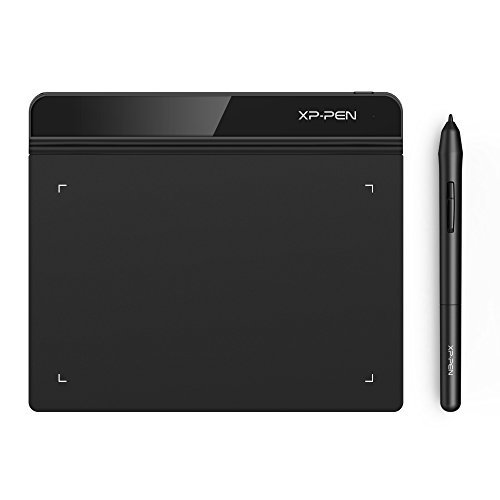
Drawing Tablet XPPen StarG640 Digital Graphics Tablet 6×4 Inch Art Tablet with 8192 Levels Battery-Free Stylus Pen Tablet for Mac, Windows and Chromebook (Drawing/ E-Learning/Remote Working)
Standing screen display size
6 Inches
Series
Star G640
Item model number
Star G640
Operating System
Windows 7 and above, Mac OS X version 10.10 or later
Item Weight
6 ounces
Product Dimensions
7.5 x 6.5 x 0.1 inches
Item Dimensions LxWxH
7.5 x 6.5 x 0.1 inches
Color
StarG640 Black
Manufacturer
XP-PEN
ASIN
B078YR2MTF
Country of Origin
China
Is Discontinued By Manufacturer
No
Date First Available
March 4, 2016
Test video – Drawing Tablet XPPen StarG640 Digital Graphics Tablet :
Product highlights :
【Battery-Free Pen】StarG640 drawing tablet is the perfect replacement for a traditional mouse! The XPPen advanced Battery-free PN01 stylus does not require charging, allowing for constant uninterrupted Draw and Play, making lines flow quicker and smoother, enhancing overall performance.
【Ideal for Online Education】XPPen G640 graphics tablet is designed for digital drawing, painting, sketching, E-signatures, online teaching, remote work, photo editing, it’s compatible with Microsoft Office apps like Word, PowerPoint, OneNote, Zoom, Xsplit etc. Works perfect than a mouse, visually present your handwritten notes, signatures precisely.
【Compact and Portable】The G640 art tablet is only 2mm thick, it’s as slim as all primary level graphic tablets, allowing you to carry it with you on the go.
【Active Area: 6 x 4 inches】Fully utilizing our 8192 levels of pen pressure sensitivity―Providing you with groundbreaking control and fluidity to expand your creative output.
【Multipurpose Use】Designed for playing OSU! Game, digital drawing, painting, sketch, sign documents digitally, this writing tablet also compatible with Microsoft Office programs like Word, PowerPoint, OneNote and more. Create mind-maps, draw diagrams or take notes as replacement for mouse.
【Chromebook Supported】XPPen G640 digital drawing tablet is ready to work seamlessly with Chromebook devices now, so you can create information-rich content and collaborate with teachers and classmates on Google Jamboard’s whiteboard; Take notes quickly and conveniently with Google Keep, and effortlessly sketch diagrams with the Google Canvas.
➕ What is the price of Drawing Tablet XPPen StarG640 Digital Graphics Tablet in Saudi Arabia ?
The price of Drawing Tablet XPPen StarG640 Digital Graphics Tablet in-store is 150 SAR VAT.
➕ When Drawing Tablet XPPen StarG640 Digital Graphics Tablet was released ?
The release date was March 4, 2016.
➕ What is the price of Drawing Tablet XPPen StarG640 Digital Graphics Tablet cheap used ?
The price of Drawing Tablet XPPen StarG640 Digital Graphics Tablet used is 100 SAR VAT.
➕ What are the main characteristics of Drawing Tablet XPPen StarG640 Digital Graphics Tablet ?
Special specifications :
【Battery-Free Pen】StarG640 drawing tablet is the perfect replacement for a traditional mouse! The XPPen advanced Battery-free PN01 stylus does not require charging, allowing for constant uninterrupted Draw and Play, making lines flow quicker and smoother, enhancing overall performance.
➕ Is it interesting to buy this product ?
The best people who can answer you are customers who have already bought and tested this product (See Customer Reviews). This product is rated 4.3 / 5 on Amazon.
➕ Where to buy Drawing Tablet XPPen StarG640 Digital Graphics Tablet in Saudi Arabia ?
Windows 7 and above, Mac OS X version 10.10 or later
Series
Star G640
Screen Size
6 Inches
Purchase advice :
Warranty :
Check the duration of the warranty and also the faults and defects it covers. Is it complete or limited? and What is included in the warranty (parts, repairs or both)?
Shipping :
Is delivery offered? And how long does it take to get delivered (Delivery time)
Proof of purchase :
Does the shop give you an invoice ?
After-sales service :
Do they have an after-sales service to have information about the installation or operation (instructions for use). Also in case of problem, it is the seller who takes charge or you must contact the manufacturer or supplier yourself.
_____________________________
14 reviews for Drawing Tablet XPPen StarG640 Digital Graphics Tablet
Rated 5 out of 5
T. P (verified owner)–
10/10 Quality – Customer Satisfaction!!! – I loved this product so much! I used it for taking notes and digital drawing for a month, but then had to return it, because I realized I need a bigger working area (but I attached to this device too much that returning it was hard for me ).
Rated 4 out of 5
M. G (verified owner)–
Signature Pad – The setup is very easy, basically plug and play. It takes a lot of time to be able to writ on the pad and get the signature to look decent. It gets better the more times you try. It works with Paint and that is a very limited application. I use it to sign drawings that have to be sealed and signed. I am sure the more times I use it the easier it will be.
Rated 4 out of 5
K. K (verified owner)–
Good entry level pen tablet input. – I purchased this product to support online tutoring it was super easy to set up truly plug and play. The only issue is that sometimes it makes a scratching sound that is annoying but that is in the nature of the product. It is a decent size for using as a mousing and writing tool.
Rated 4 out of 5
M. G (verified owner)–
Signature Pad – The setup is very easy, basically plug and play. It takes a lot of time to be able to writ on the pad and get the signature to look decent. It gets better the more times you try. It works with Paint and that is a very limited application. I use it to sign drawings that have to be sealed and signed. I am sure the more times I use it the easier it will be.
Rated 5 out of 5
R. J (verified owner)–
Simple drawing tablet, easy to use and set up. Works on linux – Overall great drawing tablet, enough features to make the most of learning to draw on a pc, not too large for those who don’t have enough space and if you’re like me and switch between Linux and windows more frequently than most would/should it’s great because it’s pretty compatible all around.
Rated 5 out of 5
F. B (verified owner)–
A Great Budget Drawing Tablet – I purchased the XP-Pen StarG640 drawing tablet as someone who is very much a beginner in digital art. I had drawn a little with a mouse, and then transitioned to a plastic-tipped pen on an old Surface tablet screen. This lacked accuracy, pressure sensitivity, etc. – but convinced me that I needed something better.
Rated 5 out of 5
H. R (verified owner)–
Good for beginners – My first drawing tablet and it didn’t take long to get used to drawing with it.
Rated 5 out of 5
F. B (verified owner)–
A Great Budget Drawing Tablet – I purchased the XP-Pen StarG640 drawing tablet as someone who is very much a beginner in digital art. I had drawn a little with a mouse, and then transitioned to a plastic-tipped pen on an old Surface tablet screen. This lacked accuracy, pressure sensitivity, etc. – but convinced me that I needed something better.
Rated 4 out of 5
K. K (verified owner)–
Good entry level pen tablet input. – I purchased this product to support online tutoring it was super easy to set up truly plug and play. The only issue is that sometimes it makes a scratching sound that is annoying but that is in the nature of the product. It is a decent size for using as a mousing and writing tool.
Rated 5 out of 5
A. H (verified owner)–
Easy to use. Perfect for classes – It is very easy to use. The only two buttons it has can be changed with their app (you have to download it). Though sometimes the pen forgets the options you choose for the buttons. But it’s easy to set them again.
Rated 5 out of 5
H. R (verified owner)–
Good for beginners – My first drawing tablet and it didn’t take long to get used to drawing with it.
Rated 5 out of 5
T. P (verified owner)–
10/10 Quality – Customer Satisfaction!!! – I loved this product so much! I used it for taking notes and digital drawing for a month, but then had to return it, because I realized I need a bigger working area (but I attached to this device too much that returning it was hard for me ).
Rated 5 out of 5
R. J (verified owner)–
Simple drawing tablet, easy to use and set up. Works on linux – Overall great drawing tablet, enough features to make the most of learning to draw on a pc, not too large for those who don’t have enough space and if you’re like me and switch between Linux and windows more frequently than most would/should it’s great because it’s pretty compatible all around.
Rated 5 out of 5
A. H (verified owner)–
Easy to use. Perfect for classes – It is very easy to use. The only two buttons it has can be changed with their app (you have to download it). Though sometimes the pen forgets the options you choose for the buttons. But it’s easy to set them again.

T. P (verified owner) –
10/10 Quality – Customer Satisfaction!!! – I loved this product so much! I used it for taking notes and digital drawing for a month, but then had to return it, because I realized I need a bigger working area (but I attached to this device too much that returning it was hard for me ).
M. G (verified owner) –
Signature Pad – The setup is very easy, basically plug and play. It takes a lot of time to be able to writ on the pad and get the signature to look decent. It gets better the more times you try. It works with Paint and that is a very limited application. I use it to sign drawings that have to be sealed and signed. I am sure the more times I use it the easier it will be.
K. K (verified owner) –
Good entry level pen tablet input. – I purchased this product to support online tutoring it was super easy to set up truly plug and play. The only issue is that sometimes it makes a scratching sound that is annoying but that is in the nature of the product. It is a decent size for using as a mousing and writing tool.
M. G (verified owner) –
Signature Pad – The setup is very easy, basically plug and play. It takes a lot of time to be able to writ on the pad and get the signature to look decent. It gets better the more times you try. It works with Paint and that is a very limited application. I use it to sign drawings that have to be sealed and signed. I am sure the more times I use it the easier it will be.
R. J (verified owner) –
Simple drawing tablet, easy to use and set up. Works on linux – Overall great drawing tablet, enough features to make the most of learning to draw on a pc, not too large for those who don’t have enough space and if you’re like me and switch between Linux and windows more frequently than most would/should it’s great because it’s pretty compatible all around.
F. B (verified owner) –
A Great Budget Drawing Tablet – I purchased the XP-Pen StarG640 drawing tablet as someone who is very much a beginner in digital art. I had drawn a little with a mouse, and then transitioned to a plastic-tipped pen on an old Surface tablet screen. This lacked accuracy, pressure sensitivity, etc. – but convinced me that I needed something better.
H. R (verified owner) –
Good for beginners – My first drawing tablet and it didn’t take long to get used to drawing with it.
F. B (verified owner) –
A Great Budget Drawing Tablet – I purchased the XP-Pen StarG640 drawing tablet as someone who is very much a beginner in digital art. I had drawn a little with a mouse, and then transitioned to a plastic-tipped pen on an old Surface tablet screen. This lacked accuracy, pressure sensitivity, etc. – but convinced me that I needed something better.
K. K (verified owner) –
Good entry level pen tablet input. – I purchased this product to support online tutoring it was super easy to set up truly plug and play. The only issue is that sometimes it makes a scratching sound that is annoying but that is in the nature of the product. It is a decent size for using as a mousing and writing tool.
A. H (verified owner) –
Easy to use. Perfect for classes – It is very easy to use. The only two buttons it has can be changed with their app (you have to download it). Though sometimes the pen forgets the options you choose for the buttons. But it’s easy to set them again.
H. R (verified owner) –
Good for beginners – My first drawing tablet and it didn’t take long to get used to drawing with it.
T. P (verified owner) –
10/10 Quality – Customer Satisfaction!!! – I loved this product so much! I used it for taking notes and digital drawing for a month, but then had to return it, because I realized I need a bigger working area (but I attached to this device too much that returning it was hard for me ).
R. J (verified owner) –
Simple drawing tablet, easy to use and set up. Works on linux – Overall great drawing tablet, enough features to make the most of learning to draw on a pc, not too large for those who don’t have enough space and if you’re like me and switch between Linux and windows more frequently than most would/should it’s great because it’s pretty compatible all around.
A. H (verified owner) –
Easy to use. Perfect for classes – It is very easy to use. The only two buttons it has can be changed with their app (you have to download it). Though sometimes the pen forgets the options you choose for the buttons. But it’s easy to set them again.