
Description
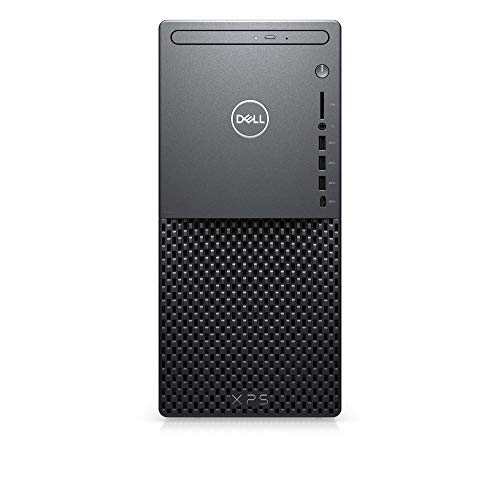
Dell XPS 8940 Desktop Computer Tower – – Features & Prices in Saudi Arabia :
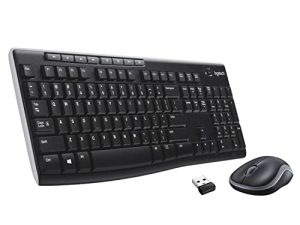
Dell XPS 8940 Desktop Computer Tower – Intel Core i7-11700, 32GB DDR4 RAM, 512GB SSD + 1TB HDD, Wired Keyboard and Mouse Combo, Intel UHD Graphics 750, Wi-Fi 6, USB, Bluetooth, Windows 11 Pro – Black
Test video – Dell XPS 8940 Desktop Computer Tower – :
Product highlights :
Questions & Answers – Dell XPS 8940 Desktop Computer Tower – :
Technical specifications – Dell XPS 8940 Desktop Computer Tower – :
Purchase advice :
-
Warranty :
Check the duration of the warranty and also the faults and defects it covers. Is it complete or limited? and What is included in the warranty (parts, repairs or both)?
-
Shipping :
Is delivery offered? And how long does it take to get delivered (Delivery time)
-
Proof of purchase :
Does the shop give you an invoice ?
-
After-sales service :
Do they have an after-sales service to have information about the installation or operation (instructions for use). Also in case of problem, it is the seller who takes charge or you must contact the manufacturer or supplier yourself.
_____________________________
Z. B (verified owner) –
Awesome, fantastic, stupid fast computer. Please read the review. – This is the fastest computer we’ve ever purchased. I have purchased thousands of computers over the years for personal use and my employers. Dell is the usual choice. This computer offers fantastic bang for the buck. There is one thing we didn’t like about it though and I am not sure who’s fault it is. Is it Dell or Microsoft or the reseller? I don’t know. When we turned this on and Windows magically appeared. I mean there wasn’t really a “boot”. Push the power button and you are greeted with the login screen. There are about 30 or more apps installed. A bunch of crap we really didn’t need and we had to go through and clean up a brand new computer. All I kept was MS office. I guess this is the normal way new computers are sold with a bunch of apps that you have to buy to use. We don’t get his with buying business machines since we use our own image but wow what a process it was getting all the adds off. Anyway the computer is awesome and we couldn’t be happier with it. Haven’t had to use support for this computer as of yet so can’t really speak to that but Dell support is usually pretty good. Would recommend and would purchase again.
Z. B (verified owner) –
Awesome, fantastic, stupid fast computer. Please read the review. – This is the fastest computer we’ve ever purchased. I have purchased thousands of computers over the years for personal use and my employers. Dell is the usual choice. This computer offers fantastic bang for the buck. There is one thing we didn’t like about it though and I am not sure who’s fault it is. Is it Dell or Microsoft or the reseller? I don’t know. When we turned this on and Windows magically appeared. I mean there wasn’t really a “boot”. Push the power button and you are greeted with the login screen. There are about 30 or more apps installed. A bunch of crap we really didn’t need and we had to go through and clean up a brand new computer. All I kept was MS office. I guess this is the normal way new computers are sold with a bunch of apps that you have to buy to use. We don’t get his with buying business machines since we use our own image but wow what a process it was getting all the adds off. Anyway the computer is awesome and we couldn’t be happier with it. Haven’t had to use support for this computer as of yet so can’t really speak to that but Dell support is usually pretty good. Would recommend and would purchase again.
T. C (verified owner) –
Great System – I have held off on getting a new PC for a while now but finally decided to get one and this PC was it. I have no complaints really, other than that I would have preferred a larger hard drive for the OS drive. The model I got had only a 1/2 TB NVMe hard drive. Although it is extremely fast, It would have been nice if it were at least 1TB in size. It did, however come with a 1TB HDD hard drive for data storage, so I will use that a lot for data storage.
T. C (verified owner) –
Great System – I have held off on getting a new PC for a while now but finally decided to get one and this PC was it. I have no complaints really, other than that I would have preferred a larger hard drive for the OS drive. The model I got had only a 1/2 TB NVMe hard drive. Although it is extremely fast, It would have been nice if it were at least 1TB in size. It did, however come with a 1TB HDD hard drive for data storage, so I will use that a lot for data storage.
E. T (verified owner) –
Solid office performer. Be prepared to expect significant IT support issues for network use. – By way of introduction and a brief CV, my first computer was a Sinclair ZX-81. I ran CP/M for a long time. I remember the KayPro I. My first laptop was a Radio Shack TRS-80 Model 100 that I used in conjunction with a TRASH-80 Model 4 with 128K RAM in two 64K switched banks and two 160k 5¼” floppy drives with TRSDOS 6 and Wordstar 3.3. I was once fluent in VAX VMS. My first 8086-based PC ran DOS 2.11. I had a Corona luggable that ran DOS 3.11. I was fluent in dBase 2, 3, and 3+ with file and record locking for multi-machine, network database use. I still have a bootleg copy of Windows 1.0 around somewhere on a 5¼” floppy. I have administered Novell Netware and later Windows networks, both ad-hoc and with server farms. At some point in my career, I’ve attended Cisco router schools and spent a year as IT support at a university. I have been around computers and networks a LONG time. I have built dozens of computers from components over the years. I haven’t bought a name-brand built computer since I had a Gateway Windows 2000 box. About every four or five years, I buy components and upgrade the ATX case I have had for twenty-five years. And I have, since 1980 and for a variety of reasons, avoided Apple products like the plague.
J. J (verified owner) –
An Excellent Upgrade Desktop – I was surprised at how well this Desktop PC performed. Ok, Yes, Upgrading the unit was required in my case, I had to upgrade the Desktop with an additional hard drive. The Hard drive received with the unit was partitioned in a way that actually complicated things for me and I had to install an upgraded graphics card. I use it for 3D modeling and photography work so upgrades were necessary. Older software appears to work on the new unit without issues, well almost no issues, Windows 11 has done a few things that have been upsetting.. So Only 4 stars due to those additional upgrades. Setup was a breeze for it otherwise. It helps to have 30 years of computer knowledge to reference when dealing with the issues on a PC.
J. J (verified owner) –
An Excellent Upgrade Desktop – I was surprised at how well this Desktop PC performed. Ok, Yes, Upgrading the unit was required in my case, I had to upgrade the Desktop with an additional hard drive. The Hard drive received with the unit was partitioned in a way that actually complicated things for me and I had to install an upgraded graphics card. I use it for 3D modeling and photography work so upgrades were necessary. Older software appears to work on the new unit without issues, well almost no issues, Windows 11 has done a few things that have been upsetting.. So Only 4 stars due to those additional upgrades. Setup was a breeze for it otherwise. It helps to have 30 years of computer knowledge to reference when dealing with the issues on a PC.
E. T (verified owner) –
Solid office performer. Be prepared to expect significant IT support issues for network use. – By way of introduction and a brief CV, my first computer was a Sinclair ZX-81. I ran CP/M for a long time. I remember the KayPro I. My first laptop was a Radio Shack TRS-80 Model 100 that I used in conjunction with a TRASH-80 Model 4 with 128K RAM in two 64K switched banks and two 160k 5¼” floppy drives with TRSDOS 6 and Wordstar 3.3. I was once fluent in VAX VMS. My first 8086-based PC ran DOS 2.11. I had a Corona luggable that ran DOS 3.11. I was fluent in dBase 2, 3, and 3+ with file and record locking for multi-machine, network database use. I still have a bootleg copy of Windows 1.0 around somewhere on a 5¼” floppy. I have administered Novell Netware and later Windows networks, both ad-hoc and with server farms. At some point in my career, I’ve attended Cisco router schools and spent a year as IT support at a university. I have been around computers and networks a LONG time. I have built dozens of computers from components over the years. I haven’t bought a name-brand built computer since I had a Gateway Windows 2000 box. About every four or five years, I buy components and upgrade the ATX case I have had for twenty-five years. And I have, since 1980 and for a variety of reasons, avoided Apple products like the plague.