
Description
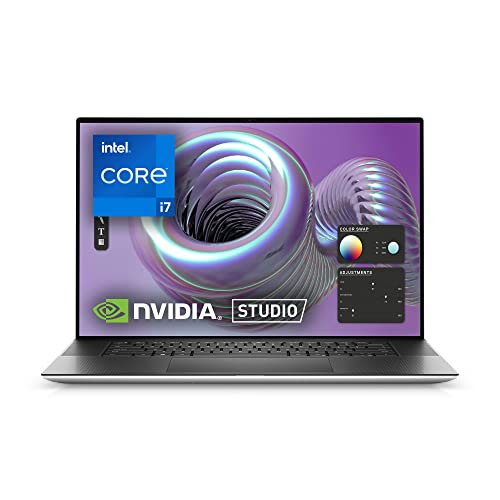
Dell XPS 17 9710, 17 inch FHD+ – Features & Prices in Saudi Arabia :
Dell XPS 17 9710, 17 inch FHD+ Laptop – Intel Core i7-11800H,16GB DDR4 RAM, 1TB SSD, NVIDIA GeForce RTX 3050 4GB GDDR6, Windows 11 Home + 1 Year Premium Support – Platinum Silver
Standing screen display size
17 Inches
Screen Resolution
1920 x 1200 pixels
Max Screen Resolution
1920 x 1200 Pixels
Processor
4.6 GHz core_i7_family
RAM
16 GB DDR4
Memory Speed
3200 MHz
Hard Drive
1 TB SSD
Graphics Coprocessor
NVIDIA GeForce RTX 3050
Chipset Brand
NVIDIA
Card Description
RTX 3050
Graphics Card Ram Size
4 GB
Wireless Type
Bluetooth
Flash Memory Size
1 TB
Hard Drive Interface
Solid State
Optical Drive Type
No Optical Drive
Power Source
Battery Powered
Voltage
20 Volts (DC)
Batteries
1 Lithium Ion batteries required. (included)
Test video – Dell XPS 17 9710, 17 inch FHD+ :
Product highlights :
Questions & Answers – Dell XPS 17 9710, 17 inch FHD+ :
Technical specifications – Dell XPS 17 9710, 17 inch FHD+ :
Brand
Dell
Series
XPS 17 9710
Screen Size
17 Inches
Color
Silver
Hard Disk Size
1 TB
CPU Model
Core i7 Family
Ram Memory Installed Size
16 GB
Operating System
Windows 11 Home
Special Feature
Dell XPS 17 Laptop
Card Description
RTX 3050
Purchase advice :
-
Warranty :
Check the duration of the warranty and also the faults and defects it covers. Is it complete or limited? and What is included in the warranty (parts, repairs or both)?
-
Shipping :
Is delivery offered? And how long does it take to get delivered (Delivery time)
-
Proof of purchase :
Does the shop give you an invoice ?
-
After-sales service :
Do they have an after-sales service to have information about the installation or operation (instructions for use). Also in case of problem, it is the seller who takes charge or you must contact the manufacturer or supplier yourself.
_____________________________
B. A (verified owner) –
The mouse pad goes out – I like the computer well enough. However, I have had it for about 2 months, and the mouse pad has gone out. I take very good care of my electronics, and I believe I read somewhere this computer model has given other users the same problem.
B. A (verified owner) –
The mouse pad goes out – I like the computer well enough. However, I have had it for about 2 months, and the mouse pad has gone out. I take very good care of my electronics, and I believe I read somewhere this computer model has given other users the same problem.
A. O (verified owner) –
Clear and bright, fast processing, but battery can’t charge fast enough during high-powered tasks – I picked up this laptop to run a CAD program and be able to occasionally work someplace besides just being chained to my desk/ desktop computer.
S. L (verified owner) –
Actually a Non-Touch screen model – At time of purchase, description stated FHD+ Touchscreen. First model I received was not touch and the exchanged model was also not touch. I suspect they meant to list this as a NON-TOUCH laptop. Otherwise, Dell XPS laptops are amazing. I have set many up for our employees. But when I order based on stated specs, I expect those specs.
H. Z (verified owner) –
DON’T KNOW YET, HAVEN’T HAD IT VERY LONG…… – SO FAR SO GOOD!!!!! I DON’T SEE ANY SECURITY THAT COMES WITH IT. Still looking!!
S. L (verified owner) –
Actually a Non-Touch screen model – At time of purchase, description stated FHD+ Touchscreen. First model I received was not touch and the exchanged model was also not touch. I suspect they meant to list this as a NON-TOUCH laptop. Otherwise, Dell XPS laptops are amazing. I have set many up for our employees. But when I order based on stated specs, I expect those specs.
L. F (verified owner) –
Missing the small afapter? – Why Dell and Microsoft demand pushing customers into new compexities is beyond me.
R. O (verified owner) –
NOT touchscreen – The specs listed in the description are not correct. This model is not a touchscreen.
S. C (verified owner) –
Razor Sharp laptop case edge! – While it is lightning fast, which is super important, and the keyboard lights up which is a big deal especially at night, there are several big issues I just can’t get over. The worst is why the edge of the casing is literally like a RAZOR BLADE! I’m not exaggerating: After just a couple of minutes the case edge Literally cuts into your palm and hand! There are always deep red marks. At this point I may have nerve damage. I can hear you now saying OMG what an exaggeration but go to a Best Buy and play with these laptops for a few minutes. The corners are like daggers! WHY??? Who would design the exact place where you rest your hand like that?!! The other thing is the center placement of the keyboard. Because many laptops have a Number Pad, I’m used to the keyboard being offset to the left. But because this one doesn’t have a numberpad, It’s super awkward typing on this center keyboard. I don’t think I’ll ever get used to it. Third is the super sensitive mousepad. Yes I know we can adjust it but the default shouldn’t be like this. It accidentally clicks on everything you don’t want it to. If they at least added a numberpad and fixed the jagged razor sharp case, I might be able to live with it. But since I’m not into getting injured every time I use it, I’m sending it back.. especially for $2,000 you think they’d bring extra comfort. Ridiculous!
L. F (verified owner) –
Missing the small afapter? – Why Dell and Microsoft demand pushing customers into new compexities is beyond me.
J. K (verified owner) –
Not a touch screen – The description is very misleading since it states it is a touch screen. However when I received it it is not a touchscreen
J. K (verified owner) –
Not a touch screen – The description is very misleading since it states it is a touch screen. However when I received it it is not a touchscreen
R. O (verified owner) –
NOT touchscreen – The specs listed in the description are not correct. This model is not a touchscreen.
S. C (verified owner) –
Razor Sharp laptop case edge! – While it is lightning fast, which is super important, and the keyboard lights up which is a big deal especially at night, there are several big issues I just can’t get over. The worst is why the edge of the casing is literally like a RAZOR BLADE! I’m not exaggerating: After just a couple of minutes the case edge Literally cuts into your palm and hand! There are always deep red marks. At this point I may have nerve damage. I can hear you now saying OMG what an exaggeration but go to a Best Buy and play with these laptops for a few minutes. The corners are like daggers! WHY??? Who would design the exact place where you rest your hand like that?!! The other thing is the center placement of the keyboard. Because many laptops have a Number Pad, I’m used to the keyboard being offset to the left. But because this one doesn’t have a numberpad, It’s super awkward typing on this center keyboard. I don’t think I’ll ever get used to it. Third is the super sensitive mousepad. Yes I know we can adjust it but the default shouldn’t be like this. It accidentally clicks on everything you don’t want it to. If they at least added a numberpad and fixed the jagged razor sharp case, I might be able to live with it. But since I’m not into getting injured every time I use it, I’m sending it back.. especially for $2,000 you think they’d bring extra comfort. Ridiculous!
H. Z (verified owner) –
DON’T KNOW YET, HAVEN’T HAD IT VERY LONG…… – SO FAR SO GOOD!!!!! I DON’T SEE ANY SECURITY THAT COMES WITH IT. Still looking!!
A. O (verified owner) –
Clear and bright, fast processing, but battery can’t charge fast enough during high-powered tasks – I picked up this laptop to run a CAD program and be able to occasionally work someplace besides just being chained to my desk/ desktop computer.