Corsair Scimitar Pro RGB – MMO Gaming – Features & Prices in Saudi Arabia :
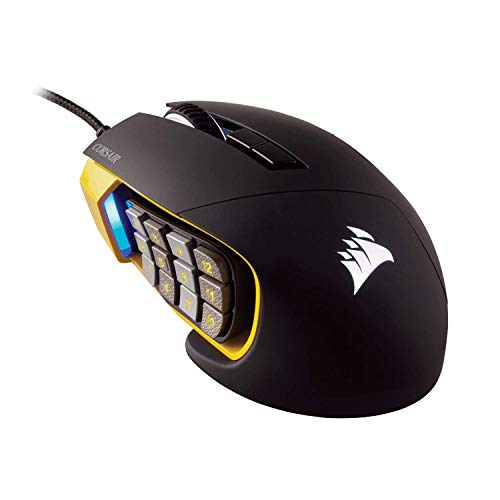
Corsair Scimitar Pro RGB – MMO Gaming Mouse – 16,000 DPI Optical Sensor – 12 Programmable Side Buttons – Yellow, Model Number: CH-9304011-NA
Manufacturer
Corsair
Brand
Corsair
Item Weight
4.3 ounces
Product Dimensions
4.75 x 3.04 x 1.67 inches
Item model number
CH-9304011-NA
Batteries
1 AA batteries required.
Is Discontinued By Manufacturer
No
Color
Yellow
Material Type
Plastic
Number of Items
1
Size
MMO
Manufacturer Part Number
CH-9304011-NA
Test video – Corsair Scimitar Pro RGB – MMO Gaming :
Product highlights :
Exclusive key Slider macro button control system. Compatibility – A PC with a USB port , Windows 10, Windows 8 or Windows 7 , An internet connection is required to download the Corsair Utility Engine software
12 optimized mechanical side buttons designed to Pro player specifications for consistent tactile feedback and precise actuation. Textured side button keycaps provide enhanced grip and feel
The patent pending design provides 8mm of key travel with secure lock to ensure every button is within reach. Surface calibration tuning Utility: optimizes sensor precision and responsiveness for your playing surface
Onboard storage with hardware macro playback: three predefined profiles include actions common for MMO gaming as well as General purpose keyboard shortcuts
➕ What is the price of Corsair Scimitar Pro RGB - MMO Gaming in Saudi Arabia ?
The price of Corsair Scimitar Pro RGB – MMO Gaming in-store is 480 SAR VAT.
➕ When Corsair Scimitar Pro RGB - MMO Gaming was released ?
The release date was .
➕ What is the price of Corsair Scimitar Pro RGB - MMO Gaming cheap used ?
The price of Corsair Scimitar Pro RGB – MMO Gaming used is 330 SAR VAT.
➕ What are the main characteristics of Corsair Scimitar Pro RGB - MMO Gaming ?
Special specifications :
Exclusive key Slider macro button control system. Compatibility – A PC with a USB port , Windows 10, Windows 8 or Windows 7 , An internet connection is required to download the Corsair Utility Engine software
➕ Is it interesting to buy this product ?
The best people who can answer you are customers who have already bought and tested this product (See Customer Reviews). This product is rated 4.5 / 5 on Amazon.
➕ Where to buy Corsair Scimitar Pro RGB - MMO Gaming in Saudi Arabia ?
Check the duration of the warranty and also the faults and defects it covers. Is it complete or limited? and What is included in the warranty (parts, repairs or both)?
Shipping :
Is delivery offered? And how long does it take to get delivered (Delivery time)
Proof of purchase :
Does the shop give you an invoice ?
After-sales service :
Do they have an after-sales service to have information about the installation or operation (instructions for use). Also in case of problem, it is the seller who takes charge or you must contact the manufacturer or supplier yourself.
_____________________________
16 reviews for Corsair Scimitar Pro RGB – MMO Gaming
Rated 5 out of 5
L. D (verified owner)–
Probably the bear 12 button mouse – I’ve had the radar Naga trinity and the Logitech mmo mouse and this is by far the best. It feels good in your hand and if you need those 12 buttons on the side like I do, do your hand the favor and get this one.
Rated 5 out of 5
D. O (verified owner)–
Great mouse, horrible program – Had this mouse 2 years now still going strong. That was until the new icue software update. Now it is not supported by icue and has a Alert Issued tag on it. After researching the Corsair forums… I’m not the only one. Corsairs new update does not support this mouse anymore. Shame on Corsair. Time to find another company..
Rated 5 out of 5
D. O (verified owner)–
Great mouse, horrible program – Had this mouse 2 years now still going strong. That was until the new icue software update. Now it is not supported by icue and has a Alert Issued tag on it. After researching the Corsair forums… I’m not the only one. Corsairs new update does not support this mouse anymore. Shame on Corsair. Time to find another company..
Rated 5 out of 5
B. K (verified owner)–
Better than Razor Naga – Compared to the Razor Naga, this mouse is much much better. Not only does ICUE actually work in detecting your Corsair items, the mouse also feels good to hold and also great to play with. It was a little hard to figure out how to remap they keys, but after looking at a few tutorials it became very clear and easy if you find the right tutorials that show you how to use ICUE 4. The mouse also feels more matte than others so if you have sweaty hands like me it will prevent it from slipping out as much.
Rated 4 out of 5
B. B (verified owner)–
Cualidades interesantes pero difícil de usar – Cabe aclarar que es mi primer mouse de este estilo y tal vez por eso se me dificulta un poco usarlo, pero como tal el diseño es ergonómico y se ajusta bien a mi mano. Sin embargo siento que los botones principales no se siente muy resistentes ni de buen material para ser un mouse de esta marca y con ese precio. Igualmente el botón derecho por alguna razón es demasiado sensible y por error puedes terminar presionándolo fácilmente y hacerte cometer errores mientras trabajas o juegas. Por otro lado la configuración del mismo no me gustó mucho porque en lo personal, el software Icue 4 no es muy intuitivo que digamos y me eché poco más de una hora entendiendo cómo configurar los 12 botones laterales. En general creo que me arriesgué mucho al comprar esta versión y no una más sencilla, pero ya veremos cómo va a medida que me acostumbro a él y que no comience a dar problemas con los botones principales, sobre todo el derecho que es bastante sensible y no se siente de buena calidad.
Rated 4 out of 5
F. L (verified owner)–
Specialty work only – The mouse is great for use with MMO’s and if you enjoy making custom macros and the such
Rated 4 out of 5
K. S (verified owner)–
Great, but a pain to set up. – Good mouse all around, but the side buttons have to be set up manually in Corsair’s proprietary software. The setup is confusing enough that I had to search for youtube tutorials, and it would be great if that could work out of the box.
Rated 4 out of 5
B. B (verified owner)–
Cualidades interesantes pero difícil de usar – Cabe aclarar que es mi primer mouse de este estilo y tal vez por eso se me dificulta un poco usarlo, pero como tal el diseño es ergonómico y se ajusta bien a mi mano. Sin embargo siento que los botones principales no se siente muy resistentes ni de buen material para ser un mouse de esta marca y con ese precio. Igualmente el botón derecho por alguna razón es demasiado sensible y por error puedes terminar presionándolo fácilmente y hacerte cometer errores mientras trabajas o juegas. Por otro lado la configuración del mismo no me gustó mucho porque en lo personal, el software Icue 4 no es muy intuitivo que digamos y me eché poco más de una hora entendiendo cómo configurar los 12 botones laterales. En general creo que me arriesgué mucho al comprar esta versión y no una más sencilla, pero ya veremos cómo va a medida que me acostumbro a él y que no comience a dar problemas con los botones principales, sobre todo el derecho que es bastante sensible y no se siente de buena calidad.
Rated 4 out of 5
K. S (verified owner)–
Great, but a pain to set up. – Good mouse all around, but the side buttons have to be set up manually in Corsair’s proprietary software. The setup is confusing enough that I had to search for youtube tutorials, and it would be great if that could work out of the box.
Rated 5 out of 5
T. G (verified owner)–
Amazing mouse! – I absolutely love this mouse! I have very tiny hands and tried all sorts of MMO mice, but this is the only one with an ergonomic design that my hand could fit on. Not only that, the side buttons help so much in MMOs like FFXIV and WOW, and on this one you can slide the side button panel up or down to adjust as you want for your thumb!
Rated 4 out of 5
F. L (verified owner)–
Specialty work only – The mouse is great for use with MMO’s and if you enjoy making custom macros and the such
Rated 5 out of 5
K. S (verified owner)–
Great mouse – I used the original version of this for a few years but had a weird USB issue that eventually annoyed me enough to go back to a Naga – this was a mistake. The Scimitar is definitely better than the Naga. That said, when I purchased this, less than a week later the 4 button on the side started sticking. I immediately requested a replacement which I now have…will update this review if it starts sticking with the new one as well. Aside from that, it’s awesome!
Rated 5 out of 5
K. S (verified owner)–
Great mouse – I used the original version of this for a few years but had a weird USB issue that eventually annoyed me enough to go back to a Naga – this was a mistake. The Scimitar is definitely better than the Naga. That said, when I purchased this, less than a week later the 4 button on the side started sticking. I immediately requested a replacement which I now have…will update this review if it starts sticking with the new one as well. Aside from that, it’s awesome!
Rated 5 out of 5
B. K (verified owner)–
Better than Razor Naga – Compared to the Razor Naga, this mouse is much much better. Not only does ICUE actually work in detecting your Corsair items, the mouse also feels good to hold and also great to play with. It was a little hard to figure out how to remap they keys, but after looking at a few tutorials it became very clear and easy if you find the right tutorials that show you how to use ICUE 4. The mouse also feels more matte than others so if you have sweaty hands like me it will prevent it from slipping out as much.
Rated 5 out of 5
T. G (verified owner)–
Amazing mouse! – I absolutely love this mouse! I have very tiny hands and tried all sorts of MMO mice, but this is the only one with an ergonomic design that my hand could fit on. Not only that, the side buttons help so much in MMOs like FFXIV and WOW, and on this one you can slide the side button panel up or down to adjust as you want for your thumb!
Rated 5 out of 5
L. D (verified owner)–
Probably the bear 12 button mouse – I’ve had the radar Naga trinity and the Logitech mmo mouse and this is by far the best. It feels good in your hand and if you need those 12 buttons on the side like I do, do your hand the favor and get this one.

L. D (verified owner) –
Probably the bear 12 button mouse – I’ve had the radar Naga trinity and the Logitech mmo mouse and this is by far the best. It feels good in your hand and if you need those 12 buttons on the side like I do, do your hand the favor and get this one.
D. O (verified owner) –
Great mouse, horrible program – Had this mouse 2 years now still going strong. That was until the new icue software update. Now it is not supported by icue and has a Alert Issued tag on it. After researching the Corsair forums… I’m not the only one. Corsairs new update does not support this mouse anymore. Shame on Corsair. Time to find another company..
D. O (verified owner) –
Great mouse, horrible program – Had this mouse 2 years now still going strong. That was until the new icue software update. Now it is not supported by icue and has a Alert Issued tag on it. After researching the Corsair forums… I’m not the only one. Corsairs new update does not support this mouse anymore. Shame on Corsair. Time to find another company..
B. K (verified owner) –
Better than Razor Naga – Compared to the Razor Naga, this mouse is much much better. Not only does ICUE actually work in detecting your Corsair items, the mouse also feels good to hold and also great to play with. It was a little hard to figure out how to remap they keys, but after looking at a few tutorials it became very clear and easy if you find the right tutorials that show you how to use ICUE 4. The mouse also feels more matte than others so if you have sweaty hands like me it will prevent it from slipping out as much.
B. B (verified owner) –
Cualidades interesantes pero difícil de usar – Cabe aclarar que es mi primer mouse de este estilo y tal vez por eso se me dificulta un poco usarlo, pero como tal el diseño es ergonómico y se ajusta bien a mi mano. Sin embargo siento que los botones principales no se siente muy resistentes ni de buen material para ser un mouse de esta marca y con ese precio. Igualmente el botón derecho por alguna razón es demasiado sensible y por error puedes terminar presionándolo fácilmente y hacerte cometer errores mientras trabajas o juegas. Por otro lado la configuración del mismo no me gustó mucho porque en lo personal, el software Icue 4 no es muy intuitivo que digamos y me eché poco más de una hora entendiendo cómo configurar los 12 botones laterales. En general creo que me arriesgué mucho al comprar esta versión y no una más sencilla, pero ya veremos cómo va a medida que me acostumbro a él y que no comience a dar problemas con los botones principales, sobre todo el derecho que es bastante sensible y no se siente de buena calidad.
F. L (verified owner) –
Specialty work only – The mouse is great for use with MMO’s and if you enjoy making custom macros and the such
K. S (verified owner) –
Great, but a pain to set up. – Good mouse all around, but the side buttons have to be set up manually in Corsair’s proprietary software. The setup is confusing enough that I had to search for youtube tutorials, and it would be great if that could work out of the box.
B. B (verified owner) –
Cualidades interesantes pero difícil de usar – Cabe aclarar que es mi primer mouse de este estilo y tal vez por eso se me dificulta un poco usarlo, pero como tal el diseño es ergonómico y se ajusta bien a mi mano. Sin embargo siento que los botones principales no se siente muy resistentes ni de buen material para ser un mouse de esta marca y con ese precio. Igualmente el botón derecho por alguna razón es demasiado sensible y por error puedes terminar presionándolo fácilmente y hacerte cometer errores mientras trabajas o juegas. Por otro lado la configuración del mismo no me gustó mucho porque en lo personal, el software Icue 4 no es muy intuitivo que digamos y me eché poco más de una hora entendiendo cómo configurar los 12 botones laterales. En general creo que me arriesgué mucho al comprar esta versión y no una más sencilla, pero ya veremos cómo va a medida que me acostumbro a él y que no comience a dar problemas con los botones principales, sobre todo el derecho que es bastante sensible y no se siente de buena calidad.
K. S (verified owner) –
Great, but a pain to set up. – Good mouse all around, but the side buttons have to be set up manually in Corsair’s proprietary software. The setup is confusing enough that I had to search for youtube tutorials, and it would be great if that could work out of the box.
T. G (verified owner) –
Amazing mouse! – I absolutely love this mouse! I have very tiny hands and tried all sorts of MMO mice, but this is the only one with an ergonomic design that my hand could fit on. Not only that, the side buttons help so much in MMOs like FFXIV and WOW, and on this one you can slide the side button panel up or down to adjust as you want for your thumb!
F. L (verified owner) –
Specialty work only – The mouse is great for use with MMO’s and if you enjoy making custom macros and the such
K. S (verified owner) –
Great mouse – I used the original version of this for a few years but had a weird USB issue that eventually annoyed me enough to go back to a Naga – this was a mistake. The Scimitar is definitely better than the Naga. That said, when I purchased this, less than a week later the 4 button on the side started sticking. I immediately requested a replacement which I now have…will update this review if it starts sticking with the new one as well. Aside from that, it’s awesome!
K. S (verified owner) –
Great mouse – I used the original version of this for a few years but had a weird USB issue that eventually annoyed me enough to go back to a Naga – this was a mistake. The Scimitar is definitely better than the Naga. That said, when I purchased this, less than a week later the 4 button on the side started sticking. I immediately requested a replacement which I now have…will update this review if it starts sticking with the new one as well. Aside from that, it’s awesome!
B. K (verified owner) –
Better than Razor Naga – Compared to the Razor Naga, this mouse is much much better. Not only does ICUE actually work in detecting your Corsair items, the mouse also feels good to hold and also great to play with. It was a little hard to figure out how to remap they keys, but after looking at a few tutorials it became very clear and easy if you find the right tutorials that show you how to use ICUE 4. The mouse also feels more matte than others so if you have sweaty hands like me it will prevent it from slipping out as much.
T. G (verified owner) –
Amazing mouse! – I absolutely love this mouse! I have very tiny hands and tried all sorts of MMO mice, but this is the only one with an ergonomic design that my hand could fit on. Not only that, the side buttons help so much in MMOs like FFXIV and WOW, and on this one you can slide the side button panel up or down to adjust as you want for your thumb!
L. D (verified owner) –
Probably the bear 12 button mouse – I’ve had the radar Naga trinity and the Logitech mmo mouse and this is by far the best. It feels good in your hand and if you need those 12 buttons on the side like I do, do your hand the favor and get this one.