
Description
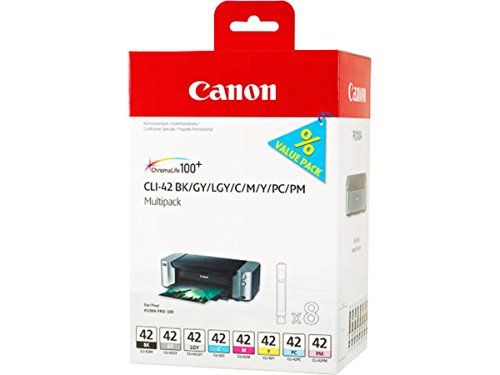
Canon CLI-42 8 PK Value Pack Ink, – Features & Prices in Saudi Arabia :
Canon CLI-42 8 PK Value Pack Ink, 8 Pack Compatible to PIXMA PRO-100
Manufacturer
Canon Ink
Brand
Canon
Item Weight
10.4 ounces
Product Dimensions
2.7 x 6.7 x 4.3 inches
Item model number
CLI-42 8 PK
Is Discontinued By Manufacturer
No
Color
Multicoloured
Number of Items
1
Size
6384B010
Manufacturer Part Number
6384B007
Test video – Canon CLI-42 8 PK Value Pack Ink, :
Product highlights :
Questions & Answers – Canon CLI-42 8 PK Value Pack Ink, :
Technical specifications – Canon CLI-42 8 PK Value Pack Ink, :
Model Name
FBA_6384B010
Brand
Canon
Compatible Devices
Printer
Special Feature
Ink Tank
Compatibility Options
Compatible
Color
Multicoloured
Purchase advice :
-
Warranty :
Check the duration of the warranty and also the faults and defects it covers. Is it complete or limited? and What is included in the warranty (parts, repairs or both)?
-
Shipping :
Is delivery offered? And how long does it take to get delivered (Delivery time)
-
Proof of purchase :
Does the shop give you an invoice ?
-
After-sales service :
Do they have an after-sales service to have information about the installation or operation (instructions for use). Also in case of problem, it is the seller who takes charge or you must contact the manufacturer or supplier yourself.
_____________________________

P. I (verified owner) –
great – great
P. F (verified owner) –
Expensive but Necessary and Amazing (Unfortunately) – First of all, this is not a paid review – I have written maybe 2 amazon reviews ever, but I’m hoping this one will be helpful. I got a Canon Pixma Pro 100 about a year ago, and it was given to me slightly used – with Canon ink. I have a side business where I made collages, photograph them, and then make greeting cards out of the photographs, so this printer is essential to that business. When the original ink ran out, I bought the $37 off-brand replacement ink off Amazon and thought nothing of it – a couple of times. But then my prints started looking terrible, even when I did everything I could to enhance my photos. After some online searching, I realized for the first time that the off-brand ink might be the problem, so I reluctantly spent $115 on the real deal. As you can see from my photos, the Canon ink made a world of difference – the offbrand ink was producing unexplained stripes in the artwork, and certain colors like blue or yellow would randomly not come through even though the ink was full. With the Canon ink, I love the printer as much as I did on day one because the stripes and color issues are gone. So, long story short, this ink is expensive, which sucks. However, buying the cheaper version is the same thing as throwing your money away if you have any interest in printing high quality images on your printer. After a couple of months of stress and disappointment, the Canon ink solved all my problems, and I’ll never be able to go back to the offbrand despite the expense. TRUST ME, DONT SKIMP AND BUY THE REAL DEAL!
P. F (verified owner) –
Expensive but Necessary and Amazing (Unfortunately) – First of all, this is not a paid review – I have written maybe 2 amazon reviews ever, but I’m hoping this one will be helpful. I got a Canon Pixma Pro 100 about a year ago, and it was given to me slightly used – with Canon ink. I have a side business where I made collages, photograph them, and then make greeting cards out of the photographs, so this printer is essential to that business. When the original ink ran out, I bought the $37 off-brand replacement ink off Amazon and thought nothing of it – a couple of times. But then my prints started looking terrible, even when I did everything I could to enhance my photos. After some online searching, I realized for the first time that the off-brand ink might be the problem, so I reluctantly spent $115 on the real deal. As you can see from my photos, the Canon ink made a world of difference – the offbrand ink was producing unexplained stripes in the artwork, and certain colors like blue or yellow would randomly not come through even though the ink was full. With the Canon ink, I love the printer as much as I did on day one because the stripes and color issues are gone. So, long story short, this ink is expensive, which sucks. However, buying the cheaper version is the same thing as throwing your money away if you have any interest in printing high quality images on your printer. After a couple of months of stress and disappointment, the Canon ink solved all my problems, and I’ll never be able to go back to the offbrand despite the expense. TRUST ME, DONT SKIMP AND BUY THE REAL DEAL!
N. D (verified owner) –
Genuine product. Only drawback is expensive – Like the quality. Expensive though.
P. I (verified owner) –
great – great
N. E (verified owner) –
The Real Deal – I’ve tried other, cheaper, knock-off brand inks in my Canon Pixma printer — some were satisfactory for awhile, but then they either ran out quickly or leaked badly. (The last ink “explosion” was the final straw for me. No more generic inks.)
H. A (verified owner) –
Need correct product image – Item pictured on the site is different from what was actually received. Both appear to be genuine Canon products, but probably from different countries of origin. Product appears to be fine.
E. K (verified owner) –
Canon Inks will match your monitor image best – If you want to save money but don’t care about the overall quality of the print, then the substitute inks are good enough. If you want the print to look like what you see on the monitor, then you need to spend the bucks and bite the bullet and all the other cliches and get the Canon ink set. I had some prints that I did with the original inks but then replaced the inks with the substitutes. For some prints it was fine, but where the color cast really was important, the whole print came out with a red tinge and cast. So, I calibrated the monitor again, tweaked the settings, used different papers (all Canon papers) and nothing helped. Still red. Then I read the reviews, one of them talked about the red cast, and I decided to spend the money one time to see if it made a difference. It did. The prints came out without the red cast and look like they do on the monitor. So, try it once- buy the expensive ink and see if there is a difference. If so, use the Canon ink. If not, well you still have all those replacement inks that you bought so use them. FYI- I have a Canon Pixma 100 Pro printer. It’s all Canon stuff and that seems to make a difference.
N. K (verified owner) –
The best ink for printing photos – When printing photos, I am very demanding and generic inks rarely match the quality of the Canon Ink for my Pixma Pro 100. I wish they lasted longer and contained more ink, but the print quality is my key need.
N. K (verified owner) –
The best ink for printing photos – When printing photos, I am very demanding and generic inks rarely match the quality of the Canon Ink for my Pixma Pro 100. I wish they lasted longer and contained more ink, but the print quality is my key need.
H. A (verified owner) –
Need correct product image – Item pictured on the site is different from what was actually received. Both appear to be genuine Canon products, but probably from different countries of origin. Product appears to be fine.
R. O (verified owner) –
Bought this expensive ink, after failing on some generic refills; these worked instantly – So I got the Pro-100 printer about 2 years ago, and knowing I would print a lot, I immediately shopped for spare ink. I decided to try a generic ink refill kit, not wanting to give into Canon’s notorious ink prices. (we all know they make $$$ on ink). Anyway, the original printer cartridges actually lasted a lot longer than I expected, printing whatever I wanted, in sizes of 5×7, 8×10 and quite a few 13×19. I never felt rushed. But after not using the printer few several months after a house move, several tanks were erroring as empty. I tried the refill kit. It’s ink as far as I can tell from naive eyes looks legit. The problem with the generics was I had ink smears on my paper, failing Nozzle Test print pages, and mysterious spots of ink on the paper. I tried all cleanings. After getting an almost perfect test page with the generic refills, I finally I printed out a 5×7 with the generic printer. It was streaked and had ink pools on it. I gave up knowing the sloppy refills seemed to be giving out too much ink. I don’t blame the ink or color qaulity, I blame the faulty cartridges that remain after refill. I threw away those cartridges and the refill ink. I bought these genuine canon cartridges which were installed in minutes. I cleaned once. Did a single perfect test sheet, and printed a perfect 5×7 minutes after install. Yes, these cartridges are expensive and I hate Canon for it. But honestly for avoiding the huge hassle of failed refills, I’ll take it for the cost.
N. D (verified owner) –
Genuine product. Only drawback is expensive – Like the quality. Expensive though.
R. O (verified owner) –
Bought this expensive ink, after failing on some generic refills; these worked instantly – So I got the Pro-100 printer about 2 years ago, and knowing I would print a lot, I immediately shopped for spare ink. I decided to try a generic ink refill kit, not wanting to give into Canon’s notorious ink prices. (we all know they make $$$ on ink). Anyway, the original printer cartridges actually lasted a lot longer than I expected, printing whatever I wanted, in sizes of 5×7, 8×10 and quite a few 13×19. I never felt rushed. But after not using the printer few several months after a house move, several tanks were erroring as empty. I tried the refill kit. It’s ink as far as I can tell from naive eyes looks legit. The problem with the generics was I had ink smears on my paper, failing Nozzle Test print pages, and mysterious spots of ink on the paper. I tried all cleanings. After getting an almost perfect test page with the generic refills, I finally I printed out a 5×7 with the generic printer. It was streaked and had ink pools on it. I gave up knowing the sloppy refills seemed to be giving out too much ink. I don’t blame the ink or color qaulity, I blame the faulty cartridges that remain after refill. I threw away those cartridges and the refill ink. I bought these genuine canon cartridges which were installed in minutes. I cleaned once. Did a single perfect test sheet, and printed a perfect 5×7 minutes after install. Yes, these cartridges are expensive and I hate Canon for it. But honestly for avoiding the huge hassle of failed refills, I’ll take it for the cost.
N. E (verified owner) –
The Real Deal – I’ve tried other, cheaper, knock-off brand inks in my Canon Pixma printer — some were satisfactory for awhile, but then they either ran out quickly or leaked badly. (The last ink “explosion” was the final straw for me. No more generic inks.)
E. K (verified owner) –
Canon Inks will match your monitor image best – If you want to save money but don’t care about the overall quality of the print, then the substitute inks are good enough. If you want the print to look like what you see on the monitor, then you need to spend the bucks and bite the bullet and all the other cliches and get the Canon ink set. I had some prints that I did with the original inks but then replaced the inks with the substitutes. For some prints it was fine, but where the color cast really was important, the whole print came out with a red tinge and cast. So, I calibrated the monitor again, tweaked the settings, used different papers (all Canon papers) and nothing helped. Still red. Then I read the reviews, one of them talked about the red cast, and I decided to spend the money one time to see if it made a difference. It did. The prints came out without the red cast and look like they do on the monitor. So, try it once- buy the expensive ink and see if there is a difference. If so, use the Canon ink. If not, well you still have all those replacement inks that you bought so use them. FYI- I have a Canon Pixma 100 Pro printer. It’s all Canon stuff and that seems to make a difference.