
Description
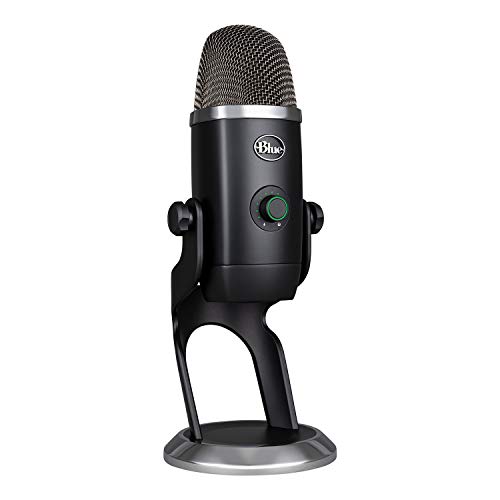
Blue Yeti X Professional USB Condenser Microphone – Features & Prices in Saudi Arabia :
Blue Yeti X Professional USB Condenser Microphone for PC, Mac, Gaming, Recording, Streaming, Podcasting on PC, Desktop Mic with High-Res Metering, LED Lighting, Blue VO!CE Effects – Black
Item Weight
2.8 pounds
Product Dimensions
4.33 x 4.8 x 11.38 inches
Country of Origin
China
ASIN
B07QKQJL17
Item model number
988-000105
Batteries
1 Lithium Ion batteries required.
Date First Available
September 13, 2019
Color Name
Black
Compatible Devices
Personal Computer
Connector Type
USB
Material Type
Metal
Size
One Name
Hardware Platform
PC, Mac
Power Source
Usb Microphone
Processor Count
4
Test video – Blue Yeti X Professional USB Condenser Microphone :
Product highlights :
Questions & Answers – Blue Yeti X Professional USB Condenser Microphone :
Technical specifications – Blue Yeti X Professional USB Condenser Microphone :
Purchase advice :
-
Warranty :
Check the duration of the warranty and also the faults and defects it covers. Is it complete or limited? and What is included in the warranty (parts, repairs or both)?
-
Shipping :
Is delivery offered? And how long does it take to get delivered (Delivery time)
-
Proof of purchase :
Does the shop give you an invoice ?
-
After-sales service :
Do they have an after-sales service to have information about the installation or operation (instructions for use). Also in case of problem, it is the seller who takes charge or you must contact the manufacturer or supplier yourself.
_____________________________
P. R (verified owner) –
Excellent for vlogging, streaming, and podcasting – In terms of versatility, this is probably the best USB only mic for the money. It has 4 polar pickup patterns, a headphone jack, and can be mounted on a boom arm. I don’t believe that a more expensive USB only mic will offer any additional benefits for vloggers, streamers, and podcasters. The price is less when purchased during the holiday season or on Prime Day. I paid $120 plus tax with free shipping.
E. C (verified owner) –
High quality, big and heavy, lots of customization – So I ordered this on a whim to try out for gaming and some zoom meetings. I should preface everything you read from here by saying I game on a laptop so your experience will be different if you are on a desktop.
Z. K (verified owner) –
One design flaw I noticed… – I love this thing so much more than my snowball; the issue is the mount on the bottom and the USB port and headphones right next to it. I got stabilizing support for it; it works great, but no thought. The design threw it partially obstructed, and I had t manhandle the USB. I blame this part on the stabilizing mount advertising it works with and this terrible design flaw on Blue’s end. Otherwise, the quality is excellent. I love it more than any mic I’ve had until now; I just don’t get why it has that slot on the bottom for mounting so close to the USB port. Luckily I use a USB headset, so that headphone port is worthless, but it’s covered up, and a more extended jack might be a pain in the butt to use with this setup.
F. H (verified owner) –
The Mic is pretty awesome – Sounds great, super heavy duty, thing weighs like 20lbs and its solid. Should last forever.
P. R (verified owner) –
Excellent for vlogging, streaming, and podcasting – In terms of versatility, this is probably the best USB only mic for the money. It has 4 polar pickup patterns, a headphone jack, and can be mounted on a boom arm. I don’t believe that a more expensive USB only mic will offer any additional benefits for vloggers, streamers, and podcasters. The price is less when purchased during the holiday season or on Prime Day. I paid $120 plus tax with free shipping.
Z. K (verified owner) –
One design flaw I noticed… – I love this thing so much more than my snowball; the issue is the mount on the bottom and the USB port and headphones right next to it. I got stabilizing support for it; it works great, but no thought. The design threw it partially obstructed, and I had t manhandle the USB. I blame this part on the stabilizing mount advertising it works with and this terrible design flaw on Blue’s end. Otherwise, the quality is excellent. I love it more than any mic I’ve had until now; I just don’t get why it has that slot on the bottom for mounting so close to the USB port. Luckily I use a USB headset, so that headphone port is worthless, but it’s covered up, and a more extended jack might be a pain in the butt to use with this setup.
S. C (verified owner) –
Blue Yeti X Works GREAT With Dragon NaturallySpeaking 15 Individual !!! – I’ve been a Dragon NaturallySpeaking (DNS) user for decades to avoid repetitive stress on my hands from typing and mouse-clicking. I’ve tried all sorts of microphones. By far, the best microphone I’ve ever used is a Shure T 1G-V guitarist clip on headset microphone wired to a belt battery pack/transmitter. But the headset and belt transmitter are a pain to wear, and I can’t eat and drink with the headset on, etc. I’ve had an inexpensive Andrea tabletop array microphone, the Andrea Communications C1-1021450-100 device, which works well but is nowhere near as good as the Shure. But I have to say now, that the Blue Yeti X may be as good or better than the Shure and it gives me a headset/belt pack-free dictating experience. A tip or two. It certainly helps to have a powerful computer as well as a good mic for voice recognition (I have i9-9900K processor, 32 Gb RAM, an NVMe SSD drive, a powerful NVIDIA GPU). I use the Broadcaster 1 profile with the Blue Voice noise cancellation turned off and the NVIDIA AI noise cancellation plug-in download enabled with the Yeti 16 to 18 in. away from my face. A DNS user forum, at which some users also praised Blue Yeti to the skies, also recommends, contrary to Blue Yeti instructions, turning the input gain all the way up and that seems to help a bit. I like the fact that the Blue Yeti X is big and heavy and very hard to knock over accidentally sitting just behind my keyboard (and below monitor level) on my workbench in front of my computer. Lots of times there’s refrigerator or air conditioning noise in the room background and even with the input gain turned all the way up, with the NVIDIA noise cancellation plug-in and the cardioid input setting, none of that noise shows up in test recordings of background noise made with the Windows 11 voice recorder via which my recorded voice sounds crystal-clear. I am able to run the USB cable and move the mic about by holding the wire near the base of the support stand in a way that puts no stress on the USB cable so perhaps reviewers who have complained about the USB cable connection, etc., are not taking the care they should be when repositioning the mic, etc. It would be nicer to have a more flexible USB cable, but my Blue Yeti is going to spend its life sitting motionless in one place. IMHO, it was well worth the cost (and I remember the Shure mic being a LOT more expensive a decade or more ago, probably even pricier now if it were still sold).
F. H (verified owner) –
The Mic is pretty awesome – Sounds great, super heavy duty, thing weighs like 20lbs and its solid. Should last forever.
E. C (verified owner) –
High quality, big and heavy, lots of customization – So I ordered this on a whim to try out for gaming and some zoom meetings. I should preface everything you read from here by saying I game on a laptop so your experience will be different if you are on a desktop.
S. C (verified owner) –
Blue Yeti X Works GREAT With Dragon NaturallySpeaking 15 Individual !!! – I’ve been a Dragon NaturallySpeaking (DNS) user for decades to avoid repetitive stress on my hands from typing and mouse-clicking. I’ve tried all sorts of microphones. By far, the best microphone I’ve ever used is a Shure T 1G-V guitarist clip on headset microphone wired to a belt battery pack/transmitter. But the headset and belt transmitter are a pain to wear, and I can’t eat and drink with the headset on, etc. I’ve had an inexpensive Andrea tabletop array microphone, the Andrea Communications C1-1021450-100 device, which works well but is nowhere near as good as the Shure. But I have to say now, that the Blue Yeti X may be as good or better than the Shure and it gives me a headset/belt pack-free dictating experience. A tip or two. It certainly helps to have a powerful computer as well as a good mic for voice recognition (I have i9-9900K processor, 32 Gb RAM, an NVMe SSD drive, a powerful NVIDIA GPU). I use the Broadcaster 1 profile with the Blue Voice noise cancellation turned off and the NVIDIA AI noise cancellation plug-in download enabled with the Yeti 16 to 18 in. away from my face. A DNS user forum, at which some users also praised Blue Yeti to the skies, also recommends, contrary to Blue Yeti instructions, turning the input gain all the way up and that seems to help a bit. I like the fact that the Blue Yeti X is big and heavy and very hard to knock over accidentally sitting just behind my keyboard (and below monitor level) on my workbench in front of my computer. Lots of times there’s refrigerator or air conditioning noise in the room background and even with the input gain turned all the way up, with the NVIDIA noise cancellation plug-in and the cardioid input setting, none of that noise shows up in test recordings of background noise made with the Windows 11 voice recorder via which my recorded voice sounds crystal-clear. I am able to run the USB cable and move the mic about by holding the wire near the base of the support stand in a way that puts no stress on the USB cable so perhaps reviewers who have complained about the USB cable connection, etc., are not taking the care they should be when repositioning the mic, etc. It would be nicer to have a more flexible USB cable, but my Blue Yeti is going to spend its life sitting motionless in one place. IMHO, it was well worth the cost (and I remember the Shure mic being a LOT more expensive a decade or more ago, probably even pricier now if it were still sold).