Beelink U59 Pro Mini Pc with 11th – Features & Prices in Saudi Arabia :
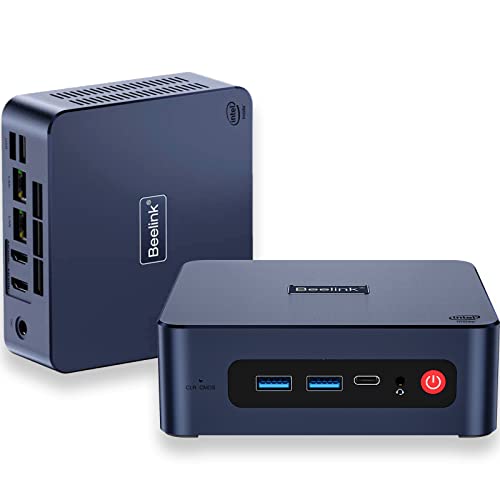
Beelink U59 Pro Mini Pc with 11th Gen 4 Core Processor N5105,16GB DDR4 500GB SSD Mini Desktop Computers, Micro Pc Support Dual LAN/HDMI2.0 4K@60Hz/Type-C/WiFi5/BT4.0 for Home/Office/School
Processor
2.9 GHz celeron
RAM
16 GB DDR4
Hard Drive
500 GB
Graphics Coprocessor
Intel UHD Graphics, 800MHz
Chipset Brand
Intel
Card Description
Integrated
Wireless Type
802.11ac
Number of USB 3.0 Ports
4
Color
Navy Blue
Processor Brand
Intel
Processor Count
4
Computer Memory Type
DDR4 SDRAM
Hard Drive Interface
Serial ATA-600
Test video – Beelink U59 Pro Mini Pc with 11th :
Product highlights :
⭐【Small but Powerful 】U59 Pro mini pc is 4.88*4.44*1.65 inch, space-saving design is the top choice for light OFFICE work. Powered by 11th Gen processor N5105 (4C/4T, 4M Cache, up to 2.9GHz), delivers incredible responsiveness and runs more smoother than J4125, J3455, J4205, N345 etc. Easily switch back and forth between more applications with 16GB+500GB memory configuration. Say goodbye to system delays and crashes.
⭐【UHD Graphics & 4K Triple Display Support】Mini desktop computer equipped with Intel UHD Graphics(up to 800MHz, 24 execution units), brings ultmate picture experience. Dual HDMI ports supports 4k HD video playback and web surfing, or connect to a TV/projector as a home theatre, enjoy a wonderful movie night with your family. Dual HDMI2.0 and Type-C allow you to connect three monitors simultaneously, simplifying and doubling your work efficiency.
⭐【Stable Connection, Fast Transmission】The latest wireless connectivity with 802.11ac and Dual Band WiFi offers speeds up to 450Mbps on the 2.4GHz band & 1300Mbps on the 5GHz, ensures stable, high-speed data transfers. Bluetooth 4.0 connect faster speed, farther coverage. What makes the small pc stand out from other micro pc is the dual Lan design. High-speed wireless connection technology provides a faster internet experience for browsing, streaming and gaming.
⭐【Updated Storage Flexibly】Beelink U59 Pro mini desktop pc has built-in dual channle 16GB DDR4 RAM ( max 32GB expandable, not included), 500GB M.2 SATA SSD (support up to 2TB of M.2 SATA3 SSD 2280/2.5in 7mm SATA3 HDD, not included). What’s more, it has combined with a quiet large fan for maximum energy-saving and heat dissipation.
⭐【Ready to Use & Meet Deeply Needs】Just plug in and use immediately. The mini computer comes with 1*VESA bracket which can hide the mini pcs on the back of the monitor or HDTV and make it like an all-in-one PC, free you from the messy desktop! The small computer is ideal for diverse usage scenarios such as home, entertainment, office work, casual games, online education, digital signage, industry, etc.
Questions & Answers – Beelink U59 Pro Mini Pc with 11th :
➕ What is the price of Beelink U59 Pro Mini Pc with 11th in Saudi Arabia ?
The price of Beelink U59 Pro Mini Pc with 11th in-store is 1090 SAR VAT.
➕ When Beelink U59 Pro Mini Pc with 11th was released ?
The release date was .
➕ What is the price of Beelink U59 Pro Mini Pc with 11th cheap used ?
The price of Beelink U59 Pro Mini Pc with 11th used is 760 SAR VAT.
➕ What are the main characteristics of Beelink U59 Pro Mini Pc with 11th ?
Special specifications :
⭐【Small but Powerful 】U59 Pro mini pc is 4.88*4.44*1.65 inch, space-saving design is the top choice for light OFFICE work. Powered by 11th Gen processor N5105 (4C/4T, 4M Cache, up to 2.9GHz), delivers incredible responsiveness and runs more smoother than J4125, J3455, J4205, N345 etc. Easily switch back and forth between more applications with 16GB+500GB memory configuration. Say goodbye to system delays and crashes.
➕ Is it interesting to buy this product ?
The best people who can answer you are customers who have already bought and tested this product (See Customer Reviews). This product is rated 4.3 / 5 on Amazon.
➕ Where to buy Beelink U59 Pro Mini Pc with 11th in Saudi Arabia ?
Technical specifications – Beelink U59 Pro Mini Pc with 11th :
Specific Uses For Product
Office work, Home Entertainment, Digital signage, Education
Brand
Beelink
Personal computer design type
Mini PC
Operating System
Ubuntu, Linux, W10, W11 Pro
Memory Storage Capacity
500 GB
Ram Memory Installed Size
16 GB
Series
U59 Pro
Included Components
1* VESA bracket, 1*HDMI100CM, 1*HDMI 25CM, 1*Adapter12V/3A 36W, 1*Manual
CPU Model
Celeron
Color
Navy Blue
Purchase advice :
Warranty :
Check the duration of the warranty and also the faults and defects it covers. Is it complete or limited? and What is included in the warranty (parts, repairs or both)?
Shipping :
Is delivery offered? And how long does it take to get delivered (Delivery time)
Proof of purchase :
Does the shop give you an invoice ?
After-sales service :
Do they have an after-sales service to have information about the installation or operation (instructions for use). Also in case of problem, it is the seller who takes charge or you must contact the manufacturer or supplier yourself.
_____________________________
16 reviews for Beelink U59 Pro Mini Pc with 11th
Rated 4 out of 5
O. D (verified owner)–
Tiny, but Mighty Desktop PC – I would like to note that I had to buy this mini pc to get the truth about what materials were in the chassis. I was not surprised to find that the sides and top (below the fabric cover) are plastic. The bottom panel is metal (aluminum) and the mesh vents on each side are metal (steel.) Opening the pc to access the internals requires the removal of 4 screws to remove the bottom plate, but getting to the RAM, NVMe drive, etc. requires a little more effort. You have to remove two screws from the SSD connector, then three more screws that hold down the SSD holder and cooler. Once the screws are out, you must carefully push the SSD connector out of the way and gently remove the cooler and lift it out while being careful not to damage wires connecting the fan to power. You don’t have to disconnect the wire if you are cautious. This provides access to the mainboard and you can see the RAM and the SSD if you want to change anything. I purchased the 32GB unit, so there were 2 each 16GB RAM modules, I understand the 16GB version has 1 each 16GB module, but I can only confirm the configuration of this version. As you can see in the photos, the RAM is Crucial and masked behind the silicone pad is a Kingston NVMe PCIE 4.0 SSD. Reassembling the unit was pretty straightforward, but a magnetic screwdriver is key, since some of the bosses where the screws are inserted are in small access points. Outside the pc is a dark blue color and has a bit of a minimal number of ports. The pc would be significantly improved if they had included USB C ports that were either USB 4.0 of Thunderbolt 4 on the front and rear, also the USB A ports really should all be USB 3.2 now, the two USB 2.0 ports on the back are a low point. At least the USB C port on the front allows for easy access to use with portable drives, etc. I connected the ports to HDMI, Network, USB to a switch with 6 devices, and power to start the computer. The power brick is really a bit of a downer, it weighs 17.4 ounces including the cables while the computer itself weighs just over 16 ounces, so the power supply actually weighs as much as the computer. I have to believe they could have included a power supply that was of adequate size and maybe was one quarter the weight. The power supply looks like overkill to me. On start up you set up the already activated Windows 11 PRO OS, not much in the way of Beelink associated effort. I had to download and install the Kingston SSD software to update the firmware of the SSD, but most everything else was handed by the Windows configuration. There seems to be a little hiccup on the boot up where the Beelink logo comes and goes and comes again, but bootup takes about 26 seconds. I did also have to change the video settings, as it came up in 4K, but at 30 Hz, I was able to change to 60 Hz refresh without an issue, but I make the change. It will take some time living with the computer to know if there are any issues, but initial indications are that it is a capable unit. If it were available barebones, the RAM and SSD would have added around $150 to the cost, so the bare bones price equivalent would have been around $289. The price for the computer on Amazon had a pretty big range for both the 16 and 32 GB units, so it pays to check out all the options. For the usage I plan to use the computer, I think it will be more than adequate. For those of you like me who are concerned about the noise from the computer (it does have two small fans), I can give it good marks even when under demand it just noticeable not objectionable. Due to the size of fans the sound frequency is a bit higher pitched than my other mini pcs, but I can live with it on my desk and when it is 4 or 5 feet away on my computer shelf, it will probably not be an issue at all. I am a Vine Voice, but this computer was a personal purchase.
Rated 4 out of 5
O. D (verified owner)–
Tiny, but Mighty Desktop PC – I would like to note that I had to buy this mini pc to get the truth about what materials were in the chassis. I was not surprised to find that the sides and top (below the fabric cover) are plastic. The bottom panel is metal (aluminum) and the mesh vents on each side are metal (steel.) Opening the pc to access the internals requires the removal of 4 screws to remove the bottom plate, but getting to the RAM, NVMe drive, etc. requires a little more effort. You have to remove two screws from the SSD connector, then three more screws that hold down the SSD holder and cooler. Once the screws are out, you must carefully push the SSD connector out of the way and gently remove the cooler and lift it out while being careful not to damage wires connecting the fan to power. You don’t have to disconnect the wire if you are cautious. This provides access to the mainboard and you can see the RAM and the SSD if you want to change anything. I purchased the 32GB unit, so there were 2 each 16GB RAM modules, I understand the 16GB version has 1 each 16GB module, but I can only confirm the configuration of this version. As you can see in the photos, the RAM is Crucial and masked behind the silicone pad is a Kingston NVMe PCIE 4.0 SSD. Reassembling the unit was pretty straightforward, but a magnetic screwdriver is key, since some of the bosses where the screws are inserted are in small access points. Outside the pc is a dark blue color and has a bit of a minimal number of ports. The pc would be significantly improved if they had included USB C ports that were either USB 4.0 of Thunderbolt 4 on the front and rear, also the USB A ports really should all be USB 3.2 now, the two USB 2.0 ports on the back are a low point. At least the USB C port on the front allows for easy access to use with portable drives, etc. I connected the ports to HDMI, Network, USB to a switch with 6 devices, and power to start the computer. The power brick is really a bit of a downer, it weighs 17.4 ounces including the cables while the computer itself weighs just over 16 ounces, so the power supply actually weighs as much as the computer. I have to believe they could have included a power supply that was of adequate size and maybe was one quarter the weight. The power supply looks like overkill to me. On start up you set up the already activated Windows 11 PRO OS, not much in the way of Beelink associated effort. I had to download and install the Kingston SSD software to update the firmware of the SSD, but most everything else was handed by the Windows configuration. There seems to be a little hiccup on the boot up where the Beelink logo comes and goes and comes again, but bootup takes about 26 seconds. I did also have to change the video settings, as it came up in 4K, but at 30 Hz, I was able to change to 60 Hz refresh without an issue, but I make the change. It will take some time living with the computer to know if there are any issues, but initial indications are that it is a capable unit. If it were available barebones, the RAM and SSD would have added around $150 to the cost, so the bare bones price equivalent would have been around $289. The price for the computer on Amazon had a pretty big range for both the 16 and 32 GB units, so it pays to check out all the options. For the usage I plan to use the computer, I think it will be more than adequate. For those of you like me who are concerned about the noise from the computer (it does have two small fans), I can give it good marks even when under demand it just noticeable not objectionable. Due to the size of fans the sound frequency is a bit higher pitched than my other mini pcs, but I can live with it on my desk and when it is 4 or 5 feet away on my computer shelf, it will probably not be an issue at all. I am a Vine Voice, but this computer was a personal purchase.
Rated 5 out of 5
M. B (verified owner)–
Excellent value for small computer – I purchased this computer to control my home firewall and ad blocker. I ran it up today and was overly surprised at the overall product. So much so I ordered a second one today. It has been running most of the morning and it still very cool to the touch. It has ample resources for doing I would say most home computing. I can not speak for gaming as I am not a gamer. I am Systems Engineer, so I write scripts and work with python. But I would honestly say anyone who need a small footprint computer for home to do “Home Computing” apps this would be ideal. For the price I paid to come with 16GB Ram, 500Gb SSD HDD, Windows 11, well worth it. Hope this helps someone.. Thanks
Rated 5 out of 5
M. T (verified owner)–
very fast and compact – I was skeptical about purchasing this product as my knowledge about these things is limited but it seems to be everything it was advertised as. Lightweight, compact, fast (I went with the 16/256 fan cooled option). I have not heard anything from the unit so far, not even the fan. Overall, I’m pleased with it and would recommend it to others.
Rated 4 out of 5
M. D (verified owner)–
Very Well Made – Works appears well made. Product MANUAL is problematic, confusing, and poorly written.
Rated 5 out of 5
T. I (verified owner)–
Mighty little Powerhouse – This is my first mini-PC and I have been quite impressed. Very nice build quality and setup was not only easy, but the pre-instaaled Win 11 was quick and permitted several options to choice from. The system is very fast and all programs I’ve installed (astrophotography, photo editing, etc.) are working very well.
Rated 5 out of 5
H. B (verified owner)–
Awesoem Plex server – I’m going to give value for money 5, for gaming and tech 3. 1, I don;t game on it. 2 Not much to break.
Rated 5 out of 5
M. B (verified owner)–
Excellent value for small computer – I purchased this computer to control my home firewall and ad blocker. I ran it up today and was overly surprised at the overall product. So much so I ordered a second one today. It has been running most of the morning and it still very cool to the touch. It has ample resources for doing I would say most home computing. I can not speak for gaming as I am not a gamer. I am Systems Engineer, so I write scripts and work with python. But I would honestly say anyone who need a small footprint computer for home to do “Home Computing” apps this would be ideal. For the price I paid to come with 16GB Ram, 500Gb SSD HDD, Windows 11, well worth it. Hope this helps someone.. Thanks
Rated 5 out of 5
T. I (verified owner)–
Mighty little Powerhouse – This is my first mini-PC and I have been quite impressed. Very nice build quality and setup was not only easy, but the pre-instaaled Win 11 was quick and permitted several options to choice from. The system is very fast and all programs I’ve installed (astrophotography, photo editing, etc.) are working very well.
Rated 5 out of 5
J. J (verified owner)–
Good for Ubunto – I got this as a gift for family, to install Ubuntu and RetroPie. I went with Beelink on recommendation from the youtuber ETA Prime, though the specific mini PC he recommended was a little out of my budget. Luckily Beelink offered a lower cost version without a i7 or i5, and has a Celeron processor. It works great. With the price of Raspberry Pi at the moment, this was a viable alternative. It was slightly more expensive to get this over a Raspberry Pi, case with fan, and SD memory. So at the moment until Raspberry Pi comes down in price, or until there’s a single board, affordable alternative, this is a great value.
Rated 5 out of 5
J. J (verified owner)–
Good for Ubunto – I got this as a gift for family, to install Ubuntu and RetroPie. I went with Beelink on recommendation from the youtuber ETA Prime, though the specific mini PC he recommended was a little out of my budget. Luckily Beelink offered a lower cost version without a i7 or i5, and has a Celeron processor. It works great. With the price of Raspberry Pi at the moment, this was a viable alternative. It was slightly more expensive to get this over a Raspberry Pi, case with fan, and SD memory. So at the moment until Raspberry Pi comes down in price, or until there’s a single board, affordable alternative, this is a great value.
Rated 5 out of 5
M. T (verified owner)–
very fast and compact – I was skeptical about purchasing this product as my knowledge about these things is limited but it seems to be everything it was advertised as. Lightweight, compact, fast (I went with the 16/256 fan cooled option). I have not heard anything from the unit so far, not even the fan. Overall, I’m pleased with it and would recommend it to others.
Rated 5 out of 5
O. J (verified owner)–
It’s working like a champ, got the job done, I think I’ll go have a fit in celebration….. – So far have acquired several of these for replacements for older workstations, no worries so far. Low power consumption, run cool, use one as a media player…works fine
Rated 4 out of 5
M. D (verified owner)–
Very Well Made – Works appears well made. Product MANUAL is problematic, confusing, and poorly written.
Rated 5 out of 5
H. B (verified owner)–
Awesoem Plex server – I’m going to give value for money 5, for gaming and tech 3. 1, I don;t game on it. 2 Not much to break.
Rated 5 out of 5
O. J (verified owner)–
It’s working like a champ, got the job done, I think I’ll go have a fit in celebration….. – So far have acquired several of these for replacements for older workstations, no worries so far. Low power consumption, run cool, use one as a media player…works fine


O. D (verified owner) –
Tiny, but Mighty Desktop PC – I would like to note that I had to buy this mini pc to get the truth about what materials were in the chassis. I was not surprised to find that the sides and top (below the fabric cover) are plastic. The bottom panel is metal (aluminum) and the mesh vents on each side are metal (steel.) Opening the pc to access the internals requires the removal of 4 screws to remove the bottom plate, but getting to the RAM, NVMe drive, etc. requires a little more effort. You have to remove two screws from the SSD connector, then three more screws that hold down the SSD holder and cooler. Once the screws are out, you must carefully push the SSD connector out of the way and gently remove the cooler and lift it out while being careful not to damage wires connecting the fan to power. You don’t have to disconnect the wire if you are cautious. This provides access to the mainboard and you can see the RAM and the SSD if you want to change anything. I purchased the 32GB unit, so there were 2 each 16GB RAM modules, I understand the 16GB version has 1 each 16GB module, but I can only confirm the configuration of this version. As you can see in the photos, the RAM is Crucial and masked behind the silicone pad is a Kingston NVMe PCIE 4.0 SSD. Reassembling the unit was pretty straightforward, but a magnetic screwdriver is key, since some of the bosses where the screws are inserted are in small access points. Outside the pc is a dark blue color and has a bit of a minimal number of ports. The pc would be significantly improved if they had included USB C ports that were either USB 4.0 of Thunderbolt 4 on the front and rear, also the USB A ports really should all be USB 3.2 now, the two USB 2.0 ports on the back are a low point. At least the USB C port on the front allows for easy access to use with portable drives, etc. I connected the ports to HDMI, Network, USB to a switch with 6 devices, and power to start the computer. The power brick is really a bit of a downer, it weighs 17.4 ounces including the cables while the computer itself weighs just over 16 ounces, so the power supply actually weighs as much as the computer. I have to believe they could have included a power supply that was of adequate size and maybe was one quarter the weight. The power supply looks like overkill to me. On start up you set up the already activated Windows 11 PRO OS, not much in the way of Beelink associated effort. I had to download and install the Kingston SSD software to update the firmware of the SSD, but most everything else was handed by the Windows configuration. There seems to be a little hiccup on the boot up where the Beelink logo comes and goes and comes again, but bootup takes about 26 seconds. I did also have to change the video settings, as it came up in 4K, but at 30 Hz, I was able to change to 60 Hz refresh without an issue, but I make the change. It will take some time living with the computer to know if there are any issues, but initial indications are that it is a capable unit. If it were available barebones, the RAM and SSD would have added around $150 to the cost, so the bare bones price equivalent would have been around $289. The price for the computer on Amazon had a pretty big range for both the 16 and 32 GB units, so it pays to check out all the options. For the usage I plan to use the computer, I think it will be more than adequate. For those of you like me who are concerned about the noise from the computer (it does have two small fans), I can give it good marks even when under demand it just noticeable not objectionable. Due to the size of fans the sound frequency is a bit higher pitched than my other mini pcs, but I can live with it on my desk and when it is 4 or 5 feet away on my computer shelf, it will probably not be an issue at all. I am a Vine Voice, but this computer was a personal purchase.
O. D (verified owner) –
Tiny, but Mighty Desktop PC – I would like to note that I had to buy this mini pc to get the truth about what materials were in the chassis. I was not surprised to find that the sides and top (below the fabric cover) are plastic. The bottom panel is metal (aluminum) and the mesh vents on each side are metal (steel.) Opening the pc to access the internals requires the removal of 4 screws to remove the bottom plate, but getting to the RAM, NVMe drive, etc. requires a little more effort. You have to remove two screws from the SSD connector, then three more screws that hold down the SSD holder and cooler. Once the screws are out, you must carefully push the SSD connector out of the way and gently remove the cooler and lift it out while being careful not to damage wires connecting the fan to power. You don’t have to disconnect the wire if you are cautious. This provides access to the mainboard and you can see the RAM and the SSD if you want to change anything. I purchased the 32GB unit, so there were 2 each 16GB RAM modules, I understand the 16GB version has 1 each 16GB module, but I can only confirm the configuration of this version. As you can see in the photos, the RAM is Crucial and masked behind the silicone pad is a Kingston NVMe PCIE 4.0 SSD. Reassembling the unit was pretty straightforward, but a magnetic screwdriver is key, since some of the bosses where the screws are inserted are in small access points. Outside the pc is a dark blue color and has a bit of a minimal number of ports. The pc would be significantly improved if they had included USB C ports that were either USB 4.0 of Thunderbolt 4 on the front and rear, also the USB A ports really should all be USB 3.2 now, the two USB 2.0 ports on the back are a low point. At least the USB C port on the front allows for easy access to use with portable drives, etc. I connected the ports to HDMI, Network, USB to a switch with 6 devices, and power to start the computer. The power brick is really a bit of a downer, it weighs 17.4 ounces including the cables while the computer itself weighs just over 16 ounces, so the power supply actually weighs as much as the computer. I have to believe they could have included a power supply that was of adequate size and maybe was one quarter the weight. The power supply looks like overkill to me. On start up you set up the already activated Windows 11 PRO OS, not much in the way of Beelink associated effort. I had to download and install the Kingston SSD software to update the firmware of the SSD, but most everything else was handed by the Windows configuration. There seems to be a little hiccup on the boot up where the Beelink logo comes and goes and comes again, but bootup takes about 26 seconds. I did also have to change the video settings, as it came up in 4K, but at 30 Hz, I was able to change to 60 Hz refresh without an issue, but I make the change. It will take some time living with the computer to know if there are any issues, but initial indications are that it is a capable unit. If it were available barebones, the RAM and SSD would have added around $150 to the cost, so the bare bones price equivalent would have been around $289. The price for the computer on Amazon had a pretty big range for both the 16 and 32 GB units, so it pays to check out all the options. For the usage I plan to use the computer, I think it will be more than adequate. For those of you like me who are concerned about the noise from the computer (it does have two small fans), I can give it good marks even when under demand it just noticeable not objectionable. Due to the size of fans the sound frequency is a bit higher pitched than my other mini pcs, but I can live with it on my desk and when it is 4 or 5 feet away on my computer shelf, it will probably not be an issue at all. I am a Vine Voice, but this computer was a personal purchase.
M. B (verified owner) –
Excellent value for small computer – I purchased this computer to control my home firewall and ad blocker. I ran it up today and was overly surprised at the overall product. So much so I ordered a second one today. It has been running most of the morning and it still very cool to the touch. It has ample resources for doing I would say most home computing. I can not speak for gaming as I am not a gamer. I am Systems Engineer, so I write scripts and work with python. But I would honestly say anyone who need a small footprint computer for home to do “Home Computing” apps this would be ideal. For the price I paid to come with 16GB Ram, 500Gb SSD HDD, Windows 11, well worth it. Hope this helps someone.. Thanks
M. T (verified owner) –
very fast and compact – I was skeptical about purchasing this product as my knowledge about these things is limited but it seems to be everything it was advertised as. Lightweight, compact, fast (I went with the 16/256 fan cooled option). I have not heard anything from the unit so far, not even the fan. Overall, I’m pleased with it and would recommend it to others.
M. D (verified owner) –
Very Well Made – Works appears well made. Product MANUAL is problematic, confusing, and poorly written.
T. I (verified owner) –
Mighty little Powerhouse – This is my first mini-PC and I have been quite impressed. Very nice build quality and setup was not only easy, but the pre-instaaled Win 11 was quick and permitted several options to choice from. The system is very fast and all programs I’ve installed (astrophotography, photo editing, etc.) are working very well.
H. B (verified owner) –
Awesoem Plex server – I’m going to give value for money 5, for gaming and tech 3. 1, I don;t game on it. 2 Not much to break.
M. B (verified owner) –
Excellent value for small computer – I purchased this computer to control my home firewall and ad blocker. I ran it up today and was overly surprised at the overall product. So much so I ordered a second one today. It has been running most of the morning and it still very cool to the touch. It has ample resources for doing I would say most home computing. I can not speak for gaming as I am not a gamer. I am Systems Engineer, so I write scripts and work with python. But I would honestly say anyone who need a small footprint computer for home to do “Home Computing” apps this would be ideal. For the price I paid to come with 16GB Ram, 500Gb SSD HDD, Windows 11, well worth it. Hope this helps someone.. Thanks
T. I (verified owner) –
Mighty little Powerhouse – This is my first mini-PC and I have been quite impressed. Very nice build quality and setup was not only easy, but the pre-instaaled Win 11 was quick and permitted several options to choice from. The system is very fast and all programs I’ve installed (astrophotography, photo editing, etc.) are working very well.
J. J (verified owner) –
Good for Ubunto – I got this as a gift for family, to install Ubuntu and RetroPie. I went with Beelink on recommendation from the youtuber ETA Prime, though the specific mini PC he recommended was a little out of my budget. Luckily Beelink offered a lower cost version without a i7 or i5, and has a Celeron processor. It works great. With the price of Raspberry Pi at the moment, this was a viable alternative. It was slightly more expensive to get this over a Raspberry Pi, case with fan, and SD memory. So at the moment until Raspberry Pi comes down in price, or until there’s a single board, affordable alternative, this is a great value.
J. J (verified owner) –
Good for Ubunto – I got this as a gift for family, to install Ubuntu and RetroPie. I went with Beelink on recommendation from the youtuber ETA Prime, though the specific mini PC he recommended was a little out of my budget. Luckily Beelink offered a lower cost version without a i7 or i5, and has a Celeron processor. It works great. With the price of Raspberry Pi at the moment, this was a viable alternative. It was slightly more expensive to get this over a Raspberry Pi, case with fan, and SD memory. So at the moment until Raspberry Pi comes down in price, or until there’s a single board, affordable alternative, this is a great value.
M. T (verified owner) –
very fast and compact – I was skeptical about purchasing this product as my knowledge about these things is limited but it seems to be everything it was advertised as. Lightweight, compact, fast (I went with the 16/256 fan cooled option). I have not heard anything from the unit so far, not even the fan. Overall, I’m pleased with it and would recommend it to others.
O. J (verified owner) –
It’s working like a champ, got the job done, I think I’ll go have a fit in celebration….. – So far have acquired several of these for replacements for older workstations, no worries so far. Low power consumption, run cool, use one as a media player…works fine
M. D (verified owner) –
Very Well Made – Works appears well made. Product MANUAL is problematic, confusing, and poorly written.
H. B (verified owner) –
Awesoem Plex server – I’m going to give value for money 5, for gaming and tech 3. 1, I don;t game on it. 2 Not much to break.
O. J (verified owner) –
It’s working like a champ, got the job done, I think I’ll go have a fit in celebration….. – So far have acquired several of these for replacements for older workstations, no worries so far. Low power consumption, run cool, use one as a media player…works fine