Beelink GTR5 Mini PC AMD Ryzen 9 – Features & Prices in Saudi Arabia :
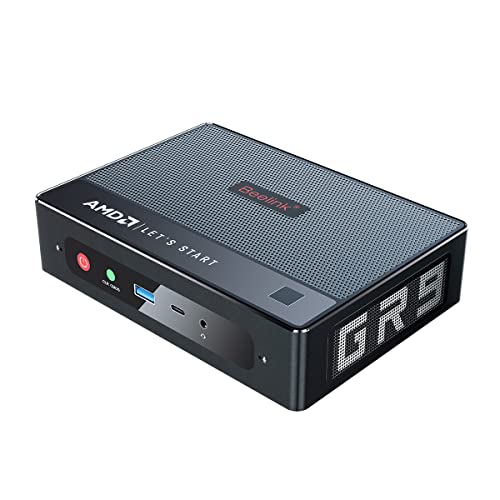
Beelink GTR5 Mini PC AMD Ryzen 9 5900hx 8C/16T W11 Pro Mini Computer, 32GB RAM DDR4 500GB NVMe SSD, HDMI & DP & USB-C 4K@60Hz Output, 2X 2.5G RJ45, 2X M.2 SSD Slot, WiFi 6E, AMD Radeon Tower PC
Processor
4.6 GHz ryzen_9
RAM
32 GB DDR4
Hard Drive
500 GB SSD
Graphics Coprocessor
AMD Radeon Graphics 8core
Chipset Brand
AMD
Card Description
Integrated
Graphics Card Ram Size
512.00
Wireless Type
Bluetooth, 802.11a/b/g/n/ac, 802.11ax
Number of USB 2.0 Ports
2
Number of USB 3.0 Ports
3
Processor Count
8
Computer Memory Type
DDR4 SDRAM
Flash Memory Size
512 GB
Hard Drive Interface
ATA
Hard Drive Rotational Speed
2200.00
Test video – Beelink GTR5 Mini PC AMD Ryzen 9 :
Product highlights :
【High Performance】Powered with AMD Ryzen 9 5900hx CPU(8 core/16 thread, up to 4.6GHz) and AMD Radeon Graphics and dual fans(23-62dB,10cm distance). Preinstalled with W11 Pro 64bit.
【Triple Display Output】GTR5 Mini PC comes with Integrated AMD Radeon Graphics(8 Core 2100MHz), 4K@60Hz triple display output via HDMI and DP and USB-C Port, which enable you to multi-task with ease.Stream 4K video, edit media, work from home, or finish your homework.
【Large Capacity】 Pre-installed 32GB DDR4(2x SODIMM slot, up to 64GB) + 500GB Kingsdon 2280 NVMe SSD(2 x M.2 2280 SSD slot, M.2 SATA slot is free, up to 4TB). 2.5 inch SATA HDD slots can up to 2TB. Sufficient capacity,Run design software smoothly, enjoy large-scale movies,photos and games.
【Superior Connectivity】GTR5 mini PC adopts WiFi 6E and Bluetooth 5.0. Comes with dual 2500Mbps Lan Port, allowing you to use more networks such as software routers (OpenWRT / DD-WRT / Tomato etc.), firewalls, NAT, network isolation etc.
【More Functions and Warranty】Support fingerprint unlock and Cortana control(include dual DMIC). And also supports RTC Wake up/Wake on Lan/Auto Power on (BIOS setting)/Network boot.1-year worry-free warranty and 24 Hours customer service.
Questions & Answers – Beelink GTR5 Mini PC AMD Ryzen 9 :
➕ What is the price of Beelink GTR5 Mini PC AMD Ryzen 9 in Saudi Arabia ?
The price of Beelink GTR5 Mini PC AMD Ryzen 9 in-store is 3200 SAR VAT.
➕ When Beelink GTR5 Mini PC AMD Ryzen 9 was released ?
The release date was .
➕ What is the price of Beelink GTR5 Mini PC AMD Ryzen 9 cheap used ?
The price of Beelink GTR5 Mini PC AMD Ryzen 9 used is 2240 SAR VAT.
➕ What are the main characteristics of Beelink GTR5 Mini PC AMD Ryzen 9 ?
Special specifications :
【High Performance】Powered with AMD Ryzen 9 5900hx CPU(8 core/16 thread, up to 4.6GHz) and AMD Radeon Graphics and dual fans(23-62dB,10cm distance). Preinstalled with W11 Pro 64bit.
➕ Is it interesting to buy this product ?
The best people who can answer you are customers who have already bought and tested this product (See Customer Reviews). This product is rated 4.4 / 5 on Amazon.
➕ Where to buy Beelink GTR5 Mini PC AMD Ryzen 9 in Saudi Arabia ?
Technical specifications – Beelink GTR5 Mini PC AMD Ryzen 9 :
Brand
Beelink
Personal computer design type
Mini PC
Operating System
W11 Pro
Memory Storage Capacity
500 GB
Ram Memory Installed Size
32 GB
Series
GTR5
CPU Model
Ryzen 9
Color
Black
CPU Manufacturer
AMD
Wireless network technology
Wi-Fi
Purchase advice :
Warranty :
Check the duration of the warranty and also the faults and defects it covers. Is it complete or limited? and What is included in the warranty (parts, repairs or both)?
Shipping :
Is delivery offered? And how long does it take to get delivered (Delivery time)
Proof of purchase :
Does the shop give you an invoice ?
After-sales service :
Do they have an after-sales service to have information about the installation or operation (instructions for use). Also in case of problem, it is the seller who takes charge or you must contact the manufacturer or supplier yourself.
_____________________________

10 reviews for Beelink GTR5 Mini PC AMD Ryzen 9
Rated 4 out of 5
F. F (verified owner)–
Excellent Little Windows PC For The Money With One Annoying Flaw (Not Deal Breaker) – This is a very competitively priced PC with fast components in a small case that takes up a tiny amount of room on your desktop or none if you mount it to the back of your monitor. So far my wife loves it since the hardware is fast and its WIFI chip support WIFI 6E, so her internet speed is significantly faster and more dependable than her previous PC. Note that at first there was an AMD driver issue that caused it to re-boot with that used to be called a blue screen of death but after I applied all the updates I could find via Windows 11 Update and from the BeeLink website, those driver issues went away. The one annoying thing that has not gone away is that if you stop using the PC for a while, it will go into sleep mode no matter what you tell it to do in the Windows 11 power settings. I set the power settings to keep the PC on always (never sleep) but the PC ignores the Windows 11 settings. I looked at the BIOS settings and found nothing that controls when the PC sleeps. So, as near as I can tell this PC is hard-wired to go to sleep after 10 minutes or so with no user input from the mouse or keyboard. Mind you it does come out of sleep fairly fast which makes this behavior an annoyance and not a deal-breaker but its much slower than if it never entered sleep mode in the first place. I still recommend this PC but that forced sleep behavior is something you need to be OK with.
Rated 4 out of 5
N. G (verified owner)–
Worth the money (after a few upgrades) – So I had this product for going on 3-4 weeks and so far I am impressed. Let me preface this review by stating that I did upgrade this machine by swapping out the 500 GB M.2 NVME drive with a 2 TB M.2 NVME drive and added a 2.5 inch 2 TB SATA3 SSD drive. Reason being is that the 2nd M.2 slot in this machine is for a M.2 Sata SSD drive which offers the same iOPs speed as a standard 2.5 inch SATA3 SSD drive and since the 2.5 inch drive (same storage size) is a bit cheaper, I went that route.
Rated 5 out of 5
M. F (verified owner)–
I love this platform with only a few caveats – I purchased four of these units for my home lab running ESXi 6.7 and 7.0. The NIC’s on the GTR’s are using AMD Ryzen 9 CPU with I love. Low power and cool running. It also uses the RealTek 2.5gb chipset which is troublesome for ESXi 6.7 but can be overcome with a custom ISO to include the RealTek drivers. The ESXi 7.0 fails completely as RealTek has not taken the initiative to develop updated drivers for ESXi 7 or 8. It would appear they are rolling over to Marvell/Aquantia and Intel juggernauts to own this ESXi Home Lab market – which is really disappointing. With the advent of edge computing and distributed computing ESXi can still play a huge role and these units fill a great void. I purchased G-SKill 32gb memory to max out the system to 64gb RAM, and I upgraded the NVME drive to 2TB Samsump 890 Pro and added an M.2 SATA and a 2.5 inch SATA, too. All in I’ve built a 16 threaded ESXi host with 4tb of SSD storage and 64gb RAM for less than 1000.00. This same server in a rackmount configuration would be very loud, very hot and 7 times more expensive to place anywhere other than in a datacenter. I have also installed windows 10 and windows 11 on these and they run beautifully. The DP and HDMI video both work great. Bee-Link tech support will respond to requests for help but don’t expect any level of expertise to engage and answer your questions. So far, its only rudimentary collection of information which is not really helpful at all, though they are always responsive and polite, so I’ve decided to present the Miss-Congeniality award to Bee-Link Tech Support. I hope they never lose that aspect of their tech support.
Rated 4 out of 5
N. G (verified owner)–
Worth the money (after a few upgrades) – So I had this product for going on 3-4 weeks and so far I am impressed. Let me preface this review by stating that I did upgrade this machine by swapping out the 500 GB M.2 NVME drive with a 2 TB M.2 NVME drive and added a 2.5 inch 2 TB SATA3 SSD drive. Reason being is that the 2nd M.2 slot in this machine is for a M.2 Sata SSD drive which offers the same iOPs speed as a standard 2.5 inch SATA3 SSD drive and since the 2.5 inch drive (same storage size) is a bit cheaper, I went that route.
Rated 5 out of 5
Z. N (verified owner)–
Better than expected overall. – CONs:
Rated 4 out of 5
I. N (verified owner)–
Not bad for the price – Not a bad PC for the price. It did require some tinkering of settings to get it to work with my TV as the monitor. The one thing I am not happy about is that the description says the memory is 2x8gb and it’s actually only 1x16gb. It helped me justify the extra expense of the added 16gb memory stick, but only because they work better with dual channel than single channel.
Rated 4 out of 5
I. N (verified owner)–
Not bad for the price – Not a bad PC for the price. It did require some tinkering of settings to get it to work with my TV as the monitor. The one thing I am not happy about is that the description says the memory is 2x8gb and it’s actually only 1x16gb. It helped me justify the extra expense of the added 16gb memory stick, but only because they work better with dual channel than single channel.
Rated 5 out of 5
M. F (verified owner)–
I love this platform with only a few caveats – I purchased four of these units for my home lab running ESXi 6.7 and 7.0. The NIC’s on the GTR’s are using AMD Ryzen 9 CPU with I love. Low power and cool running. It also uses the RealTek 2.5gb chipset which is troublesome for ESXi 6.7 but can be overcome with a custom ISO to include the RealTek drivers. The ESXi 7.0 fails completely as RealTek has not taken the initiative to develop updated drivers for ESXi 7 or 8. It would appear they are rolling over to Marvell/Aquantia and Intel juggernauts to own this ESXi Home Lab market – which is really disappointing. With the advent of edge computing and distributed computing ESXi can still play a huge role and these units fill a great void. I purchased G-SKill 32gb memory to max out the system to 64gb RAM, and I upgraded the NVME drive to 2TB Samsump 890 Pro and added an M.2 SATA and a 2.5 inch SATA, too. All in I’ve built a 16 threaded ESXi host with 4tb of SSD storage and 64gb RAM for less than 1000.00. This same server in a rackmount configuration would be very loud, very hot and 7 times more expensive to place anywhere other than in a datacenter. I have also installed windows 10 and windows 11 on these and they run beautifully. The DP and HDMI video both work great. Bee-Link tech support will respond to requests for help but don’t expect any level of expertise to engage and answer your questions. So far, its only rudimentary collection of information which is not really helpful at all, though they are always responsive and polite, so I’ve decided to present the Miss-Congeniality award to Bee-Link Tech Support. I hope they never lose that aspect of their tech support.
Rated 4 out of 5
F. F (verified owner)–
Excellent Little Windows PC For The Money With One Annoying Flaw (Not Deal Breaker) – This is a very competitively priced PC with fast components in a small case that takes up a tiny amount of room on your desktop or none if you mount it to the back of your monitor. So far my wife loves it since the hardware is fast and its WIFI chip support WIFI 6E, so her internet speed is significantly faster and more dependable than her previous PC. Note that at first there was an AMD driver issue that caused it to re-boot with that used to be called a blue screen of death but after I applied all the updates I could find via Windows 11 Update and from the BeeLink website, those driver issues went away. The one annoying thing that has not gone away is that if you stop using the PC for a while, it will go into sleep mode no matter what you tell it to do in the Windows 11 power settings. I set the power settings to keep the PC on always (never sleep) but the PC ignores the Windows 11 settings. I looked at the BIOS settings and found nothing that controls when the PC sleeps. So, as near as I can tell this PC is hard-wired to go to sleep after 10 minutes or so with no user input from the mouse or keyboard. Mind you it does come out of sleep fairly fast which makes this behavior an annoyance and not a deal-breaker but its much slower than if it never entered sleep mode in the first place. I still recommend this PC but that forced sleep behavior is something you need to be OK with.
F. F (verified owner) –
Excellent Little Windows PC For The Money With One Annoying Flaw (Not Deal Breaker) – This is a very competitively priced PC with fast components in a small case that takes up a tiny amount of room on your desktop or none if you mount it to the back of your monitor. So far my wife loves it since the hardware is fast and its WIFI chip support WIFI 6E, so her internet speed is significantly faster and more dependable than her previous PC. Note that at first there was an AMD driver issue that caused it to re-boot with that used to be called a blue screen of death but after I applied all the updates I could find via Windows 11 Update and from the BeeLink website, those driver issues went away. The one annoying thing that has not gone away is that if you stop using the PC for a while, it will go into sleep mode no matter what you tell it to do in the Windows 11 power settings. I set the power settings to keep the PC on always (never sleep) but the PC ignores the Windows 11 settings. I looked at the BIOS settings and found nothing that controls when the PC sleeps. So, as near as I can tell this PC is hard-wired to go to sleep after 10 minutes or so with no user input from the mouse or keyboard. Mind you it does come out of sleep fairly fast which makes this behavior an annoyance and not a deal-breaker but its much slower than if it never entered sleep mode in the first place. I still recommend this PC but that forced sleep behavior is something you need to be OK with.
N. G (verified owner) –
Worth the money (after a few upgrades) – So I had this product for going on 3-4 weeks and so far I am impressed. Let me preface this review by stating that I did upgrade this machine by swapping out the 500 GB M.2 NVME drive with a 2 TB M.2 NVME drive and added a 2.5 inch 2 TB SATA3 SSD drive. Reason being is that the 2nd M.2 slot in this machine is for a M.2 Sata SSD drive which offers the same iOPs speed as a standard 2.5 inch SATA3 SSD drive and since the 2.5 inch drive (same storage size) is a bit cheaper, I went that route.
M. F (verified owner) –
I love this platform with only a few caveats – I purchased four of these units for my home lab running ESXi 6.7 and 7.0. The NIC’s on the GTR’s are using AMD Ryzen 9 CPU with I love. Low power and cool running. It also uses the RealTek 2.5gb chipset which is troublesome for ESXi 6.7 but can be overcome with a custom ISO to include the RealTek drivers. The ESXi 7.0 fails completely as RealTek has not taken the initiative to develop updated drivers for ESXi 7 or 8. It would appear they are rolling over to Marvell/Aquantia and Intel juggernauts to own this ESXi Home Lab market – which is really disappointing. With the advent of edge computing and distributed computing ESXi can still play a huge role and these units fill a great void. I purchased G-SKill 32gb memory to max out the system to 64gb RAM, and I upgraded the NVME drive to 2TB Samsump 890 Pro and added an M.2 SATA and a 2.5 inch SATA, too. All in I’ve built a 16 threaded ESXi host with 4tb of SSD storage and 64gb RAM for less than 1000.00. This same server in a rackmount configuration would be very loud, very hot and 7 times more expensive to place anywhere other than in a datacenter. I have also installed windows 10 and windows 11 on these and they run beautifully. The DP and HDMI video both work great. Bee-Link tech support will respond to requests for help but don’t expect any level of expertise to engage and answer your questions. So far, its only rudimentary collection of information which is not really helpful at all, though they are always responsive and polite, so I’ve decided to present the Miss-Congeniality award to Bee-Link Tech Support. I hope they never lose that aspect of their tech support.
N. G (verified owner) –
Worth the money (after a few upgrades) – So I had this product for going on 3-4 weeks and so far I am impressed. Let me preface this review by stating that I did upgrade this machine by swapping out the 500 GB M.2 NVME drive with a 2 TB M.2 NVME drive and added a 2.5 inch 2 TB SATA3 SSD drive. Reason being is that the 2nd M.2 slot in this machine is for a M.2 Sata SSD drive which offers the same iOPs speed as a standard 2.5 inch SATA3 SSD drive and since the 2.5 inch drive (same storage size) is a bit cheaper, I went that route.
Z. N (verified owner) –
Better than expected overall. – CONs:
I. N (verified owner) –
Not bad for the price – Not a bad PC for the price. It did require some tinkering of settings to get it to work with my TV as the monitor. The one thing I am not happy about is that the description says the memory is 2x8gb and it’s actually only 1x16gb. It helped me justify the extra expense of the added 16gb memory stick, but only because they work better with dual channel than single channel.
I. N (verified owner) –
Not bad for the price – Not a bad PC for the price. It did require some tinkering of settings to get it to work with my TV as the monitor. The one thing I am not happy about is that the description says the memory is 2x8gb and it’s actually only 1x16gb. It helped me justify the extra expense of the added 16gb memory stick, but only because they work better with dual channel than single channel.
M. F (verified owner) –
I love this platform with only a few caveats – I purchased four of these units for my home lab running ESXi 6.7 and 7.0. The NIC’s on the GTR’s are using AMD Ryzen 9 CPU with I love. Low power and cool running. It also uses the RealTek 2.5gb chipset which is troublesome for ESXi 6.7 but can be overcome with a custom ISO to include the RealTek drivers. The ESXi 7.0 fails completely as RealTek has not taken the initiative to develop updated drivers for ESXi 7 or 8. It would appear they are rolling over to Marvell/Aquantia and Intel juggernauts to own this ESXi Home Lab market – which is really disappointing. With the advent of edge computing and distributed computing ESXi can still play a huge role and these units fill a great void. I purchased G-SKill 32gb memory to max out the system to 64gb RAM, and I upgraded the NVME drive to 2TB Samsump 890 Pro and added an M.2 SATA and a 2.5 inch SATA, too. All in I’ve built a 16 threaded ESXi host with 4tb of SSD storage and 64gb RAM for less than 1000.00. This same server in a rackmount configuration would be very loud, very hot and 7 times more expensive to place anywhere other than in a datacenter. I have also installed windows 10 and windows 11 on these and they run beautifully. The DP and HDMI video both work great. Bee-Link tech support will respond to requests for help but don’t expect any level of expertise to engage and answer your questions. So far, its only rudimentary collection of information which is not really helpful at all, though they are always responsive and polite, so I’ve decided to present the Miss-Congeniality award to Bee-Link Tech Support. I hope they never lose that aspect of their tech support.
F. F (verified owner) –
Excellent Little Windows PC For The Money With One Annoying Flaw (Not Deal Breaker) – This is a very competitively priced PC with fast components in a small case that takes up a tiny amount of room on your desktop or none if you mount it to the back of your monitor. So far my wife loves it since the hardware is fast and its WIFI chip support WIFI 6E, so her internet speed is significantly faster and more dependable than her previous PC. Note that at first there was an AMD driver issue that caused it to re-boot with that used to be called a blue screen of death but after I applied all the updates I could find via Windows 11 Update and from the BeeLink website, those driver issues went away. The one annoying thing that has not gone away is that if you stop using the PC for a while, it will go into sleep mode no matter what you tell it to do in the Windows 11 power settings. I set the power settings to keep the PC on always (never sleep) but the PC ignores the Windows 11 settings. I looked at the BIOS settings and found nothing that controls when the PC sleeps. So, as near as I can tell this PC is hard-wired to go to sleep after 10 minutes or so with no user input from the mouse or keyboard. Mind you it does come out of sleep fairly fast which makes this behavior an annoyance and not a deal-breaker but its much slower than if it never entered sleep mode in the first place. I still recommend this PC but that forced sleep behavior is something you need to be OK with.
Z. N (verified owner) –
Better than expected overall. – CONs: