ASUS Zenbook 15.6″ FHD 2-in-1 Touchscreen Business – Features & Prices in Saudi Arabia :
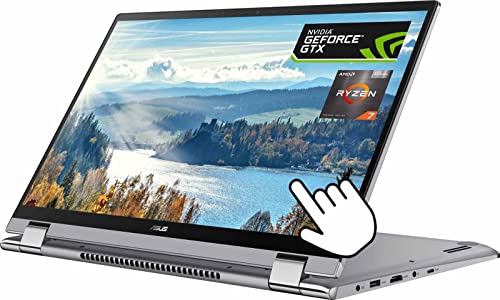
ASUS Zenbook 15.6″ FHD 2-in-1 Touchscreen Business Laptop, AMD Ryzen 7 5700U(Beat i7-1180G7, Up to 4.3GHz), 8GB RAM, 1TB PCIe SSD, NVIDIA GeForce MX450, Windows 11 Home, Gray, w/GM Accessories
Standing screen display size
15.6 Inches
Max Screen Resolution
1920 x 1080 Pixels
Processor
4.3 GHz ryzen_7
RAM
8 GB DDR4
Hard Drive
1 TB SSD
Graphics Coprocessor
NVIDIA GeForce MX450
Chipset Brand
NVIDIA
Card Description
Integrated
Wireless Type
Bluetooth, 802.11ac
Number of USB 3.0 Ports
3
Processor Count
8
Computer Memory Type
DDR4 SDRAM
Hard Drive Interface
PCIE x 16
Hard Drive Rotational Speed
7200 RPM
Test video – ASUS Zenbook 15.6″ FHD 2-in-1 Touchscreen Business :
Product highlights :
【15.6″ Full HD touch screen for hands-on control】You deserve to see more, and in rich, crystal clarity. With a 15.6″ IPS touch screen in Full HD(1920 x 1080), you can do just that, no matter which mode you choose. The narrow-bezel design offers more real estate for amazing images. A backlit keyboard makes keys visible in low light environments.
【Powerful Processor】AMD Ryzen7 5700U processor up to 4.3 GHz max boost clock, 8 MB L3 cache, 8 cores, 16 threads. The possibilities are infinite. With AMD Radeon Graphics enable the modern features and applications you need for creating, gaming, or educating.
【8GB LPDDR4X RAM, Upgraded to 1TB PCIe SSD】Substantial high-bandwidth RAM to smoothly run your games and photo- and video-editing applications, as well as multiple programs and browser tabs all at once.Save files fast and store more data. With massive amounts of storage and advanced communication power, PCI-e SSDs are great for major gaming applications, multiple servers, daily backups, and more.
【Convertible Convenience】Work the way you want. The 360-degree convertible use modes enable you to present or share your screen in more convenient and collaborative ways, while also allowing you work in areas with limited space such as on a plane or train. Anti-glare screen protect your eyes.
【Outstanding Graphics】NVIDIA GeForce MX450 graphics provides solid image quality for Internet use, movies, basic photo editing and casual gaming.
Questions & Answers – ASUS Zenbook 15.6″ FHD 2-in-1 Touchscreen Business :
➕ What is the price of ASUS Zenbook 15.6
The price of ASUS Zenbook 15.6″ FHD 2-in-1 Touchscreen Business in-store is 2840 SAR VAT.
➕ When ASUS Zenbook 15.6
The release date was .
➕ What is the price of ASUS Zenbook 15.6
The price of ASUS Zenbook 15.6″ FHD 2-in-1 Touchscreen Business used is 1980 SAR VAT.
➕ What are the main characteristics of ASUS Zenbook 15.6
Special specifications :
【15.6″ Full HD touch screen for hands-on control】You deserve to see more, and in rich, crystal clarity. With a 15.6″ IPS touch screen in Full HD(1920 x 1080), you can do just that, no matter which mode you choose. The narrow-bezel design offers more real estate for amazing images. A backlit keyboard makes keys visible in low light environments.
➕ Is it interesting to buy this product ?
The best people who can answer you are customers who have already bought and tested this product (See Customer Reviews). This product is rated 3 / 5 on Amazon.
Technical specifications – ASUS Zenbook 15.6″ FHD 2-in-1 Touchscreen Business :
Brand
ASUS
Series
ASUS Zenbook
Screen Size
15.6 Inches
Color
Gray
Hard Disk Size
1 TB
CPU Model
Ryzen 7
Ram Memory Installed Size
8 GB
Operating System
Windows 11 Home
Card Description
Integrated
Graphics Coprocessor
NVIDIA GeForce MX450
Purchase advice :
Warranty :
Check the duration of the warranty and also the faults and defects it covers. Is it complete or limited? and What is included in the warranty (parts, repairs or both)?
Shipping :
Is delivery offered? And how long does it take to get delivered (Delivery time)
Proof of purchase :
Does the shop give you an invoice ?
After-sales service :
Do they have an after-sales service to have information about the installation or operation (instructions for use). Also in case of problem, it is the seller who takes charge or you must contact the manufacturer or supplier yourself.
_____________________________
4 reviews for ASUS Zenbook 15.6″ FHD 2-in-1 Touchscreen Business
Rated 1 out of 5
O. C (verified owner)–
Monitor goes black on every keystroke – Screen quality is a joke. Screen goes black with each keystroke and flashes black on perimeter of monitor. I’ve had laptop for 3 weeks, ive used it for 2 weeks. It wasn’t dropped, no water exposure, etc. I’ve been a HUGE fan of Asus. BUT, I can’t get help from Asus and can’t register the new laptop. Asus techs tried 2x to reset system-neither worked and I was told by Asus to return item to Amazon.
Rated 1 out of 5
B. O (verified owner)–
Who made the unthinkable decision to change industry standard key placement? – The computer came quickly and is as described in the description. However, the problem occurred when I opened the box and turned the computer on to begin setting it up, which of course then you can’t return the computer, to my horror I started using the keyboard and found the 10 key punch pad was not as it should be. After looking at pictures of many computers online for 3 days & nights, just know it is not the same as seeing one in person, and sadly from the small pics offered, they often do not generally give a great close-up picture of the keyboard, that created the horrible decision of this computer I finally chose. I previously had an ASUS that after 6 yrs had to be replaced. I was very happy with the one I had before so I wanted another ASUS. I am a bookkeeper, so I use the 10 key punch for about 70% of the keystrokes I make. I did make sure this computer had the 10 key pad to the right of the letters, my enormous error was not looking to see the exact location of all the keys for the 10 key pad, but then who would think anyone would dare change the industry standard for 10 key punch. I have been using 10 key punch on laptops and desktop keyboards for probably 40 years and would never dream they would not be in the correct location. I will never make this mistake again, and am miserably stuck with a laptop that I have now have had to buy a separate usb, 10 key punch attachment, making one more thing I have to carry around, as I do not have the desire or time to learn a new key placement for home but use the normal standard one for the office. So buyer beware, if the 10 key pad is something you use a lot, do not choose this laptop!
Rated 1 out of 5
O. C (verified owner)–
Monitor goes black on every keystroke – Screen quality is a joke. Screen goes black with each keystroke and flashes black on perimeter of monitor. I’ve had laptop for 3 weeks, ive used it for 2 weeks. It wasn’t dropped, no water exposure, etc. I’ve been a HUGE fan of Asus. BUT, I can’t get help from Asus and can’t register the new laptop. Asus techs tried 2x to reset system-neither worked and I was told by Asus to return item to Amazon.
Rated 1 out of 5
B. O (verified owner)–
Who made the unthinkable decision to change industry standard key placement? – The computer came quickly and is as described in the description. However, the problem occurred when I opened the box and turned the computer on to begin setting it up, which of course then you can’t return the computer, to my horror I started using the keyboard and found the 10 key punch pad was not as it should be. After looking at pictures of many computers online for 3 days & nights, just know it is not the same as seeing one in person, and sadly from the small pics offered, they often do not generally give a great close-up picture of the keyboard, that created the horrible decision of this computer I finally chose. I previously had an ASUS that after 6 yrs had to be replaced. I was very happy with the one I had before so I wanted another ASUS. I am a bookkeeper, so I use the 10 key punch for about 70% of the keystrokes I make. I did make sure this computer had the 10 key pad to the right of the letters, my enormous error was not looking to see the exact location of all the keys for the 10 key pad, but then who would think anyone would dare change the industry standard for 10 key punch. I have been using 10 key punch on laptops and desktop keyboards for probably 40 years and would never dream they would not be in the correct location. I will never make this mistake again, and am miserably stuck with a laptop that I have now have had to buy a separate usb, 10 key punch attachment, making one more thing I have to carry around, as I do not have the desire or time to learn a new key placement for home but use the normal standard one for the office. So buyer beware, if the 10 key pad is something you use a lot, do not choose this laptop!


O. C (verified owner) –
Monitor goes black on every keystroke – Screen quality is a joke. Screen goes black with each keystroke and flashes black on perimeter of monitor. I’ve had laptop for 3 weeks, ive used it for 2 weeks. It wasn’t dropped, no water exposure, etc. I’ve been a HUGE fan of Asus. BUT, I can’t get help from Asus and can’t register the new laptop. Asus techs tried 2x to reset system-neither worked and I was told by Asus to return item to Amazon.
B. O (verified owner) –
Who made the unthinkable decision to change industry standard key placement? – The computer came quickly and is as described in the description. However, the problem occurred when I opened the box and turned the computer on to begin setting it up, which of course then you can’t return the computer, to my horror I started using the keyboard and found the 10 key punch pad was not as it should be. After looking at pictures of many computers online for 3 days & nights, just know it is not the same as seeing one in person, and sadly from the small pics offered, they often do not generally give a great close-up picture of the keyboard, that created the horrible decision of this computer I finally chose. I previously had an ASUS that after 6 yrs had to be replaced. I was very happy with the one I had before so I wanted another ASUS. I am a bookkeeper, so I use the 10 key punch for about 70% of the keystrokes I make. I did make sure this computer had the 10 key pad to the right of the letters, my enormous error was not looking to see the exact location of all the keys for the 10 key pad, but then who would think anyone would dare change the industry standard for 10 key punch. I have been using 10 key punch on laptops and desktop keyboards for probably 40 years and would never dream they would not be in the correct location. I will never make this mistake again, and am miserably stuck with a laptop that I have now have had to buy a separate usb, 10 key punch attachment, making one more thing I have to carry around, as I do not have the desire or time to learn a new key placement for home but use the normal standard one for the office. So buyer beware, if the 10 key pad is something you use a lot, do not choose this laptop!
O. C (verified owner) –
Monitor goes black on every keystroke – Screen quality is a joke. Screen goes black with each keystroke and flashes black on perimeter of monitor. I’ve had laptop for 3 weeks, ive used it for 2 weeks. It wasn’t dropped, no water exposure, etc. I’ve been a HUGE fan of Asus. BUT, I can’t get help from Asus and can’t register the new laptop. Asus techs tried 2x to reset system-neither worked and I was told by Asus to return item to Amazon.
B. O (verified owner) –
Who made the unthinkable decision to change industry standard key placement? – The computer came quickly and is as described in the description. However, the problem occurred when I opened the box and turned the computer on to begin setting it up, which of course then you can’t return the computer, to my horror I started using the keyboard and found the 10 key punch pad was not as it should be. After looking at pictures of many computers online for 3 days & nights, just know it is not the same as seeing one in person, and sadly from the small pics offered, they often do not generally give a great close-up picture of the keyboard, that created the horrible decision of this computer I finally chose. I previously had an ASUS that after 6 yrs had to be replaced. I was very happy with the one I had before so I wanted another ASUS. I am a bookkeeper, so I use the 10 key punch for about 70% of the keystrokes I make. I did make sure this computer had the 10 key pad to the right of the letters, my enormous error was not looking to see the exact location of all the keys for the 10 key pad, but then who would think anyone would dare change the industry standard for 10 key punch. I have been using 10 key punch on laptops and desktop keyboards for probably 40 years and would never dream they would not be in the correct location. I will never make this mistake again, and am miserably stuck with a laptop that I have now have had to buy a separate usb, 10 key punch attachment, making one more thing I have to carry around, as I do not have the desire or time to learn a new key placement for home but use the normal standard one for the office. So buyer beware, if the 10 key pad is something you use a lot, do not choose this laptop!