
Description
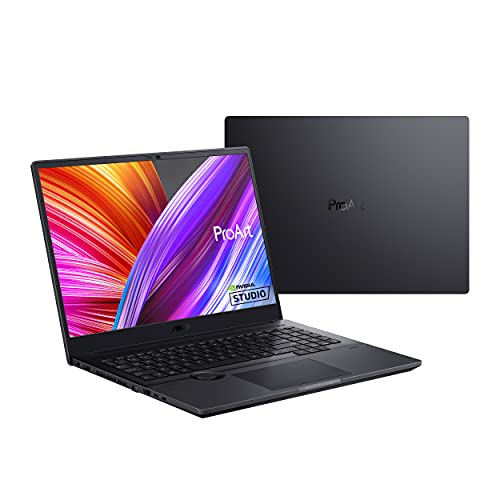
ASUS ProArt StudioBook 16 Laptop, 16” 2560×1600 – Features & Prices in Saudi Arabia :
ASUS ProArt StudioBook 16 Laptop, 16” 2560×1600 120Hz Display, AMD Ryzen 7, 32GB DDR4, 1TB PCIe SSD, Nvidia Geforce RTX 3060, Windows 11 Home, H5600QM-AH78, Star Black
Standing screen display size
16 Inches
Screen Resolution
2560 x 1600 pixels
Max Screen Resolution
2560 x 1600 Pixels
Processor
3.2 GHz amd_ryzen_7_5800h
RAM
32 GB DDR4
Memory Speed
3200 MHz
Hard Drive
1 TB SSD
Graphics Coprocessor
NVIDIA GeForce RTX 3060
Chipset Brand
NVIDIA
Card Description
RTX 3060
Wireless Type
Bluetooth, 802.11ac
Number of USB 3.0 Ports
3
Flash Memory Size
1 TB
Optical Drive Type
No Optical Drive
Voltage
20 Volts
Batteries
1 Lithium Ion batteries required. (included)
Test video – ASUS ProArt StudioBook 16 Laptop, 16” 2560×1600 :
Product highlights :
Questions & Answers – ASUS ProArt StudioBook 16 Laptop, 16” 2560×1600 :
Technical specifications – ASUS ProArt StudioBook 16 Laptop, 16” 2560×1600 :
Brand
ASUS
Series
ASUS ProArt StudioBook 16
Screen Size
16 Inches
Color
Star Black
Hard Disk Size
1 TB
CPU Model
AMD Ryzen 7 5800H
Ram Memory Installed Size
32 GB
Operating System
Windows 11 Home
Card Description
RTX 3060
Graphics Coprocessor
NVIDIA GeForce RTX 3060
Purchase advice :
-
Warranty :
Check the duration of the warranty and also the faults and defects it covers. Is it complete or limited? and What is included in the warranty (parts, repairs or both)?
-
Shipping :
Is delivery offered? And how long does it take to get delivered (Delivery time)
-
Proof of purchase :
Does the shop give you an invoice ?
-
After-sales service :
Do they have an after-sales service to have information about the installation or operation (instructions for use). Also in case of problem, it is the seller who takes charge or you must contact the manufacturer or supplier yourself.
_____________________________
K. S (verified owner) –
Asus ProArt StudioBook with AMD Ryzen 9 and 64 GB RAM!! Epic Beast!!! – After waiting 6 months for the Ryzen 9 5900HX equipped ASUS ProArt StudioBook to ship, I finally received my pre-order back in May. One of the first people to get it, I was pleasantly surprised to see I got a 2 TB model with 64 GB of RAM despite the product description. I’ve been using it now for 4 months, editing photos and video. WoW!! What a laptop! Beautiful 16 inch OLED screen with power house processor and RAM inside its military spec, black metal case. James Bond approved!!
R. G (verified owner) –
Gorgeous screen – It’s big and heavy…the case is sturdy aluminum. Booted up fingerprint scanner and facial recognition make logging in easy. The keyboard is easy to read and the keys have just the right feel. When it booted the taskbar wouldn’t load after the first update but after all the updates it works fine.
R. G (verified owner) –
Gorgeous screen – It’s big and heavy…the case is sturdy aluminum. Booted up fingerprint scanner and facial recognition make logging in easy. The keyboard is easy to read and the keys have just the right feel. When it booted the taskbar wouldn’t load after the first update but after all the updates it works fine.
L. I (verified owner) –
Nice Laptop so far – This is my preliminary review. I will post more when I’m able to try out the dial with Adobe.
P. O (verified owner) –
Dial can actually be used for almost anything unlike most reviews say – Got this Laptop in June 2022. Been using it since then and been very happy with it. Seems like a lot of the reviews online state that the dial is only able to be used for photoshop and whichever apps are preprogrammed. The dial can actually be used with any program that makes use of hotkeys. I was able to setup the dial for use with Solidworks and it helps improve my workflow tremendously. The way to do it is by opening the ProArt Creator Hub and going to the control settings tab on the left, and then there will be a dropdown menu with the current apps the dial is setup for, and when opened give the option to add other apps. You can then make a custom dial profile for the app, no need to wait for ASUS to do it for you.
L. I (verified owner) –
Nice Laptop so far – This is my preliminary review. I will post more when I’m able to try out the dial with Adobe.
K. S (verified owner) –
Asus ProArt StudioBook with AMD Ryzen 9 and 64 GB RAM!! Epic Beast!!! – After waiting 6 months for the Ryzen 9 5900HX equipped ASUS ProArt StudioBook to ship, I finally received my pre-order back in May. One of the first people to get it, I was pleasantly surprised to see I got a 2 TB model with 64 GB of RAM despite the product description. I’ve been using it now for 4 months, editing photos and video. WoW!! What a laptop! Beautiful 16 inch OLED screen with power house processor and RAM inside its military spec, black metal case. James Bond approved!!
P. O (verified owner) –
Dial can actually be used for almost anything unlike most reviews say – Got this Laptop in June 2022. Been using it since then and been very happy with it. Seems like a lot of the reviews online state that the dial is only able to be used for photoshop and whichever apps are preprogrammed. The dial can actually be used with any program that makes use of hotkeys. I was able to setup the dial for use with Solidworks and it helps improve my workflow tremendously. The way to do it is by opening the ProArt Creator Hub and going to the control settings tab on the left, and then there will be a dropdown menu with the current apps the dial is setup for, and when opened give the option to add other apps. You can then make a custom dial profile for the app, no need to wait for ASUS to do it for you.