
Description
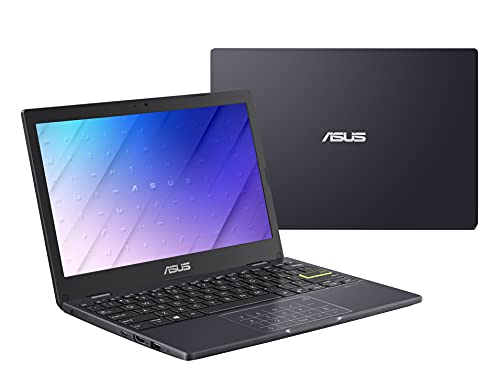
ASUS Laptop L210 11.6” Ultra Thin, Intel – Features & Prices in Saudi Arabia :
ASUS Laptop L210 11.6” Ultra Thin, Intel Celeron N4020 Processor, 4GB RAM, 64GB eMMC Storage, Windows 10 Home in S Mode with One Year of Office 365 Personal, L210MA-DB02,Star Black
Standing screen display size
11.6 Inches
Screen Resolution
1366 X 768 pixels
Max Screen Resolution
1366 x 768 Pixels
Processor
2.8 GHz celeron_n4020
RAM
4 GB DDR4
Memory Speed
2.8 GHz
Hard Drive
64 GB Emmc
Graphics Coprocessor
Intel UHD Graphics 600
Chipset Brand
Intel
Card Description
Integrated
Wireless Type
Bluetooth, 802.11ac
Number of USB 2.0 Ports
1
Number of USB 3.0 Ports
2
Optical Drive Type
No Drive
Power Source
Battery Powered
Voltage
19 Volts
Batteries
1 Lithium Ion batteries required. (included)
Test video – ASUS Laptop L210 11.6” Ultra Thin, Intel :
Product highlights :
Questions & Answers – ASUS Laptop L210 11.6” Ultra Thin, Intel :
Technical specifications – ASUS Laptop L210 11.6” Ultra Thin, Intel :
Brand
ASUS
Series
L210
Screen Size
11.6 Inches
Color
Star Black
Hard Disk Size
64 GB
CPU Model
Celeron N4020
Ram Memory Installed Size
4 GB
Operating System
Windows 10 Home
Card Description
Integrated
Graphics Coprocessor
Intel UHD Graphics 600
Purchase advice :
-
Warranty :
Check the duration of the warranty and also the faults and defects it covers. Is it complete or limited? and What is included in the warranty (parts, repairs or both)?
-
Shipping :
Is delivery offered? And how long does it take to get delivered (Delivery time)
-
Proof of purchase :
Does the shop give you an invoice ?
-
After-sales service :
Do they have an after-sales service to have information about the installation or operation (instructions for use). Also in case of problem, it is the seller who takes charge or you must contact the manufacturer or supplier yourself.
_____________________________
R. D (verified owner) –
Not Windows 10 – It’s a fine little device, but I bought it because the description said it would have Windows 10 instead of Windows 11. It has Windows 11. Otherwise, perfectly good deal if you know what to expect for the money.
C. K (verified owner) –
Good little computer – The computer works fine. So far memory hasn’t been a problem. When I’m done with files, I transfer them to a memory stick so as to keep the computer memory freed up. Using a cloud program also helps to manage memory. It surfs the internet just fine and streams videos well. The speakers are a little low in volume, but it works plenty loud enough on headphones and it pairs with my Bluetooth speaker just fine. It also pairs with my cell phone, and I can transfer files as well between them. I have Open Office loaded in along with a few other programs and it handles them fine. I’ve had Asus computers before and this works as well if not better than my regular sized Asus but more portable and the memory chips instead of hard drive makes it function quicker. The numeric mouse pad is a good idea, but if you forget to turn the number pad off it can cause problems when using it as a mouse pad. The only thing that I miss is that it cannot do alt. codes. I have to use the character map to get some of the foreign letters and special characters that I need to use once in a while. For basic use this is an excellent computer, good for the internet, and basic home, school or business functions.
R. D (verified owner) –
Not Windows 10 – It’s a fine little device, but I bought it because the description said it would have Windows 10 instead of Windows 11. It has Windows 11. Otherwise, perfectly good deal if you know what to expect for the money.
A. G (verified owner) –
False advertising – Doesn’t come with SD card port as advertised
D. K (verified owner) –
Great for what I needed it for – I have 2 PC workstations that I work from in my home offices but I wanted a small, lightweight laptop to take with me to the library (where I do book editing). I often use this when I work from my dining room table so I can keep an eye on football games on the weekend. I will likely keep it in S-mode, which has worked just fine for me so far. The number pad has not been a nuisance at all, although having the delete key right next to the power on/off button did lead to some accidents where I turned off the computer by mistake (I solved that issue by putting a tiny red dot sticky on the delete key). On the whole, I’m very pleased with it.
P. K (verified owner) –
light weight – good for taking to client’s for meetings – First off – this isn’t my main computer I primarily use it to take to meetings for presentations or note taking. When you are going from client to client all day, the fact this is very light weight makes a huge difference. I keep all my client’s work separate on external drives or cloud drive for confidentiality and store very little in this machine. Not enough space. It works well though to cast to their large monitors and pull up the documents via flash, cloud or external drive. I can fit everything I need into a very small, light weight bag and be efficient.
K. F (verified owner) –
Not everything is accurate or fully described – It is worth the money for sure but know what you read on here is not entirely accurate & even contradicts itself. One person wrote in the Q&A that is has a micro-sd slot, it does not- so I have no clue what that person is talking about. In the listed things it has it contradicts itself from that to the written ad- There are 2 USB ports total- apparently one is 3.0 & one is 2.0 (in the listed ports it says it has two 3.0 ports & one 2.0 USB port, so it contradicts itself.. it DEFINITELY only has one 3.0 USB)- you are never going to get that speed on a laptop where most of the hard drive is already taken up when you boot it up combined with 4 memory- with apps it will not allow you to delete. If you purchase this, I highly suggest you also buy an external hard drive bc there is NO SPACE on the hard drive. Also, don’t be too excited about Microsoft office- you CAN’T use it unless you are willing to have it ALL backed up to your cloud.. so if you write any sensitive documents or docs you dont mind the whole world sees bc it is online & can so easily be hacked- I mean there is no point google offers the same thing for free w googledocs & it does not expire in a year… so I was VERY dissapointed that I CAN’T do anything on it wo having it all backed up online. And if you want to add any software or hardware you are going to have to download it from online. I purchased this to have a PC & I do not see how it is ANY different than a chromebook. I wanted to be able to do things offline with it & CAN’T. You are downloading apps just like on a chromebook which is what i was trying to stay away from. I have 4 chromebooks already & never would have purchased this had I known these things so I hope this is helpful to anyone who was looking for what I was- a PC not something that requires the Internet for any and everything and is just apps like a phone is. I really wanted this for data transfer & to securely open files wo someone able to hack in.. it is NOT good for that, but if that does not concern you, then it is a fine for you just buy an external hard drive simultaneously- there is NO hard drive space.
H. Z (verified owner) –
If you number crunch…… – The ultrathin is a nicely made mobile computer, but unless you really need a dedicated number pad, I don’t recommend it as the computer for you. Even using a .BAT file to disable it, the OS still pops-up a message about needing to go to the Microsoft Store to get a app. Real bother. I’ve enlisted the use of a wireless mouse when not on the go.
P. K (verified owner) –
light weight – good for taking to client’s for meetings – First off – this isn’t my main computer I primarily use it to take to meetings for presentations or note taking. When you are going from client to client all day, the fact this is very light weight makes a huge difference. I keep all my client’s work separate on external drives or cloud drive for confidentiality and store very little in this machine. Not enough space. It works well though to cast to their large monitors and pull up the documents via flash, cloud or external drive. I can fit everything I need into a very small, light weight bag and be efficient.
F. E (verified owner) –
Nice little machine. – Although I found 64 GB of storage not to be enough for my uses, I did open it up and added a 512 SDD and switched Windows 11 (I upgraded) to that drive and put a Linux distribution that I like (Lubuntu) onto the smaller drive that the machine came with so I can dual boot it. Lubuntu zips along however Windows, since it’s sort of a bloated Operating System, is slower which I always expect. Battery life is fine (at least 8 hours) for my needs. Screen looks good since 720 dpi is fine for small screens. All in all I am glad I made the purchase to supplement all our other machines.
H. Z (verified owner) –
If you number crunch…… – The ultrathin is a nicely made mobile computer, but unless you really need a dedicated number pad, I don’t recommend it as the computer for you. Even using a .BAT file to disable it, the OS still pops-up a message about needing to go to the Microsoft Store to get a app. Real bother. I’ve enlisted the use of a wireless mouse when not on the go.
K. F (verified owner) –
Not everything is accurate or fully described – It is worth the money for sure but know what you read on here is not entirely accurate & even contradicts itself. One person wrote in the Q&A that is has a micro-sd slot, it does not- so I have no clue what that person is talking about. In the listed things it has it contradicts itself from that to the written ad- There are 2 USB ports total- apparently one is 3.0 & one is 2.0 (in the listed ports it says it has two 3.0 ports & one 2.0 USB port, so it contradicts itself.. it DEFINITELY only has one 3.0 USB)- you are never going to get that speed on a laptop where most of the hard drive is already taken up when you boot it up combined with 4 memory- with apps it will not allow you to delete. If you purchase this, I highly suggest you also buy an external hard drive bc there is NO SPACE on the hard drive. Also, don’t be too excited about Microsoft office- you CAN’T use it unless you are willing to have it ALL backed up to your cloud.. so if you write any sensitive documents or docs you dont mind the whole world sees bc it is online & can so easily be hacked- I mean there is no point google offers the same thing for free w googledocs & it does not expire in a year… so I was VERY dissapointed that I CAN’T do anything on it wo having it all backed up online. And if you want to add any software or hardware you are going to have to download it from online. I purchased this to have a PC & I do not see how it is ANY different than a chromebook. I wanted to be able to do things offline with it & CAN’T. You are downloading apps just like on a chromebook which is what i was trying to stay away from. I have 4 chromebooks already & never would have purchased this had I known these things so I hope this is helpful to anyone who was looking for what I was- a PC not something that requires the Internet for any and everything and is just apps like a phone is. I really wanted this for data transfer & to securely open files wo someone able to hack in.. it is NOT good for that, but if that does not concern you, then it is a fine for you just buy an external hard drive simultaneously- there is NO hard drive space.
C. K (verified owner) –
Good little computer – The computer works fine. So far memory hasn’t been a problem. When I’m done with files, I transfer them to a memory stick so as to keep the computer memory freed up. Using a cloud program also helps to manage memory. It surfs the internet just fine and streams videos well. The speakers are a little low in volume, but it works plenty loud enough on headphones and it pairs with my Bluetooth speaker just fine. It also pairs with my cell phone, and I can transfer files as well between them. I have Open Office loaded in along with a few other programs and it handles them fine. I’ve had Asus computers before and this works as well if not better than my regular sized Asus but more portable and the memory chips instead of hard drive makes it function quicker. The numeric mouse pad is a good idea, but if you forget to turn the number pad off it can cause problems when using it as a mouse pad. The only thing that I miss is that it cannot do alt. codes. I have to use the character map to get some of the foreign letters and special characters that I need to use once in a while. For basic use this is an excellent computer, good for the internet, and basic home, school or business functions.
A. G (verified owner) –
False advertising – Doesn’t come with SD card port as advertised
F. E (verified owner) –
Nice little machine. – Although I found 64 GB of storage not to be enough for my uses, I did open it up and added a 512 SDD and switched Windows 11 (I upgraded) to that drive and put a Linux distribution that I like (Lubuntu) onto the smaller drive that the machine came with so I can dual boot it. Lubuntu zips along however Windows, since it’s sort of a bloated Operating System, is slower which I always expect. Battery life is fine (at least 8 hours) for my needs. Screen looks good since 720 dpi is fine for small screens. All in all I am glad I made the purchase to supplement all our other machines.
D. K (verified owner) –
Great for what I needed it for – I have 2 PC workstations that I work from in my home offices but I wanted a small, lightweight laptop to take with me to the library (where I do book editing). I often use this when I work from my dining room table so I can keep an eye on football games on the weekend. I will likely keep it in S-mode, which has worked just fine for me so far. The number pad has not been a nuisance at all, although having the delete key right next to the power on/off button did lead to some accidents where I turned off the computer by mistake (I solved that issue by putting a tiny red dot sticky on the delete key). On the whole, I’m very pleased with it.