
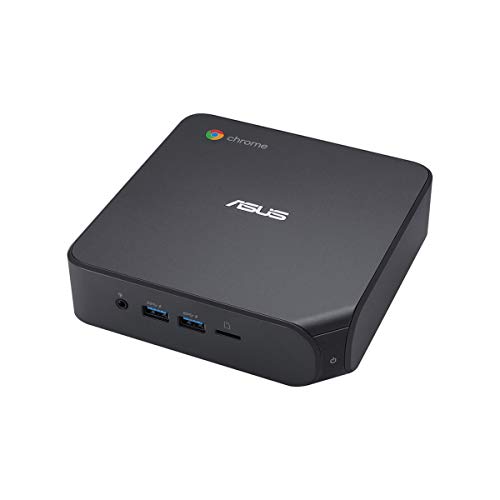
Description
ASUS Chromebox4 with Intel Core i5-10210U, 8GB – Features & Prices in Saudi Arabia :
ASUS Chromebox4 with Intel Core i5-10210U, 8GB RAM, M.2 128GB SSD Storage, Power/DisplayPort Over Type C, Dual HDMI, Gigabit LAN, WiFi 6, MicroSD Card Reader, VESA Mount, Chrome OS
Processor
1.6 GHz core_i5_10210u
RAM
8 GB DDR4
Memory Speed
2666 MHz
Hard Drive
128 GB SSD
Chipset Brand
Intel
Card Description
Integrated
Wireless Type
Bluetooth, 802.11ax
Number of USB 2.0 Ports
2
Number of USB 3.0 Ports
4
Processor Brand
Intel
Processor Count
1
Computer Memory Type
SODIMM
Hard Drive Interface
PCIE x 4
Batteries
Lithium Ion batteries required. (included)
Test video – ASUS Chromebox4 with Intel Core i5-10210U, 8GB :
Product highlights :
Questions & Answers – ASUS Chromebox4 with Intel Core i5-10210U, 8GB :
Technical specifications – ASUS Chromebox4 with Intel Core i5-10210U, 8GB :
Specific Uses For Product
Multimedia, Personal, Business
Brand
ASUS
Personal computer design type
Mini PC
Operating System
Chrome OS
Memory Storage Capacity
128 GB
Ram Memory Installed Size
8 GB
Series
CHROMEBOX4-G5043UN
Included Components
POWER CORD, VESA MOUNT
CPU Model
Core i5-10210U
Color
Black
Purchase advice :
-
Warranty :
Check the duration of the warranty and also the faults and defects it covers. Is it complete or limited? and What is included in the warranty (parts, repairs or both)?
-
Shipping :
Is delivery offered? And how long does it take to get delivered (Delivery time)
-
Proof of purchase :
Does the shop give you an invoice ?
-
After-sales service :
Do they have an after-sales service to have information about the installation or operation (instructions for use). Also in case of problem, it is the seller who takes charge or you must contact the manufacturer or supplier yourself.
_____________________________
L. J (verified owner) –
A perfect fit for this web surfer! – Just received this Chromebox 4 a few hours ago! Everything necessary was in the box. The toughest part of the set up was getting that tiny, little last screw into the VESA mount device (those suckers are tiny!) I attached my Ethernet cable into the Chromebox 4 LAN port, power up, and there it is! I have a brand new 27″ Philips 4K monitor connected to it; marvelous picture! Having Verizon FiOs provide my ultra-fast network makes my home computing complete! I am a general web surfer with some hours on YouTube and the occasional Netflix show. Having the 10th generation i5 will keep me fast and neat for quite a few years. I do recommend this small-form Chromebox to anyone who just wants great speed with enough wiggle room for some added apps and photos.
L. E (verified owner) –
Great space saver – I bought this Chromebox for three reasons: my desktop went kaput! and was well out of warranty period, I wanted to move off Microsoft, and I moved to dual monitors. I am completely satisfied with my purchase. The setup was quick and easy with no need for disks or upgrade hassle. You can put the unit almost anywhere. I have the unit on my desk and it hardly takes up any space. Moving to Chrome takes some getting used to, but it is pretty straightforward. I have used MS Office for many, many years and the reconfiguration of those all those files is proving easier than I expected. There are still some essential SW products that are not written for Chrome (ie., TurboTax) which I’m hoping will come along someday so I don’t have to keep hassling with MS-based computer. I am receiving a warranty extension from ASUS for providing this feedback.
O. E (verified owner) –
A good general purpose chromebox – I use this chromebox for general office work with Google apps, browsing the web, etc. It suits these needs perfectly. Boots up fast and Chrome is easy to use, once you get used to the idea that you don’t store everything on your computer anymore. It is definitely geared towards cloud computing. Works well with USB hard drives, SSD drives and thumb drives for archiving files and backing up photos from Google Photos.
O. A (verified owner) –
Fantastic laptop. – I bought 60pcs pf the laptop.will buy more if needs be.
O. E (verified owner) –
A good general purpose chromebox – I use this chromebox for general office work with Google apps, browsing the web, etc. It suits these needs perfectly. Boots up fast and Chrome is easy to use, once you get used to the idea that you don’t store everything on your computer anymore. It is definitely geared towards cloud computing. Works well with USB hard drives, SSD drives and thumb drives for archiving files and backing up photos from Google Photos.
L. E (verified owner) –
Great space saver – I bought this Chromebox for three reasons: my desktop went kaput! and was well out of warranty period, I wanted to move off Microsoft, and I moved to dual monitors. I am completely satisfied with my purchase. The setup was quick and easy with no need for disks or upgrade hassle. You can put the unit almost anywhere. I have the unit on my desk and it hardly takes up any space. Moving to Chrome takes some getting used to, but it is pretty straightforward. I have used MS Office for many, many years and the reconfiguration of those all those files is proving easier than I expected. There are still some essential SW products that are not written for Chrome (ie., TurboTax) which I’m hoping will come along someday so I don’t have to keep hassling with MS-based computer. I am receiving a warranty extension from ASUS for providing this feedback.
O. A (verified owner) –
Fantastic laptop. – I bought 60pcs pf the laptop.will buy more if needs be.
L. J (verified owner) –
A perfect fit for this web surfer! – Just received this Chromebox 4 a few hours ago! Everything necessary was in the box. The toughest part of the set up was getting that tiny, little last screw into the VESA mount device (those suckers are tiny!) I attached my Ethernet cable into the Chromebox 4 LAN port, power up, and there it is! I have a brand new 27″ Philips 4K monitor connected to it; marvelous picture! Having Verizon FiOs provide my ultra-fast network makes my home computing complete! I am a general web surfer with some hours on YouTube and the occasional Netflix show. Having the 10th generation i5 will keep me fast and neat for quite a few years. I do recommend this small-form Chromebox to anyone who just wants great speed with enough wiggle room for some added apps and photos.