
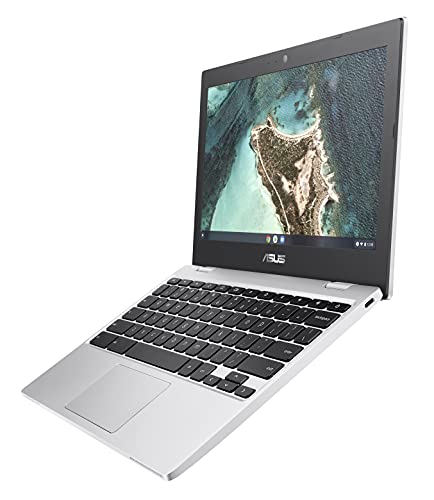
Description
ASUS Chromebook CX1, 11.6″ HD NanoEdge Display, – Features & Prices in Saudi Arabia :
ASUS Chromebook CX1, 11.6″ HD NanoEdge Display, Intel Celeron N3350 Processor, 32GB eMMC, 4GB RAM, Chrome OS, Transparent Silver, CX1100CNA-AS42
Standing screen display size
11.6 Inches
Processor
1 GHz celeron
RAM
4 GB LPDDR4
Memory Speed
2400 MHz
Hard Drive
32 GB Emmc
Chipset Brand
Intel
Card Description
Integrated
Wireless Type
802.11ac
Average Battery Life (in hours)
12 Hours
Processor Count
2
Computer Memory Type
DDR4 SDRAM
Flash Memory Size
32
Hard Drive Interface
USB 3.2
Optical Drive Type
No Optical Drive
Power Source
Battery Powered
Batteries
1 Lithium Metal batteries required.
Test video – ASUS Chromebook CX1, 11.6″ HD NanoEdge Display, :
Product highlights :
Questions & Answers – ASUS Chromebook CX1, 11.6″ HD NanoEdge Display, :
Technical specifications – ASUS Chromebook CX1, 11.6″ HD NanoEdge Display, :
Brand
ASUS
Series
ASUS Chromebook CX1
Screen Size
11.6 Inches
Color
Transparent Silver
Hard Disk Size
32 GB
CPU Model
Celeron
Ram Memory Installed Size
4 GB
Operating System
Chrome OS
Card Description
Integrated
CPU Speed
1 GHz
Purchase advice :
-
Warranty :
Check the duration of the warranty and also the faults and defects it covers. Is it complete or limited? and What is included in the warranty (parts, repairs or both)?
-
Shipping :
Is delivery offered? And how long does it take to get delivered (Delivery time)
-
Proof of purchase :
Does the shop give you an invoice ?
-
After-sales service :
Do they have an after-sales service to have information about the installation or operation (instructions for use). Also in case of problem, it is the seller who takes charge or you must contact the manufacturer or supplier yourself.
_____________________________

R. R (verified owner) –
Nice little laptop – I really like this computer..I just use it for fantasy sports on Yahoo and some other web surfing but I really like it.. I’ve previously owned larger HP ones and I wanted to go with something different and a chrome operating system because I am tired of windows and their non stop updates.. First of all battery life is excellent, once you close the computer it sleeps and uses almost zero battery, then when you open it it’s immediately ready to use, doesn’t have to boot up or anything. Also the charging port is the same upside down or right side up! You don’t have to fiddle with the port to rightly plug it in. Important to note, set-up was a little tricky as you have to sign in as a user/ owner to take it out of “guest mode” which allows you to bookmark your favorite pages to immediately have access to your faves, that involves setting up a Google Gmail account or using an existing one u have, other than that it’s a handy, simple unit that is very well worth the price. I suggest googling the process if you are unsure.. I’m not very computer savvy but I figured it out in a matter of minutes I recommend this computer.. The mousepad is also a simple tool, which has left click and right click on the pad without extra buttons so you will have to get used to that I do suggest maybe getting an actual mouse and mousepad because the panel is a little tricky to navigate other than that a great item
T. P (verified owner) –
Nice – Exactly what I needed
O. E (verified owner) –
Chromebook básico – El chromebook llegó en buen estado, es útil para las tareas básicas como navegar por internet o redactar documentos.
K. Z (verified owner) –
Ankles first…. – Overall through the price that I paid this is an excellent starter Chromebook as it was in my case. The initial idea to take on learning a new operating system came about and regard is I wanted something that was more seamless that I was someone used to so the Android operating system is pretty much a given a go to as far as performance and ease of transition from the windows platform and it worked out to be very very insightful and I have since decided to go back to Windows as an operating system however I will and do still keep Chromebooks for certain engagements and endeavors.
T. P (verified owner) –
Nice – Exactly what I needed
K. Z (verified owner) –
Ankles first…. – Overall through the price that I paid this is an excellent starter Chromebook as it was in my case. The initial idea to take on learning a new operating system came about and regard is I wanted something that was more seamless that I was someone used to so the Android operating system is pretty much a given a go to as far as performance and ease of transition from the windows platform and it worked out to be very very insightful and I have since decided to go back to Windows as an operating system however I will and do still keep Chromebooks for certain engagements and endeavors.
A. F (verified owner) –
Good quality, fast and well worth the money. – Screen quality is great. It charges quickly and the battery charge lasts a very long time. The only thing I could find some might find as an irritant is that you must readjust the screen if you move the Chromebook to different locations to have it back in a correct position to see picture perfect on the screen. This I only mention because I find myself needing to readjust screen occasionally to see the picture perfect on the screen. Of course, this does not take away any points from my 5 Star rating as this is the only thing I could find I would mention to others as something they may not find perfect.
R. R (verified owner) –
Nice little laptop – I really like this computer..I just use it for fantasy sports on Yahoo and some other web surfing but I really like it.. I’ve previously owned larger HP ones and I wanted to go with something different and a chrome operating system because I am tired of windows and their non stop updates.. First of all battery life is excellent, once you close the computer it sleeps and uses almost zero battery, then when you open it it’s immediately ready to use, doesn’t have to boot up or anything. Also the charging port is the same upside down or right side up! You don’t have to fiddle with the port to rightly plug it in. Important to note, set-up was a little tricky as you have to sign in as a user/ owner to take it out of “guest mode” which allows you to bookmark your favorite pages to immediately have access to your faves, that involves setting up a Google Gmail account or using an existing one u have, other than that it’s a handy, simple unit that is very well worth the price. I suggest googling the process if you are unsure.. I’m not very computer savvy but I figured it out in a matter of minutes I recommend this computer.. The mousepad is also a simple tool, which has left click and right click on the pad without extra buttons so you will have to get used to that I do suggest maybe getting an actual mouse and mousepad because the panel is a little tricky to navigate other than that a great item
Z. L (verified owner) –
Nice little chrome book – This chrome book had exceeded my expectations. I didn’t want to spend a ton, and just wanted a laptop to be able to browse the internet and do some very light work at home. It does great! If you need one to store a lot of data on, I probably would chose something else.
F. K (verified owner) –
You get what you pay for – This definitely isn’t anything you want to be gaming on because the CPU usage just gets so high. Mind you, it would get to 99% CPU usage with no apps open, only running the chrome browser with ONE tab open watching Netflix. I bought this just for basic usage of online browsing, watching Netflix or YouTube, checking emails, listen to music (the speakers are a bit low, wish it was a little louder) and just again very basic things. It did crash on me once while again just one tab opened watching Netflix. It would react to my clicking but it was very delayed and slow. Sometimes moving the cursor around is also a little delayed so it doesn’t have the best reaction time when clicking on something. It’s not touch screen and no backlit keyboard but it wasn’t something I was personally interested in and I don’t believe it mentions it in the ads either. Arrived next day and it’s very lightweight, does feel a little like cheapish plastic so be careful moving the screen back and forth but the overall packaging was nice and new. You get what you pay for and I really wasn’t expecting much from it. If you buy this with LOW expectations and for simple/basic use then it’s a great little Chromebook. I’ve deleted all extra apps that came preinstalled that I personally didn’t need and made sure everything is updated and clean. Sometimes your Chrome extensions can make Chrome use up a lot of CPU so be on the lookout for that (I decided to remove some extensions but yet the Chromebook does still take up a lot of space). Overall a great little Chromebook for travel but just don’t expect anything crazy or anything like a laptop. This isn’t a laptop, its a Chromebook. So no Windows OS just Chrome. Think of it like an android tablet with a keyboard really lol keeping those things in mind and making sure not too many things are running at a time, you’ll have a good experience with it!
A. F (verified owner) –
Good quality, fast and well worth the money. – Screen quality is great. It charges quickly and the battery charge lasts a very long time. The only thing I could find some might find as an irritant is that you must readjust the screen if you move the Chromebook to different locations to have it back in a correct position to see picture perfect on the screen. This I only mention because I find myself needing to readjust screen occasionally to see the picture perfect on the screen. Of course, this does not take away any points from my 5 Star rating as this is the only thing I could find I would mention to others as something they may not find perfect.
H. N (verified owner) –
Great laptop for under $110.00 – Great laptop for the price. Not worried about losing it.
O. E (verified owner) –
Chromebook básico – El chromebook llegó en buen estado, es útil para las tareas básicas como navegar por internet o redactar documentos.
F. K (verified owner) –
You get what you pay for – This definitely isn’t anything you want to be gaming on because the CPU usage just gets so high. Mind you, it would get to 99% CPU usage with no apps open, only running the chrome browser with ONE tab open watching Netflix. I bought this just for basic usage of online browsing, watching Netflix or YouTube, checking emails, listen to music (the speakers are a bit low, wish it was a little louder) and just again very basic things. It did crash on me once while again just one tab opened watching Netflix. It would react to my clicking but it was very delayed and slow. Sometimes moving the cursor around is also a little delayed so it doesn’t have the best reaction time when clicking on something. It’s not touch screen and no backlit keyboard but it wasn’t something I was personally interested in and I don’t believe it mentions it in the ads either. Arrived next day and it’s very lightweight, does feel a little like cheapish plastic so be careful moving the screen back and forth but the overall packaging was nice and new. You get what you pay for and I really wasn’t expecting much from it. If you buy this with LOW expectations and for simple/basic use then it’s a great little Chromebook. I’ve deleted all extra apps that came preinstalled that I personally didn’t need and made sure everything is updated and clean. Sometimes your Chrome extensions can make Chrome use up a lot of CPU so be on the lookout for that (I decided to remove some extensions but yet the Chromebook does still take up a lot of space). Overall a great little Chromebook for travel but just don’t expect anything crazy or anything like a laptop. This isn’t a laptop, its a Chromebook. So no Windows OS just Chrome. Think of it like an android tablet with a keyboard really lol keeping those things in mind and making sure not too many things are running at a time, you’ll have a good experience with it!
Z. L (verified owner) –
Nice little chrome book – This chrome book had exceeded my expectations. I didn’t want to spend a ton, and just wanted a laptop to be able to browse the internet and do some very light work at home. It does great! If you need one to store a lot of data on, I probably would chose something else.
H. N (verified owner) –
Great laptop for under $110.00 – Great laptop for the price. Not worried about losing it.