
Description
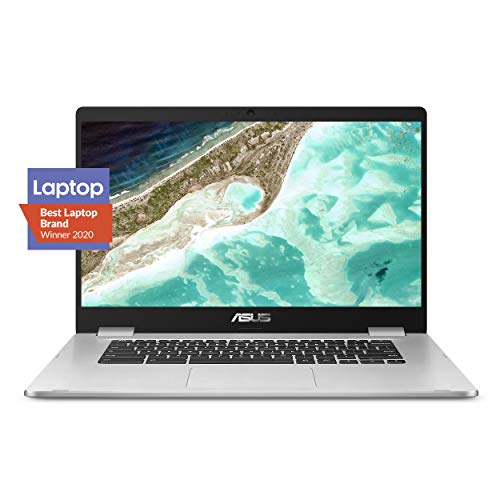
ASUS Chromebook C523 Laptop, 15.6″ HD NanoEdge-Display – Features & Prices in Saudi Arabia :
ASUS Chromebook C523 Laptop, 15.6″ HD NanoEdge-Display with 180 Degree-Hinge Intel Dual Core Celeron-Processor, 4GB-RAM, 32GB Storage, Silver Color, C523NA-DH02
Standing screen display size
15.6 Inches
Screen Resolution
1366 x 768
Max Screen Resolution
1366 x 768 Pixels
Processor
2.4 GHz celeron
RAM
4 GB LPDDR4
Memory Speed
2400 MHz
Hard Drive
32 GB Embedded MultiMediaCard
Graphics Coprocessor
Intel HD Graphics 500
Chipset Brand
Intel
Wireless Type
802.11a/b/g/n/ac
Number of USB 3.0 Ports
3
Average Battery Life (in hours)
10 Hours
Flash Memory Size
32
Hard Drive Interface
Serial ATA
Optical Drive Type
No Optical Drive
Power Source
AC & Battery
Batteries
1 Lithium Polymer batteries required. (included)
Test video – ASUS Chromebook C523 Laptop, 15.6″ HD NanoEdge-Display :
Product highlights :
Questions & Answers – ASUS Chromebook C523 Laptop, 15.6″ HD NanoEdge-Display :
Technical specifications – ASUS Chromebook C523 Laptop, 15.6″ HD NanoEdge-Display :
Brand
ASUS
Series
ASUS Chromebook C523
Screen Size
15.6 Inches
Color
Silver
Hard Disk Size
32 GB
CPU Model
Celeron
Ram Memory Installed Size
4 GB
Operating System
Chrome OS
Graphics Coprocessor
Intel HD Graphics 500
CPU Speed
2.4 GHz
Purchase advice :
-
Warranty :
Check the duration of the warranty and also the faults and defects it covers. Is it complete or limited? and What is included in the warranty (parts, repairs or both)?
-
Shipping :
Is delivery offered? And how long does it take to get delivered (Delivery time)
-
Proof of purchase :
Does the shop give you an invoice ?
-
After-sales service :
Do they have an after-sales service to have information about the installation or operation (instructions for use). Also in case of problem, it is the seller who takes charge or you must contact the manufacturer or supplier yourself.
_____________________________
K. G (verified owner) –
I love this Chromebook but… – I do. I absolutely love this device and I am so glad I bit the bullet and bought one. I have had it for a few weeks now and I don’t miss my Windows laptop one single bit. I was worried that my laptop had features with which a Chromebook could not compete. I haven’t come across any.
J. R (verified owner) –
Screen flickering and out it went! – Read Warranty carefully!!! Fine device for school age kid, but screen went out within 3months of use. Asus asks you to send it back for repair and your left in a lurch. My kid was without for school, and no replacement offered.
H. A (verified owner) –
quick delivery – Screen size is larger that expected. Got the package in 1 day from ordering. Very simple – open , charge, login with google g-mail , everything works. found Wifi, clicked on it , found printer on wifi , clicked on it. very simple to use. Has 2 x USB ports , so that helps.
H. A (verified owner) –
quick delivery – Screen size is larger that expected. Got the package in 1 day from ordering. Very simple – open , charge, login with google g-mail , everything works. found Wifi, clicked on it , found printer on wifi , clicked on it. very simple to use. Has 2 x USB ports , so that helps.
K. G (verified owner) –
I love this Chromebook but… – I do. I absolutely love this device and I am so glad I bit the bullet and bought one. I have had it for a few weeks now and I don’t miss my Windows laptop one single bit. I was worried that my laptop had features with which a Chromebook could not compete. I haven’t come across any.
O. F (verified owner) –
My very first Chromebook! – I wanted to buy my mom a laptop since her 10 year old Toshiba finally failed. I was looking at all the options out there, but everything in my budget range was either way too slow. All she does is watch movies and surf the web, youtube, etc., so I wanted to find her a laptop that was particularly keen for those type of tasks. I started looking into Chromebooks. Mind you, this was the very first Chromebook that I’ve purchased, so I didn’t know what to look for when it comes to specs. I mean, lets face it-when it comes to specs, Chromebooks that are out on the market right now has some very weak specs. But dont be fooled by the unimpressive numbers. Chromebooks use Chrome OS which was developed by Google. They use a completely different user interface than, say Microsoft or Apple. Chrome OS uses significantly less resources, therefore your computer runs very fast, even with low specs. For example, my mom’s old Toshiba had an 10 year old Intel Celeron processor, 8 GB of ram, 500 GB HDD. Nothing too impressive, just an average laptop. This Toshiba took about 4 minutes to boot up. When it comes to surfing the web, watching YouTube, etc., it was an absolute pain! This ASUS Chromebook has similar, or even weaker specs: Intel Celeron processor, 4 GB ram, 32GB storage. You would be wondering why on earth would anyone get a computer that has such weak spec sheet? Don’t be fooled. I was skeptical too when I first purchased this Chromebook. The laptop is able to boot up in 7 seconds. Thats right, 7 SECONDS!!! The entire setup of the laptop took less than 2 minutes. All you have to do is log in using your wifi information and Gmail account. Everything else sets up automatically. The user interface was really simplistic, even a kid could operate it. It makes sense as to why it only has 32GB of storage. You store all your documents on Google’s cloud. All the apps you could possibly ever want is included: Google Calendar, Google Docs, Google Drive, etc. In my mom’s case, all she does is watch YouTube, so this is the perfect laptop for that. Not to mention, it is incredibly thin! It almost looks like a MacBook Air from far away. The Chrome OS updates your computer discretely so you don’t have to worry about the hassle of updating your laptop or be alerted to do so. You also dont get any viruses on Chromebooks too since Google has your back with their security features. All in all this is a fantastic laptop for the price. My mom has been using it for a couple days now and she absolutely loves it! In fact, she tends to baby it by covering it up with the packing sleeve after every use. LOL!
O. F (verified owner) –
My very first Chromebook! – I wanted to buy my mom a laptop since her 10 year old Toshiba finally failed. I was looking at all the options out there, but everything in my budget range was either way too slow. All she does is watch movies and surf the web, youtube, etc., so I wanted to find her a laptop that was particularly keen for those type of tasks. I started looking into Chromebooks. Mind you, this was the very first Chromebook that I’ve purchased, so I didn’t know what to look for when it comes to specs. I mean, lets face it-when it comes to specs, Chromebooks that are out on the market right now has some very weak specs. But dont be fooled by the unimpressive numbers. Chromebooks use Chrome OS which was developed by Google. They use a completely different user interface than, say Microsoft or Apple. Chrome OS uses significantly less resources, therefore your computer runs very fast, even with low specs. For example, my mom’s old Toshiba had an 10 year old Intel Celeron processor, 8 GB of ram, 500 GB HDD. Nothing too impressive, just an average laptop. This Toshiba took about 4 minutes to boot up. When it comes to surfing the web, watching YouTube, etc., it was an absolute pain! This ASUS Chromebook has similar, or even weaker specs: Intel Celeron processor, 4 GB ram, 32GB storage. You would be wondering why on earth would anyone get a computer that has such weak spec sheet? Don’t be fooled. I was skeptical too when I first purchased this Chromebook. The laptop is able to boot up in 7 seconds. Thats right, 7 SECONDS!!! The entire setup of the laptop took less than 2 minutes. All you have to do is log in using your wifi information and Gmail account. Everything else sets up automatically. The user interface was really simplistic, even a kid could operate it. It makes sense as to why it only has 32GB of storage. You store all your documents on Google’s cloud. All the apps you could possibly ever want is included: Google Calendar, Google Docs, Google Drive, etc. In my mom’s case, all she does is watch YouTube, so this is the perfect laptop for that. Not to mention, it is incredibly thin! It almost looks like a MacBook Air from far away. The Chrome OS updates your computer discretely so you don’t have to worry about the hassle of updating your laptop or be alerted to do so. You also dont get any viruses on Chromebooks too since Google has your back with their security features. All in all this is a fantastic laptop for the price. My mom has been using it for a couple days now and she absolutely loves it! In fact, she tends to baby it by covering it up with the packing sleeve after every use. LOL!
J. R (verified owner) –
Screen flickering and out it went! – Read Warranty carefully!!! Fine device for school age kid, but screen went out within 3months of use. Asus asks you to send it back for repair and your left in a lurch. My kid was without for school, and no replacement offered.
I. B (verified owner) –
It Works! – My wife likes it for watching movies and perusing social media. It works.
I. B (verified owner) –
It Works! – My wife likes it for watching movies and perusing social media. It works.