
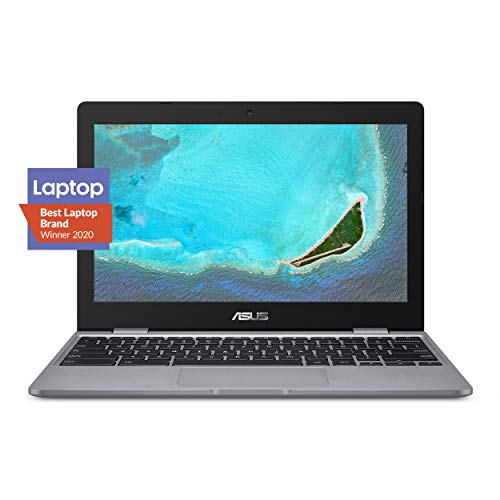
Description
ASUS Chromebook C223 11.6″ HD Chromebook Laptop, – Features & Prices in Saudi Arabia :
ASUS Chromebook C223 11.6″ HD Chromebook Laptop, Intel Dual-Core Celeron N3350 Processor (up to 2.4GHz), 4GB RAM, 32GB eMMC Storage, Premium Design, Grey, C223NA-DH02
Standing screen display size
11.6 Inches
Max Screen Resolution
1366 x 768 Pixels
Processor
2.4 GHz celeron_n3350
RAM
4 GB DDR4
Memory Speed
1 GHz
Hard Drive
32 GB Embedded MultiMediaCard
Graphics Coprocessor
Intel HD Graphics 500
Chipset Brand
Intel
Card Description
Integrated
Graphics Card Ram Size
4 GB
Wireless Type
Bluetooth, 802.11a/b/g/n/ac
Number of USB 3.0 Ports
3
Average Battery Life (in hours)
10 Hours
Hard Drive Interface
Solid State
Hard Drive Rotational Speed
10000 RPM
Optical Drive Type
No Optical Drive
Voltage
20 Volts
Batteries
1 Lithium Polymer batteries required. (included)
Test video – ASUS Chromebook C223 11.6″ HD Chromebook Laptop, :
Product highlights :
Questions & Answers – ASUS Chromebook C223 11.6″ HD Chromebook Laptop, :
Technical specifications – ASUS Chromebook C223 11.6″ HD Chromebook Laptop, :
Brand
ASUS
Series
Chromebook C223
Screen Size
11.6 Inches
Color
Grey
Hard Disk Size
32 GB
CPU Model
Celeron N3350
Ram Memory Installed Size
4 GB
Operating System
Chrome OS
Card Description
Integrated
Graphics Coprocessor
Intel HD Graphics 500
Purchase advice :
-
Warranty :
Check the duration of the warranty and also the faults and defects it covers. Is it complete or limited? and What is included in the warranty (parts, repairs or both)?
-
Shipping :
Is delivery offered? And how long does it take to get delivered (Delivery time)
-
Proof of purchase :
Does the shop give you an invoice ?
-
After-sales service :
Do they have an after-sales service to have information about the installation or operation (instructions for use). Also in case of problem, it is the seller who takes charge or you must contact the manufacturer or supplier yourself.
_____________________________
G. N (verified owner) –
An average median Chromebook for average use – I wish I could give this Chromebook a score of 3.5. It’s not as bad as a 3, but certainly not good enough to rate a 4. Believe it or not, this Chromebook got an Octane 2.0 score (https://chromium.github.io/octane/) of 10,798, which is really not that bad.
L. J (verified owner) –
Very practical, nothing fancy – I got this as a tablet replacement. I like having one hinged device with a keyboard, rather than a tablet plus keyboard packaged into a cover. And I didn’t want to pay for a Microsoft Surface. I purchased a renewed unit so it was very cheap. It does everything I need it to do. I can install apps on it like on an Android tablet, and I run everything off of Google Drive and Google Docs. I switch to my Windows laptop if I need to do any intense editing of documents, then I put them on Drive, and I can view the docs on this device.
S. J (verified owner) –
Better options are available, but durable… – Before I begin I must add that I’m a big Chromebook fan boy. I have a Chromebook as my main computer. I bought this and another computer for my siblings as xmas presents and now they think I have favorites. Why? Because the other Chromebook, despite being the same price (if you must know, Acer Chromebook 11) feels and functions better and faster. This ASUS Chromebook looks cool, but the moment you pick it up and feel it buckle under its own weight, you easily realize it’s too cheap. I was hoping to give them both a similar device just different colors. Nope. At this price point there are WAAAAY better Chromebooks available. Avoid this one unless you see it at a heavy discount. I would only recommend this specific Chromebook if the price falls to $120.
T. F (verified owner) –
The chrome OS is just bad just get windows otherwise the laptop was good – I liked that it was light had long battery life. But i dislike the OS dosent support Microsoft office and its best to use it as a notebook just to take notes
S. J (verified owner) –
Better options are available, but durable… – Before I begin I must add that I’m a big Chromebook fan boy. I have a Chromebook as my main computer. I bought this and another computer for my siblings as xmas presents and now they think I have favorites. Why? Because the other Chromebook, despite being the same price (if you must know, Acer Chromebook 11) feels and functions better and faster. This ASUS Chromebook looks cool, but the moment you pick it up and feel it buckle under its own weight, you easily realize it’s too cheap. I was hoping to give them both a similar device just different colors. Nope. At this price point there are WAAAAY better Chromebooks available. Avoid this one unless you see it at a heavy discount. I would only recommend this specific Chromebook if the price falls to $120.
B. H (verified owner) –
the viewing angles are terrible – it would be a decent computer but the glare is crazy bad. i’ve never had a laptop where this was such a big issue but it’s like there isn’t a correct viewing angle. everything is either shadowed or too bright and unsaturated. in retrospect i would pay more than $50 for this.
M. I (verified owner) –
Good – This works great, however I should have ordered a bigger screen size.
K. L (verified owner) –
Enjoying my chrome book – I like everything I see so far I’m a first time user.
R. L (verified owner) –
Get what you pay for – I know its super cheap, but the viewing angles on the laptop make it borderline unusable. Looks like a holographic trading card opening and closing the thing.
M. I (verified owner) –
Good – This works great, however I should have ordered a bigger screen size.
T. F (verified owner) –
The chrome OS is just bad just get windows otherwise the laptop was good – I liked that it was light had long battery life. But i dislike the OS dosent support Microsoft office and its best to use it as a notebook just to take notes
G. N (verified owner) –
An average median Chromebook for average use – I wish I could give this Chromebook a score of 3.5. It’s not as bad as a 3, but certainly not good enough to rate a 4. Believe it or not, this Chromebook got an Octane 2.0 score (https://chromium.github.io/octane/) of 10,798, which is really not that bad.
B. H (verified owner) –
the viewing angles are terrible – it would be a decent computer but the glare is crazy bad. i’ve never had a laptop where this was such a big issue but it’s like there isn’t a correct viewing angle. everything is either shadowed or too bright and unsaturated. in retrospect i would pay more than $50 for this.
R. L (verified owner) –
Get what you pay for – I know its super cheap, but the viewing angles on the laptop make it borderline unusable. Looks like a holographic trading card opening and closing the thing.
L. J (verified owner) –
Very practical, nothing fancy – I got this as a tablet replacement. I like having one hinged device with a keyboard, rather than a tablet plus keyboard packaged into a cover. And I didn’t want to pay for a Microsoft Surface. I purchased a renewed unit so it was very cheap. It does everything I need it to do. I can install apps on it like on an Android tablet, and I run everything off of Google Drive and Google Docs. I switch to my Windows laptop if I need to do any intense editing of documents, then I put them on Drive, and I can view the docs on this device.
K. L (verified owner) –
Enjoying my chrome book – I like everything I see so far I’m a first time user.