
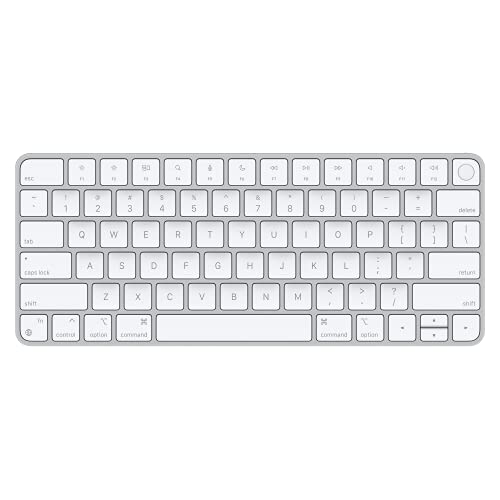
Description
Apple Magic Keyboard with Touch ID for – Features & Prices in Saudi Arabia :
Apple Magic Keyboard with Touch ID for Mac Computers Silicon (Wireless, Rechargable) – US English – White Keys
Test video – Apple Magic Keyboard with Touch ID for :
https://www.youtube.com/www.youtube.com/wat
Product highlights :
Questions & Answers – Apple Magic Keyboard with Touch ID for :
Technical specifications – Apple Magic Keyboard with Touch ID for :
Brand
Apple
Compatible Devices
,
Connectivity Technology
Bluetooth, USB-C
Keyboard Description
Standalone
Recommended Uses For Product
Office, Gaming
Special Feature
Hotkeys and Media Keys, Rechargeable
Color
White
Operating System
Mac with Apple silicon using macOS 11.4 or later
Number of Keys
78
Keyboard backlighting color support
Single Color
Purchase advice :
-
Warranty :
Check the duration of the warranty and also the faults and defects it covers. Is it complete or limited? and What is included in the warranty (parts, repairs or both)?
-
Shipping :
Is delivery offered? And how long does it take to get delivered (Delivery time)
-
Proof of purchase :
Does the shop give you an invoice ?
-
After-sales service :
Do they have an after-sales service to have information about the installation or operation (instructions for use). Also in case of problem, it is the seller who takes charge or you must contact the manufacturer or supplier yourself.
_____________________________
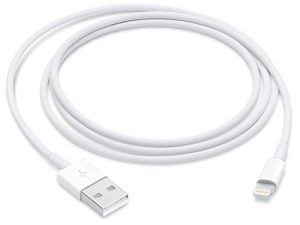
![[Apple MFi Certified] USB C to Lightning Cable 3Pack 10FT iPhone Fast Charger Cable Type C Charging Cord Compatible with iPhone 14 13 13 Pro Max 12 12 Pro Max 11 XS XR X 8 iPad](/wp-content/uploads/2023/05/41-cf4XO-0L-300x225.jpg)
![Lightning to HDMI Adapter [Apple MFi Certified]](/wp-content/uploads/2023/05/31HDLIfF27L-300x225.jpg)
E. L (verified owner) –
Beware if you use it with a Windows PC – If you use it on a PC, be aware that no key combinations will get you a ctrl+alt+del on a Windows PC. You will need another keyboard or a key mapper to be able to do it. Unfortunately, my work computer is tightly controlled and I can’t install MS Powertoys. Also, the onscreen keyboard isn’t available on the lock screen. You have to get to the login screen to activate the onscreen keyboard. The larger keyboard with the number pad has the proper forward delete key but the smaller version doesn’t. The delete key is really backspace.
R. D (verified owner) –
A Magic Keyboard with Touch ID, what’s that worth to you? – For starters, this keyboard only works fully (Touch ID) on Macs with Apple Silicon, which is unfair to anyone who bought an Intel Mac in the last few years. I mean it has to be technically possible for this to work with T2 equipped Macs, but with Apple, we get what they give us. There’s also no backlight either, so yeah. So if you like the style of these newer Magic Keyboards and you own an Intel Mac, only get this if you plan on upgrading to Apple Silicon, otherwise, you should get the $100 model without Touch ID.
F. K (verified owner) –
Cheaper material but lighter keyboard – The material feels cheaper but the overall weight of the keyboard is a lot lighter. The touch id is a nice addition and the main reason I bought this
E. L (verified owner) –
Beware if you use it with a Windows PC – If you use it on a PC, be aware that no key combinations will get you a ctrl+alt+del on a Windows PC. You will need another keyboard or a key mapper to be able to do it. Unfortunately, my work computer is tightly controlled and I can’t install MS Powertoys. Also, the onscreen keyboard isn’t available on the lock screen. You have to get to the login screen to activate the onscreen keyboard. The larger keyboard with the number pad has the proper forward delete key but the smaller version doesn’t. The delete key is really backspace.
F. K (verified owner) –
Cheaper material but lighter keyboard – The material feels cheaper but the overall weight of the keyboard is a lot lighter. The touch id is a nice addition and the main reason I bought this
Z. O (verified owner) –
Almost the perfect Mac keyboard – I love having a similar keyboard layout and feel when switching between my Macbook’s keyoard.
C. M (verified owner) –
A must have if you use your M1 MacBook with the lid closed – When I recently switched from using my MacBook open at my desk along with an external 4K monitor to a pair of monitors, this was a “must have” purchase. It replaces my previous Apple Magic Keyboard, but now has the Touch ID in place of the previously useless “Eject” button at the top right. Waking the MacBook and unlocking it is now as easy as it was when the I used to keep it open.
M. H (verified owner) –
Excelente – Es mas pequeno de lo que imaginaba pero es perfecto!
Z. O (verified owner) –
Almost the perfect Mac keyboard – I love having a similar keyboard layout and feel when switching between my Macbook’s keyoard.
M. H (verified owner) –
Excelente – Es mas pequeno de lo que imaginaba pero es perfecto!
R. D (verified owner) –
A Magic Keyboard with Touch ID, what’s that worth to you? – For starters, this keyboard only works fully (Touch ID) on Macs with Apple Silicon, which is unfair to anyone who bought an Intel Mac in the last few years. I mean it has to be technically possible for this to work with T2 equipped Macs, but with Apple, we get what they give us. There’s also no backlight either, so yeah. So if you like the style of these newer Magic Keyboards and you own an Intel Mac, only get this if you plan on upgrading to Apple Silicon, otherwise, you should get the $100 model without Touch ID.
P. K (verified owner) –
came fast – Came fast on the correct day, has good Bluetooth with the Mac, and is the correct size
C. M (verified owner) –
A must have if you use your M1 MacBook with the lid closed – When I recently switched from using my MacBook open at my desk along with an external 4K monitor to a pair of monitors, this was a “must have” purchase. It replaces my previous Apple Magic Keyboard, but now has the Touch ID in place of the previously useless “Eject” button at the top right. Waking the MacBook and unlocking it is now as easy as it was when the I used to keep it open.
R. F (verified owner) –
Really Good Keyboard for Apple Echosystem – This is a really good keyboard for Ecosystem. Paying $150 for a keyboard that does not have keyboard lighting is not good. The biggest selling point is touch key. This is the most demanding item on this keyboard.
P. K (verified owner) –
came fast – Came fast on the correct day, has good Bluetooth with the Mac, and is the correct size
R. F (verified owner) –
Really Good Keyboard for Apple Echosystem – This is a really good keyboard for Ecosystem. Paying $150 for a keyboard that does not have keyboard lighting is not good. The biggest selling point is touch key. This is the most demanding item on this keyboard.