
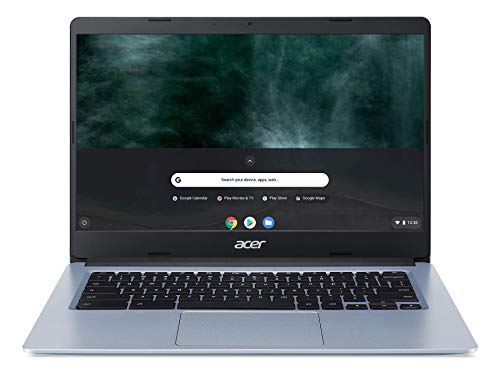
Description
Acer Chromebook 314, Intel Celeron N4000, 14″ – Features & Prices in Saudi Arabia :
Acer Chromebook 314, Intel Celeron N4000, 14″ Full HD Display, 4GB LPDDR4, 64GB eMMC, Gigabit WiFi, Google Chrome, CB314-1H-C884
Standing screen display size
14 Inches
Max Screen Resolution
1366 x 768 Pixels
Processor
2.6 GHz celeron_n
RAM
4 GB LPDDR4
Memory Speed
2.6 GHz
Hard Drive
64 GB Embedded MultiMediaCard
Graphics Coprocessor
Intel
Chipset Brand
Intel
Card Description
Integrated
Wireless Type
Bluetooth, 802.11ac
Number of USB 3.0 Ports
2
Average Battery Life (in hours)
5 Hours
Flash Memory Size
64
Hard Drive Interface
Solid State
Optical Drive Type
No Optical Drive
Power Source
Battery Powered
Batteries
1 Lithium Ion batteries required. (included)
Test video – Acer Chromebook 314, Intel Celeron N4000, 14″ :
Product highlights :
Questions & Answers – Acer Chromebook 314, Intel Celeron N4000, 14″ :
Technical specifications – Acer Chromebook 314, Intel Celeron N4000, 14″ :
Brand
Acer
Series
CB314-1H-C884
Screen Size
14 Inches
Color
Blue
Hard Disk Size
64 GB
CPU Model
Celeron N
Ram Memory Installed Size
4 GB
Operating System
Chrome OS
Card Description
Integrated
Graphics Coprocessor
Intel
Purchase advice :
-
Warranty :
Check the duration of the warranty and also the faults and defects it covers. Is it complete or limited? and What is included in the warranty (parts, repairs or both)?
-
Shipping :
Is delivery offered? And how long does it take to get delivered (Delivery time)
-
Proof of purchase :
Does the shop give you an invoice ?
-
After-sales service :
Do they have an after-sales service to have information about the installation or operation (instructions for use). Also in case of problem, it is the seller who takes charge or you must contact the manufacturer or supplier yourself.
_____________________________

K. D (verified owner) –
Great computer for home use – I just received my Acer Chromebook a few days ago and, currently I’m still navigating my way through. My current computer is a very old, outdated laptop. Since, I haven’t had much experience with the Chromebook so far it’s fabulous! The set up was easy, log in with my gmail account and I was good to go. The battery life is impressive, I have not charged my Chromebook since the initial charge three days ago. ( I do power off my device when not in use). It’s a great computer for the price, less than $300. I recommend the Acer Chromebook for anyone using it for on line banking, shopping, and email. But, there’s so much more I will be exploring!
K. F (verified owner) –
So user friendly – I’ve had this 314 a few weeks now and find everything about it a joy. I ordered through Amazon US instead of Amazon Canada and got a better price–much better–than getting it in Canada. I did have a US gift card. On the first day, there was a slight screen flickering, and was about to return it but filled out a complaint form and sent it to Chrome–the flickering stopped–and hasn’t returned. Just stopped. Feels so good to be free of Microsoft but use it sparingly when others need a doc in Word. None of those irritating Windows 10 updates.
O. L (verified owner) –
Just right I love it – This was perfect for me I no nothing about computers it was very easy set I was connected to my internet quickly I don’t really do gaming just really looking around internet nothing to big this is perfect for me and perfect price
O. T (verified owner) –
Great little computer helper – From the picture you can see I am writing the review on this computer right now. The little pink sticky is covering the webcam, if you were at all curious. It is a great little addition to my computer family and it makes it easy for me to do quick computer requests and work when needed. It starts super fast and it is really easy to use. I would say buy yourself a Logitech Bluetooth mouse and it will make everything easier. The only drawback to this machine is that it isn’t a Touch Screen. If you can live without that, then this is a fantastic addition to your house, work, or school. I added a 128 Gb microSD card to save anything I download or any documents I create. This saves space for any additional applications you may need. If you have never used a Chromebook, think of it like a tablet that you can type on and have a regular browser to use. All apps are downloaded from the Google Play store, don’t mind if it says telephone only, most of them work just fine. Just a tip, I downloaded McAfee Safe Connect and McAfee Security by T-Mobile for safe web browsing and doing my banking. Don’t use a free virus protector, pay for it. Your information is important to keep safe and it doesn’t cost much.
O. T (verified owner) –
Great little computer helper – From the picture you can see I am writing the review on this computer right now. The little pink sticky is covering the webcam, if you were at all curious. It is a great little addition to my computer family and it makes it easy for me to do quick computer requests and work when needed. It starts super fast and it is really easy to use. I would say buy yourself a Logitech Bluetooth mouse and it will make everything easier. The only drawback to this machine is that it isn’t a Touch Screen. If you can live without that, then this is a fantastic addition to your house, work, or school. I added a 128 Gb microSD card to save anything I download or any documents I create. This saves space for any additional applications you may need. If you have never used a Chromebook, think of it like a tablet that you can type on and have a regular browser to use. All apps are downloaded from the Google Play store, don’t mind if it says telephone only, most of them work just fine. Just a tip, I downloaded McAfee Safe Connect and McAfee Security by T-Mobile for safe web browsing and doing my banking. Don’t use a free virus protector, pay for it. Your information is important to keep safe and it doesn’t cost much.
K. D (verified owner) –
Great computer for home use – I just received my Acer Chromebook a few days ago and, currently I’m still navigating my way through. My current computer is a very old, outdated laptop. Since, I haven’t had much experience with the Chromebook so far it’s fabulous! The set up was easy, log in with my gmail account and I was good to go. The battery life is impressive, I have not charged my Chromebook since the initial charge three days ago. ( I do power off my device when not in use). It’s a great computer for the price, less than $300. I recommend the Acer Chromebook for anyone using it for on line banking, shopping, and email. But, there’s so much more I will be exploring!
O. K (verified owner) –
Excellent Chromebook – Anyone looking at Chromebooks these days, and trying to choose one, is in for quite the ride. So many to choose from, and at so many price points and feature sets.
O. L (verified owner) –
Just right I love it – This was perfect for me I no nothing about computers it was very easy set I was connected to my internet quickly I don’t really do gaming just really looking around internet nothing to big this is perfect for me and perfect price
K. F (verified owner) –
So user friendly – I’ve had this 314 a few weeks now and find everything about it a joy. I ordered through Amazon US instead of Amazon Canada and got a better price–much better–than getting it in Canada. I did have a US gift card. On the first day, there was a slight screen flickering, and was about to return it but filled out a complaint form and sent it to Chrome–the flickering stopped–and hasn’t returned. Just stopped. Feels so good to be free of Microsoft but use it sparingly when others need a doc in Word. None of those irritating Windows 10 updates.
B. G (verified owner) –
Decent – The processing speed is much slower than I expected, but it does have a great battery life. It has rough edges instead of a smooth bevel as described.
I. G (verified owner) –
Love the color – I love the color and the speed. I use mine for everyday stuff so it works great for my needs.
I. G (verified owner) –
Love the color – I love the color and the speed. I use mine for everyday stuff so it works great for my needs.
E. T (verified owner) –
Its nice but…… – I just wanted a smaller notebook so ease of travel and to be able to work on various projects. The thing that I found very frustrating and concerning was that apparently everything was saved to some cloud option. I need the work that am saving to the memory stick. I still have no clue where the saves were going since I do not used cloud storage because I do not trust it. I have a lot of data and well its mine. So even if your data starts on a memory stick it isn’t saved there on a chromebook. I do use Dropbox for forms and business info but I do not think it would be saved to my dropbox but to some where else in the cloud storage. I wouldn’t be able work on an airplane on a chromebook.
O. K (verified owner) –
Excellent Chromebook – Anyone looking at Chromebooks these days, and trying to choose one, is in for quite the ride. So many to choose from, and at so many price points and feature sets.
B. G (verified owner) –
Decent – The processing speed is much slower than I expected, but it does have a great battery life. It has rough edges instead of a smooth bevel as described.
E. T (verified owner) –
Its nice but…… – I just wanted a smaller notebook so ease of travel and to be able to work on various projects. The thing that I found very frustrating and concerning was that apparently everything was saved to some cloud option. I need the work that am saving to the memory stick. I still have no clue where the saves were going since I do not used cloud storage because I do not trust it. I have a lot of data and well its mine. So even if your data starts on a memory stick it isn’t saved there on a chromebook. I do use Dropbox for forms and business info but I do not think it would be saved to my dropbox but to some where else in the cloud storage. I wouldn’t be able work on an airplane on a chromebook.